

Example: sort reads stdin and writes stdout
Many Unix utilities follow the convention of reading from standard input (stdin) and writing to standard output (stdout). For example,sort reads lines of text and writes them in order.
Suppose file.txt contains:
sort file.txt reads file.txt and prints sorted lines to the terminal (stdout):
>:
> creates it. By default > overwrites the file; use >> to append instead:
> and 1> are equivalent because file descriptor 1 is stdout:
Standard streams and file descriptors
Programs use three standard streams by default:- Standard Input (
stdin) — file descriptor 0 - Standard Output (
stdout) — file descriptor 1 - Standard Error (
stderr) — file descriptor 2
< to redirect standard input, > (or 1>) to redirect standard output, and 2> to redirect standard error.
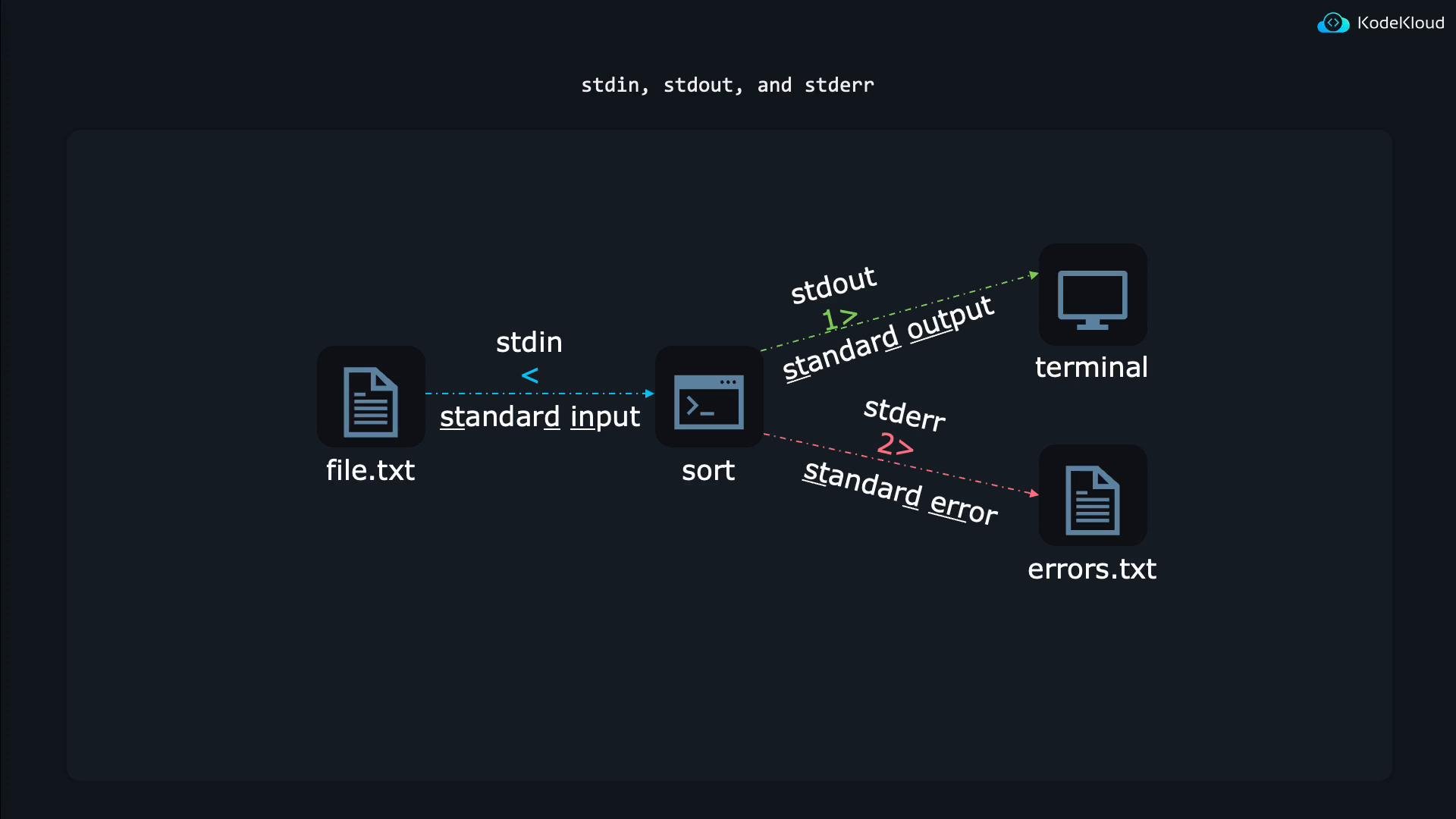
Redirecting stderr (error messages)
Many commands print error messages to stderr (fd 2). For example:/dev/null:
/dev/null discards anything written to it — useful when you want to ignore unwanted output such as diagnostic or permission errors.Capture both stdout and stderr into a single file
To capture both streams into the same file, redirect stdout first, then point stderr at stdout using2>&1:
>all_output.txtredirects stdout (fd 1) toall_output.txt2>&1directs stderr (fd 2) to wherever fd 1 currently points (the file)
Order matters when combining redirections. Use
>file 2>&1 (or 1>file 2>&1) to ensure both stdout and stderr go to file. Placing 2>&1 before >file will leave stderr pointing at the terminal.Redirecting stdin (feeding input)
Redirecting input is less common but useful when a program reads from stdin (fd 0). Use< to feed a file as input:
emailcontent.txt as if the content were typed at the keyboard.
Here-documents (multi-line stdin)
A here-document (here-doc) embeds multi-line input directly in the command:EOF is a common delimiter; any marker works. All text between the start and the delimiter is passed to the program’s stdin.
Here-strings (single-line stdin)
A here-string passes a single line/string as stdin using<<<:
Pipes: chain small programs
Pipes (|) let you chain utilities so the stdout of one becomes the stdin of the next. Example: remove comment lines, sort the entries, and align columns for readability:
Quick reference
Further reading
Summary- Use
>/>>for stdout redirection and2>/2>>for stderr. - Use
2>&1to combine stderr with stdout (mind the order). - Use
<, here-docs (<<), and here-strings (<<<) to feed stdin. - Use pipes (
|) to connect programs without intermediate files.