

- generate a component diagram quickly (we used Mermaid),
- read and prune the diagram to match an MVP scope, and
- convert the simplified design into an implementable architecture using Flask + OpenCV for on-demand image processing.
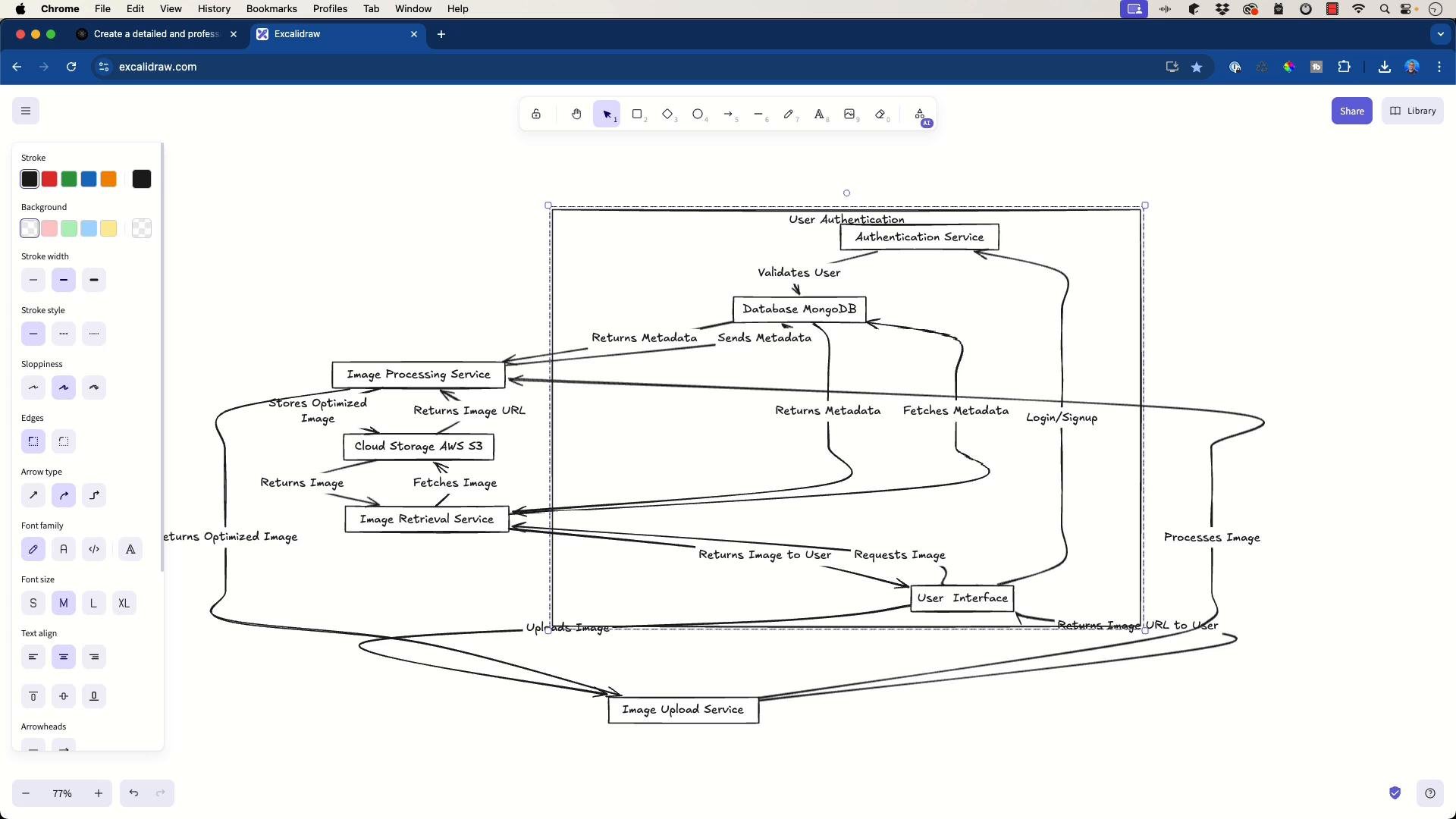
- User uploads an image via the User Interface to the Image Upload Service.
- The Image Upload Service forwards the image to the Image Processing Service.
- The Image Processing Service stores the optimized image in Cloud Storage (AWS S3) and writes metadata to the Database (MongoDB).
- The Image Retrieval Service queries metadata and object storage to return the image to the user.
- An Authentication Service handles login/signup and validates users against the database.
Tip: Start with a broad diagram to capture ideas, then prune components that aren’t required for your MVP. This keeps the design accurate and actionable.
Target implementation constraints
Simplified architecture
With those constraints, the simplified data-flow looks like this:
Design notes for the simplified flow
- No persistent storage: images are processed in-memory (or temporary ephemeral files) and streamed back to the client.
- Single Flask app can handle both upload and retrieval endpoints; separate services are unnecessary for the MVP.
- OpenCV handles decoding, minimal transformations, and re-encoding with tuned JPEG quality.
- accepts an uploaded image,
- decodes and validates it with OpenCV,
- re-encodes it as a compressed JPEG buffer, and
- returns the optimized image directly to the browser.
- Validate uploads: check
Content-Typeand attempt to decode with OpenCV before processing. - Upload size: configure Flask and the front-end to limit request size (e.g., Nginx/gunicorn client_max_body_size equivalents).
- Temporary storage: if handling very large images, write to a secure temporary directory and ensure cleanup.
- WSGI server: run Flask under gunicorn or another production server rather than Flask’s dev server.
- Multipart/form-data: clients should send files under the
imagefield (as shown in the example). - Security: if the service is public, consider rate limiting and authentication later.
- Mermaid — lightweight graph and diagram syntax: https://mermaid.js.org/
- Excalidraw — quick hand-drawn diagram sketches: https://excalidraw.com/
- draw.io / diagrams.net — full-featured diagram editor: https://app.diagrams.net/
- Flask — micro web framework: https://flask.palletsprojects.com/
- OpenCV — computer vision and image processing: https://opencv.org/
- gunicorn — WSGI HTTP server for Python: https://gunicorn.org/