

- Clear structure and industry-standard sections
- Explicit clarifying questions to avoid assumptions
- A refined output that maps directly to provided project constraints (scope, budget, timeline, tech stack)
- Ask the model to generate clarifying questions that expose missing details (e.g., target users, required file formats, concurrency targets, tech stack).
- Provide concrete answers to avoid unnecessary assumptions.
- Then ask the model to produce the refined requirements document using those answers.
When the model suggests additional items (for example, accessibility or scalability), review and accept or remove them explicitly to keep the generated document aligned with project intentions.
- Generate clarifying questions with the model.
- Provide the answers (as above) in one pass.
- Request the model to refine the requirements document according to those answers.
- Review, validate with stakeholders, and iterate as necessary.
1. Introduction
Overview: This document is a technical requirements analysis for the Image Optimizer web application. The app enables users (graphic designers) to upload images, adjust compression/quality to reduce file size, preview the optimized result, and download the optimized image. The solution targets modern desktop and laptop browsers and prioritizes client-side processing to avoid persistent server storage.2. Purpose
Objective: Provide a single, authoritative reference of functional and non-functional requirements, stakeholder roles, assumptions, constraints, and acceptance criteria to guide development, testing, and delivery.3. Scope
- In scope:
- Web-based UI accessible from modern browsers.
- Client-side image upload, quality adjustment control (slider/numeric input), preview of optimized image, and client-side download.
- User documentation and technical documentation for deployment and maintenance.
- Out of scope:
- Server-side persistent storage of modified images.
- User authentication, dashboards, notifications, or analytics (unless explicitly requested later).
4. Functional Requirements
5. Non-Functional Requirements
- Performance: Support up to 10 concurrent users. Key operations (upload, optimization, preview) should complete in under 1 second on typical client hardware and network conditions.
- Security: Use TLS for all network traffic. Sanitize and validate inputs. If server-side processing or file transfer is added later, implement virus/malware scanning and limit accepted file sizes.
- Usability: Intuitive UI with clear affordances for upload, quality control, preview, and download. Provide contextual help and inline feedback.
- Accessibility: Consider WCAG 2.1 recommendations if accessibility is required; include keyboard navigation and readable color contrast.
- Scalability: Design the architecture to allow future scaling (e.g., separate processing service) if usage or requirements grow.
- Reliability & Availability: Aim for high availability depending on hosting choices; document backup and recovery processes if server components are introduced.
6. Stakeholder Analysis
7. Assumptions and Dependencies
- Assumptions:
- Users will access the app via modern browsers (Chrome, Firefox, Edge, Safari).
- Client machines have sufficient CPU and memory for basic image processing.
- No external integrations are required for the MVP.
- Dependencies:
- If server-side processing is introduced later, dependency on hosting, storage, and security services must be documented.
8. Constraints
- Budget: $1,000,000 (example).
- Schedule: Target delivery in one month.
- Technology: Frontend based on React; backend services, if needed, use Flask.
9. Acceptance Criteria
- All functional requirements (FR-1 through FR-6) are implemented and verified via automated and manual tests.
- Performance targets (response time and concurrency) are met during load testing.
- Security review and vulnerability scans pass, or any findings have documented mitigations.
- UAT: Representative graphic designers confirm the app meets usability and quality goals.
- Documentation: User guides, API (if any), and deployment instructions are complete and delivered.
10. Example development checklist
- Implement Image Upload component with validation and format support.
- Implement Quality Adjustment control (slider + numeric).
- Implement client-side optimization pipeline and preview rendering.
- Implement Download functionality with correct MIME and filename handling.
- Add unit and integration tests covering edge cases and error handling.
- Perform load and responsiveness tests for up to 10 concurrent users.
- Complete security review and document mitigations.
- Create the initial prompt and ask the model to generate clarifying questions.
- Answer the clarifying questions in a single pass (see the clarifying answers table).
- Ask the model to refine the requirements analysis using those answers.
- Review the generated document, validate with stakeholders, and make edits as needed.
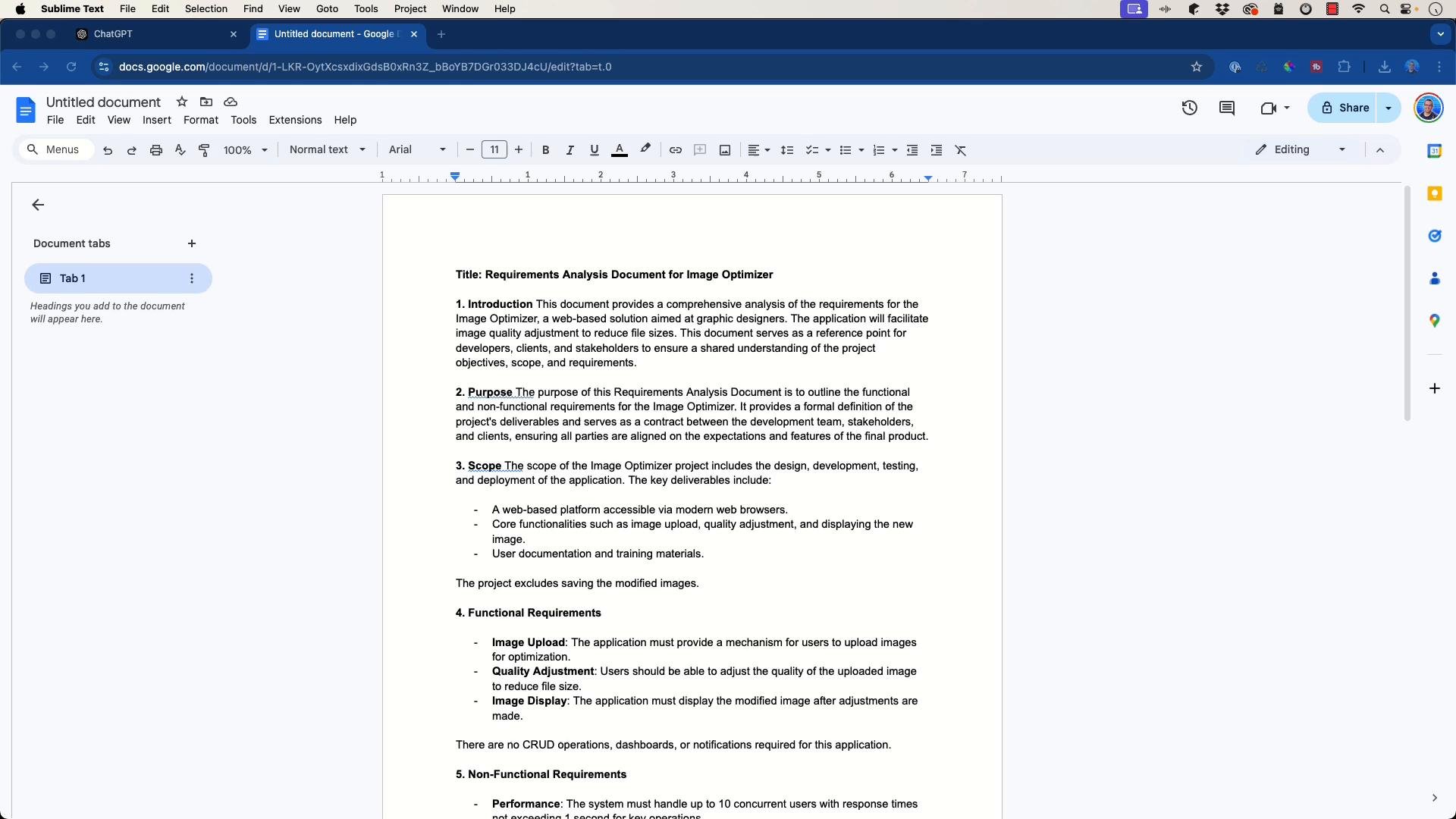
- Copy the final markdown into a document editor for distribution.
- The model’s markdown output can be copied and pasted into Google Docs (or other editors) and will render as a structured document suitable for stakeholder distribution.
- Use targeted prompts and deliberate clarifying questions to keep generated documents aligned with project needs and minimize assumptions.
- For larger projects, repeat this pattern for related artifacts: architecture diagrams, test plans, deployment guides, and runbooks.
- Keep a concise traceability matrix mapping requirements (FR-/NFR-) to implementation tasks, tests, and acceptance criteria to streamline QA and UAT.