

Use Case: External Application Access to Amazon S3
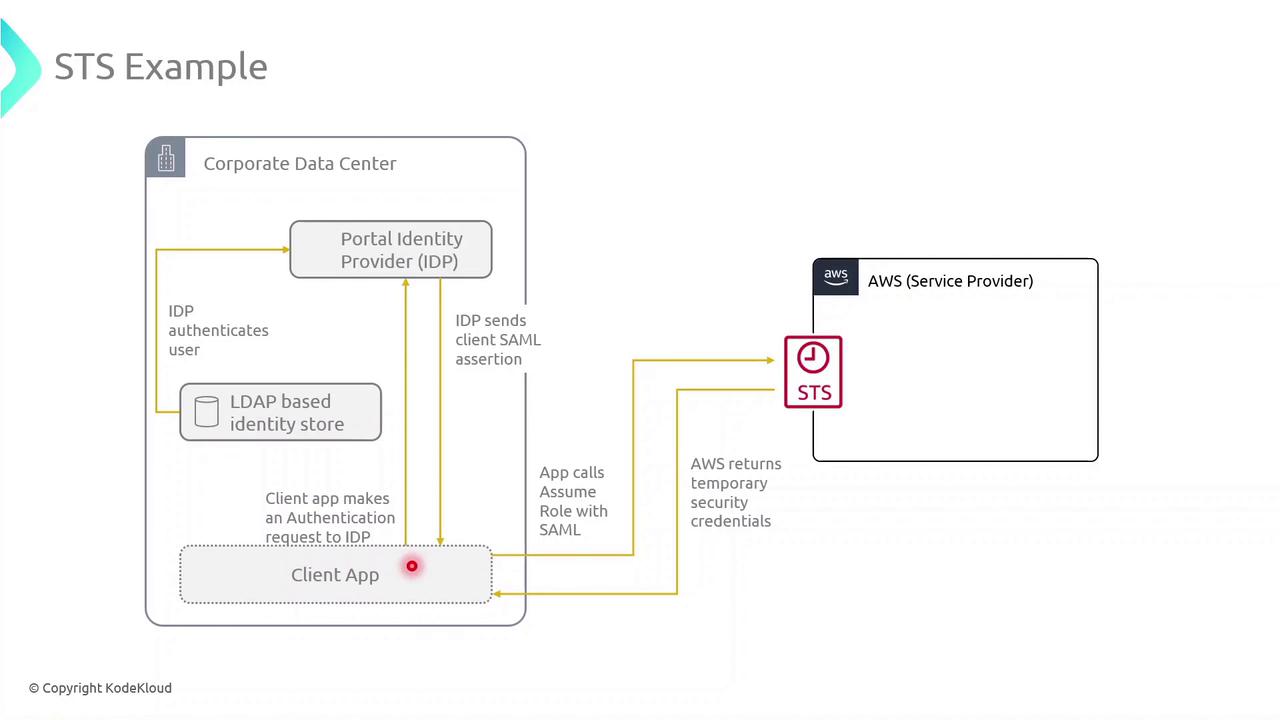
Consider an application running on-premises in your corporate data center. To retrieve objects from an S3 bucket without embedding long-term AWS keys, you can integrate STS with your identity provider (IdP) and SAML federation.Step 1: Authenticate with Your Identity Provider
- The client application prompts the user for corporate credentials.
- These credentials are sent to an external LDAP-based IdP for verification.
- Upon successful login, the IdP issues a SAML assertion to the client.
SAML federation lets you use existing corporate credentials for AWS access, reducing password sprawl and improving security posture.
Step 2: Call AssumeRoleWithSAML to Obtain Temporary Credentials
With the SAML assertion in hand, the application calls the STS endpoint:
These credentials inherit the permissions defined in the assumed role’s policy and expire automatically (up to 12 hours).
Step 3: Use the Temporary Credentials to Access S3
Export the returned credentials into your environment:Temporary credentials automatically expire after the duration specified in the role trust policy (maximum 12 hours). Always handle session renewal and error retries in your application.