

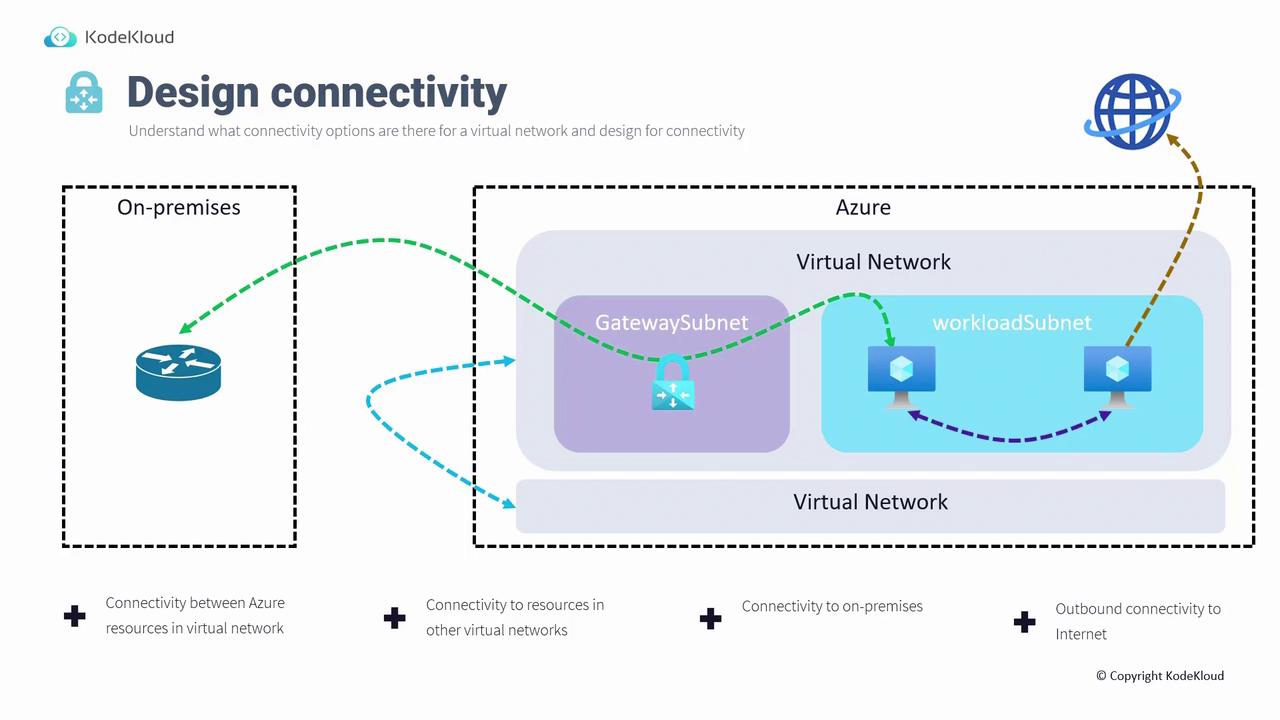
- Communication among resources within the Azure virtual network.
- Connection to resources in separate virtual networks via virtual network peering or VNet-to-VNet VPN gateway connections.
- Secure connections from on-premises devices to Azure with site-to-site VPN or point-to-site VPN for remote users.
- Outbound connectivity to the internet.
Design Topology
Next, we examine various network topology patterns available in Azure. There are three primary approaches to consider:1. Single Network Approach
In the Single Network Approach, all resources (such as those for a three-tier application) are deployed within a single virtual network. Isolation is achieved using subnet segmentation—for example, dividing a virtual network into frontend, mid-tier, and database subnets. Since these subnets reside within the same virtual network, system routes automatically allow inter-subnet communication without extra configuration.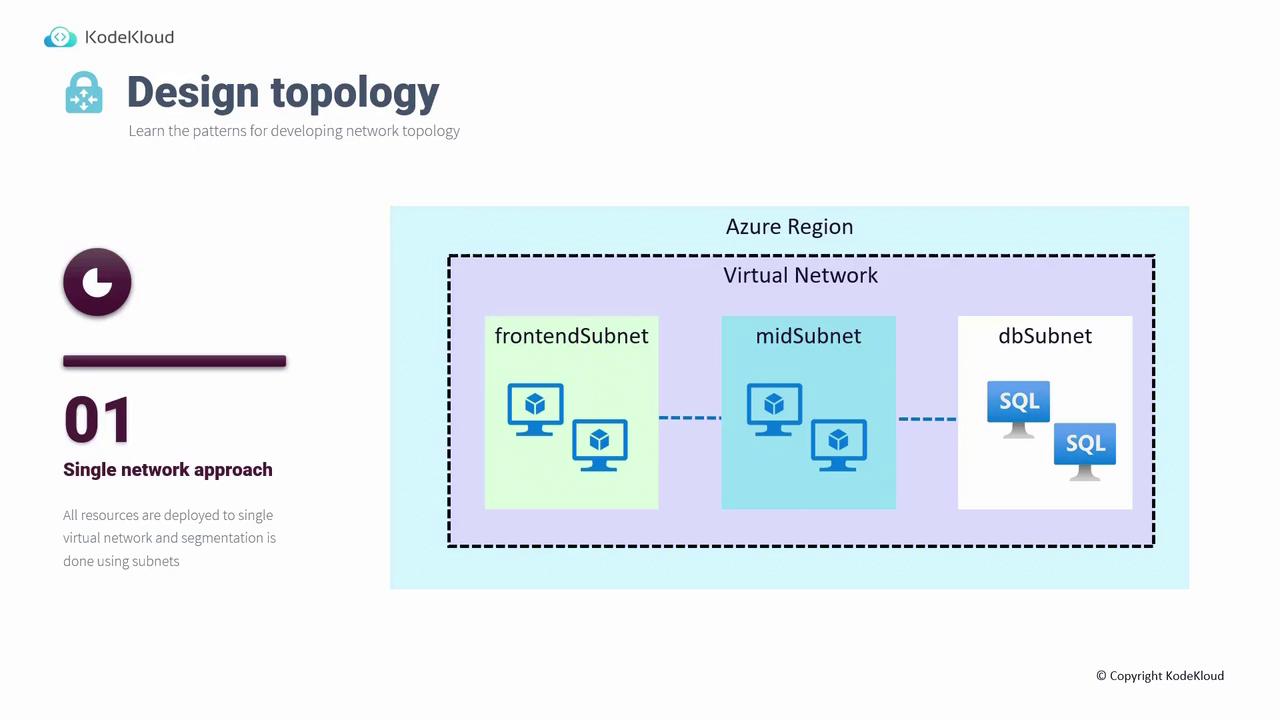
2. Multiple Peer Networks
This topology involves deploying workloads across multiple virtual networks that communicate via Virtual Network Peering. By leveraging the Microsoft Backbone network, virtual network peering ensures low-latency communication, which is particularly beneficial for scenarios like database failover or high-volume transactions.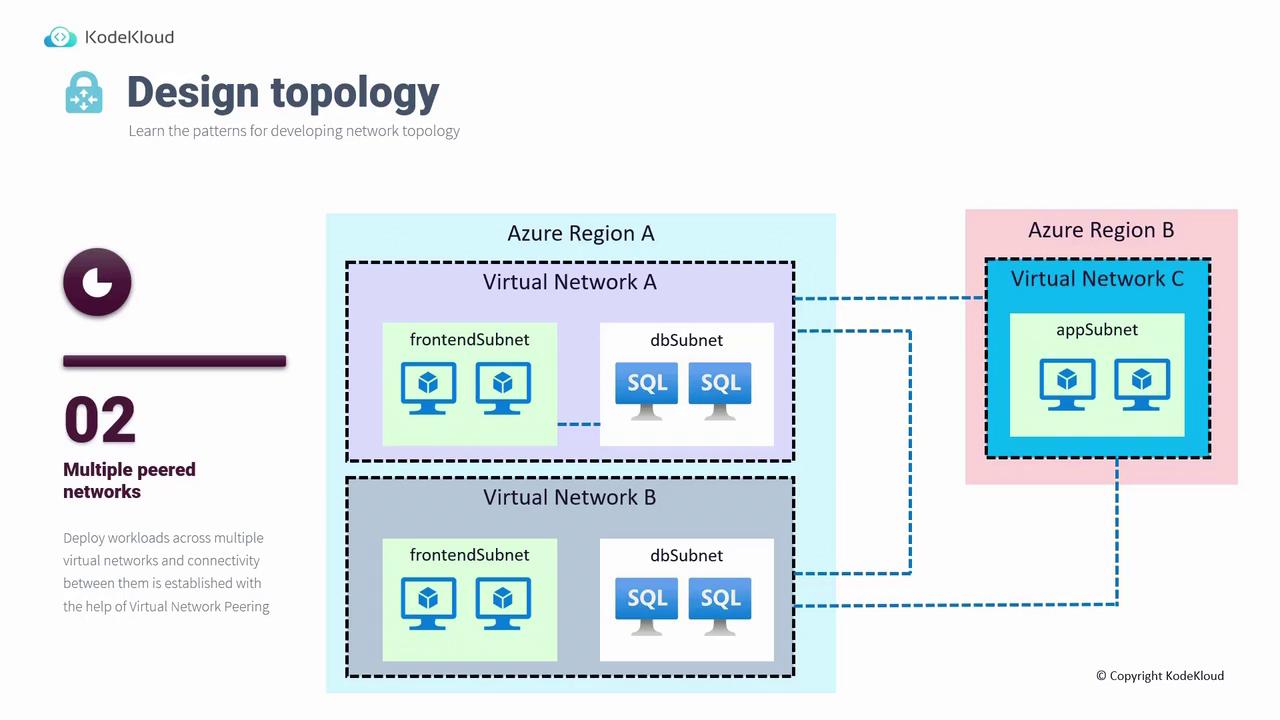
3. Hub-Spoke Architecture
Widely adopted in enterprise environments, the Hub-Spoke Architecture centralizes connectivity in a hub (either a virtual network or a virtual WAN), which then connects to multiple spokes. Spokes represent additional virtual networks that link to the central hub via virtual network peering or VPN gateways. The hub can also peer with other hubs across regions, enabling efficient cross-region communication.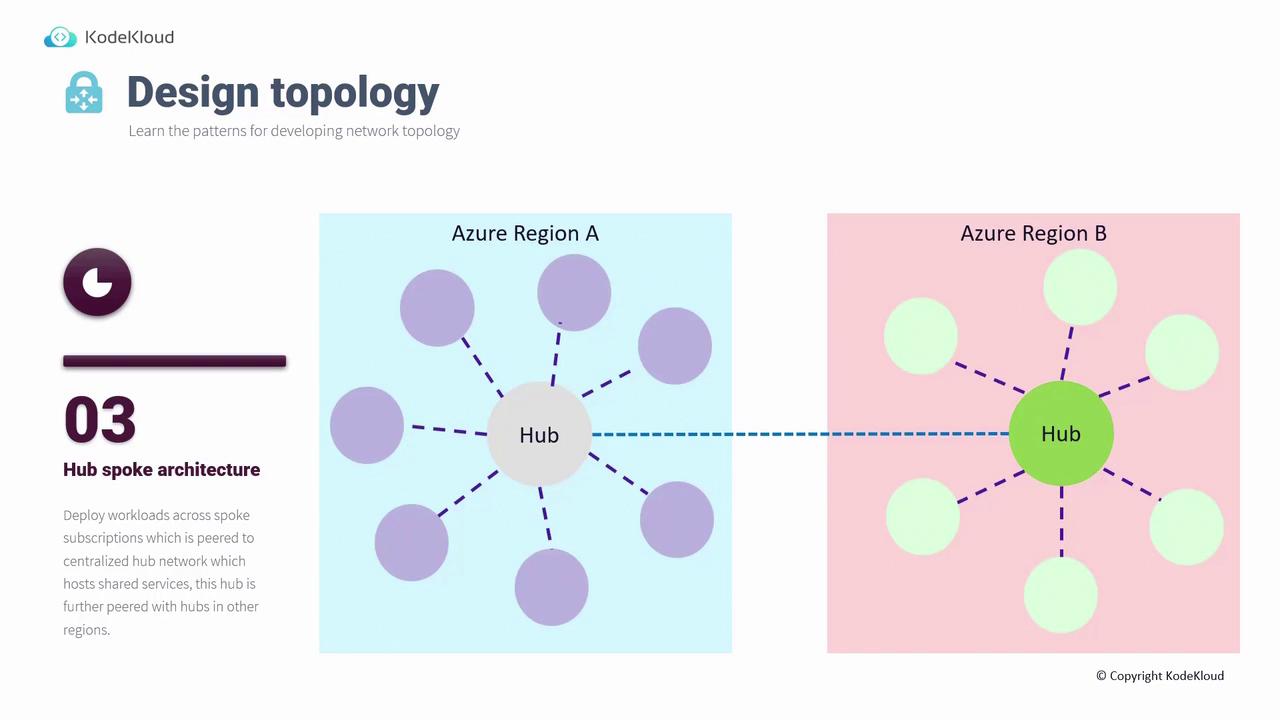
Designing Outbound Connectivity
Managing outbound connectivity is key to controlling how your virtual network accesses external resources. Azure offers three primary options:1. Azure Firewall
Azure Firewall can centralize outbound traffic management by forcing all outbound traffic through a secure firewall. By configuring a user-defined route (UDR) that directs traffic through the firewall, organizations can enforce security policies and monitor traffic effectively.2. Azure Load Balancer
Using an Azure Load Balancer, you can set up outbound rules that determine how outbound traffic is routed. This method allows for load-balanced management of connections from your virtual network to the internet.3. NAT Gateway
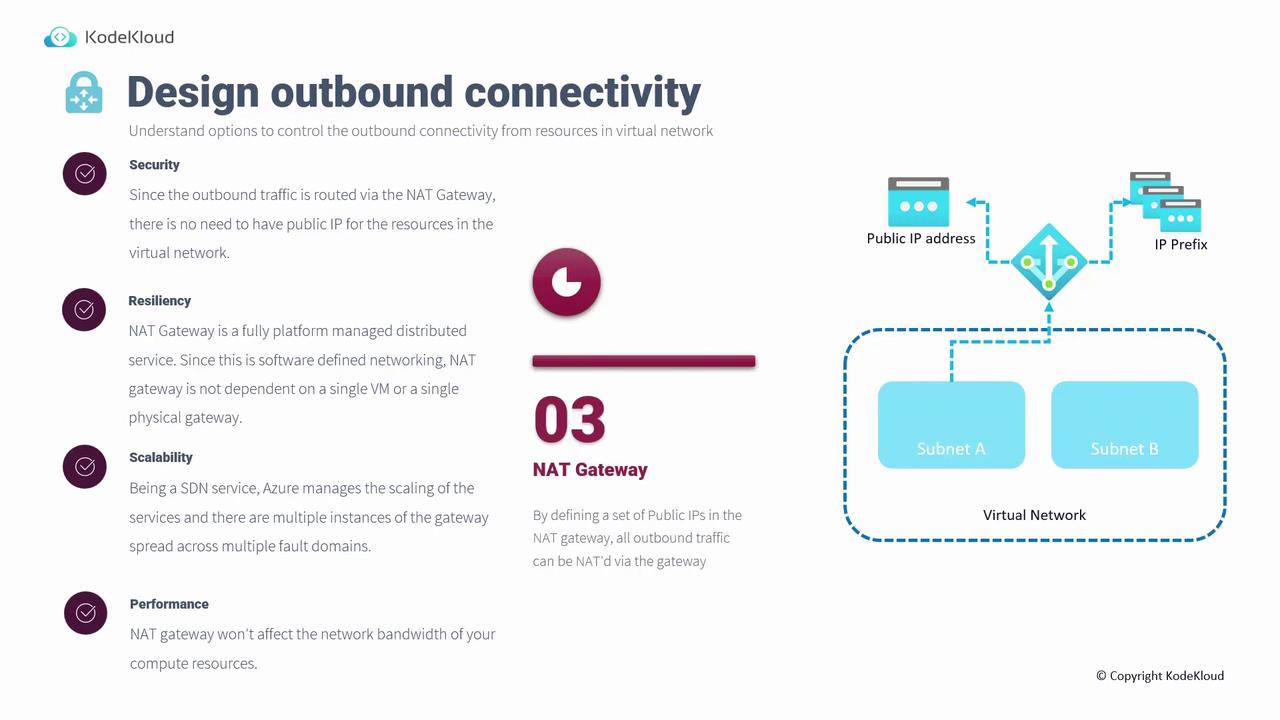
A NAT Gateway simplifies outbound connectivity by translating private IP addresses into a set of defined public IP addresses. When resources within a subnet pass outbound traffic through a NAT gateway, external destinations see only the gateway’s public IPs—similar to how a home router works. For example, deploying a NAT gateway on subnet A (or multiple subnets like A and B) ensures that all outbound traffic from those subnets is translated to the NAT gateway’s public IP addresses.- Security: Eliminates the need for individual public IP addresses on resources.
- Resiliency: Fully platform-managed, eliminating single points of failure.
- Scalability: Automatically scales across multiple fault domains.
- Performance: Maintains high network bandwidth.
Managing Routing in Azure
Routing within an Azure virtual network determines how traffic is directed between resources and external networks. Azure leverages route tables to implement routing policies, similar to routing used by traditional networking devices. There are two primary types of routes:System Routes
When a virtual network is created in Azure, system routes are automatically configured. These routes facilitate communication between subnets, enable internet access for virtual machines, and even extend to peer virtual networks. For example, Windows machines receive system routes that allow them to download updates without additional configuration.User-Defined Routes (UDRs)
In cases where the default routing behavior needs modification, you can create User-Defined Routes (UDRs) to manually override system routes. UDRs allow traffic to be custom-routed—for instance, sending all outbound traffic through an Azure Firewall. To implement a UDR, add it to a route table and then associate it with a specific subnet or network interface. The priority of routing is as follows: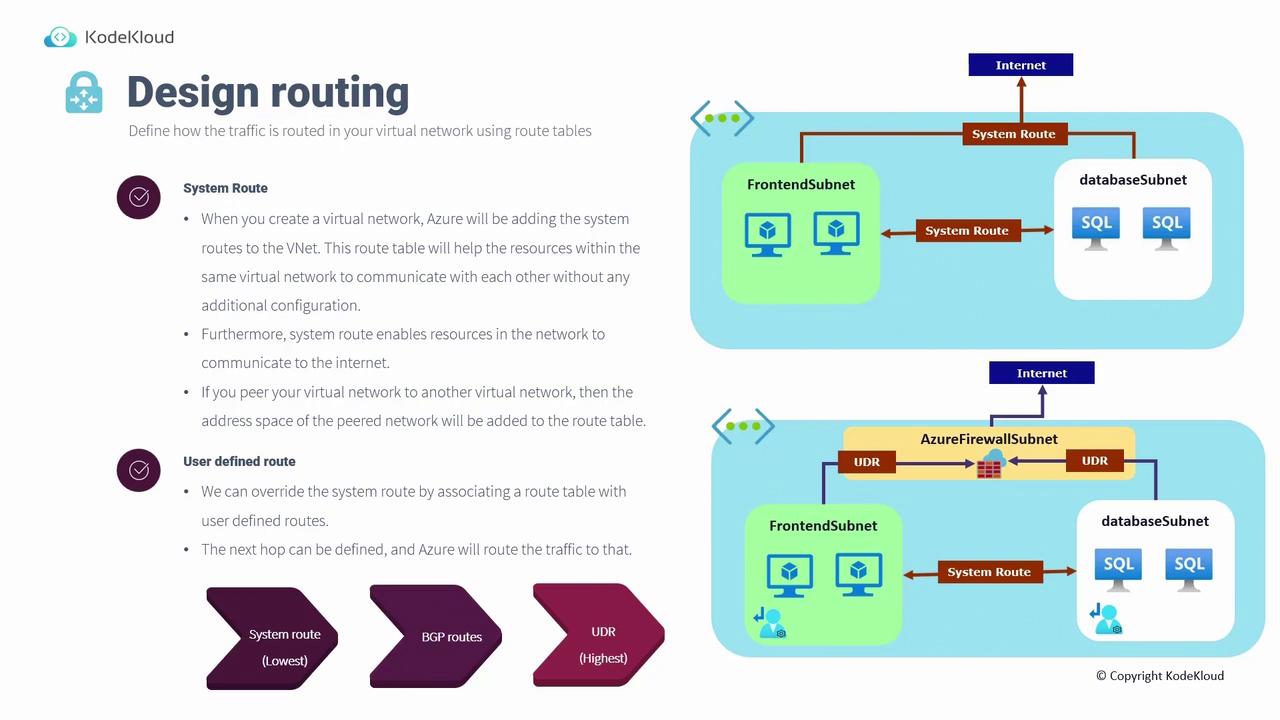
With a thorough understanding of connectivity options, network topology designs, outbound connectivity strategies, and Azure routing mechanisms, you are well-equipped to design and manage a secure and efficient network infrastructure in Azure. Future content will delve into design considerations for application delivery, further enhancing your solutions architecture.