

Replication Options
Below, you will find detailed explanations of the available replication strategies:Locally Redundant Storage (LRS)
LRS replicates your data three times within a single data center across different fault domains. This approach ensures that if one rack or cluster becomes unavailable, your data remains accessible from other clusters in the same facility. LRS provides a durability SLA of 99.19%.Zone-Redundant Storage (ZRS)
Unlike LRS, ZRS replicates data three times across multiple availability zones within the same region. This distribution across zones offers enhanced protection since your data stays available even if one complete zone goes offline. ZRS delivers a durability level of approximately 99.12%.Geo-Redundant Storage (GRS) and Read-Access GRS (RAGRS)
GRS uses LRS within the primary region (replicating data three times) and then replicates the data in a secondary region, resulting in six copies overall. This setup achieves a durability of 99.16%. However, note that the secondary copy is not immediately available for read operations without a failover event initiated by you or automatically by Microsoft. For users requiring continuous read access to the secondary region, Read-Access Geo-Redundant Storage (RAGRS) is available. RAGRS enables data access in the secondary region without the need for a failover action.Geo-Zone-Redundant Storage (GZRS)
GZRS, sometimes referred to as Geo-Consistent Redundant Storage (GCRS), combines the strengths of ZRS and LRS. In this approach, data is replicated three times across availability zones in the primary region and three times across fault domains in the secondary region. This results in durability similar to GRS (approximately 99.16%). As with GRS, the secondary copy in GZRS is available for read operations only after a failover, unless you opt for RAGRS to allow continuous secondary region read access.Not all storage account types support every replication option. For example, General Purpose v2 accounts offer the full range of redundancy configurations, while premium page blobs are generally limited to LRS and ZRS.
Selecting the Right Option
When creating a storage account, Azure displays the available redundancy options based on the account type you choose. For instance, LRS does not support secondary read access. In contrast, selecting GRS will present an option to enable read access—effectively converting it to RAGRS. The following table summarizes the key characteristics of these replication strategies: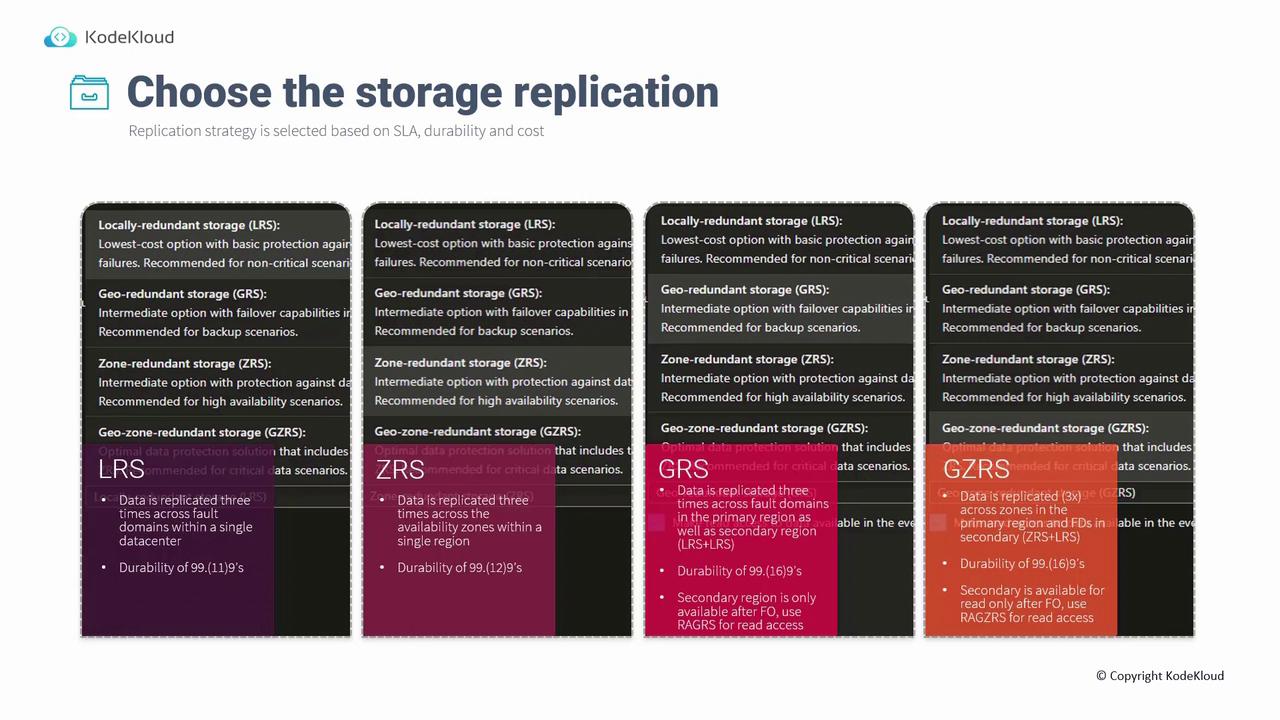
Ensure that your chosen redundancy option aligns with your SLA, durability, and budget requirements. Higher redundancy usually leads to increased costs.