

Accessing the EKS Clusters
Open the AWS EKS console to view your clusters. In our setup, the console shows two active clusters named “prod” and “staging,” both running Kubernetes version 1.27 with extended support until July 24, 2025.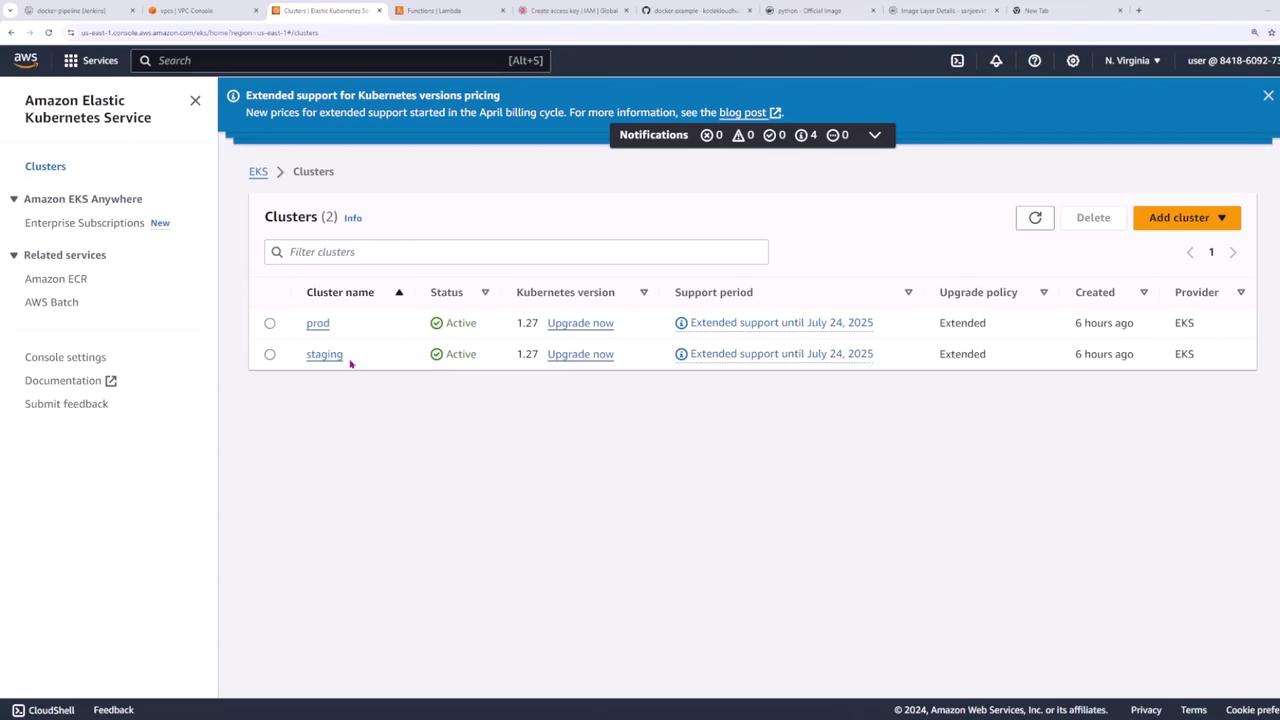
Inspecting the kubeconfig File
Your kubeconfig file, usually located at~/.kube/config, contains configurations for your clusters, users, and contexts. To inspect the file, run:
config.yaml in your preferred IDE.
Do not commit this file to Git or any public repository as it contains sensitive cluster credentials.
current-context is set to the production cluster by default:
Switching Between Clusters
To operate on different clusters, switch contexts. First, check the nodes on your current production cluster:Deploying the Flask Application
Our Kubernetes configurations are stored in thek8s/ directory, which includes the deployment.yaml and service.yaml files.
Deployment Configuration
Thedeployment.yaml file sets up a deployment for a Flask application with three replicas:
Service Configuration
Theservice.yaml file defines a LoadBalancer service to expose the Flask application externally:
Deploying Resources to the Cluster
Before deploying, confirm that your current context is correct:EXTERNAL-IP or hostname and access your application on port 5000.
Load Testing with k6
Use k6 to simulate user traffic and measure your application’s performance. k6 lets you define virtual users (VUs), duration, and thresholds for request response times. Create a file namedacceptance-test.js with the following content:
Updating the Application Version
Our current deployment uses version 3 of the image:-
Build the New Image
-
Push the Image to Docker Hub
-
Update the Deployment in Kubernetes
Use the
kubectl set imagecommand to update the image version:You should see a confirmation:
This lesson covered managing multiple Kubernetes clusters, deploying a Flask application, conducting load tests with k6, and updating the application version seamlessly—all crucial skills for maintaining an efficient CI/CD pipeline.