In this tutorial, you’ll learn how to use Flux’s Helm Controller to deploy a Helm chart from a Git repository into your Kubernetes cluster. We’ll create Flux sources, overrides, and a HelmRelease to run the block-buster-helm-app version 7.5.0.

Prerequisites

  • A Kubernetes cluster with Flux CD installed
  • kubectl configured for your cluster
  • A Git repository containing your Helm chart

Step 1: Prepare a Git Branch

Switch to the application source and create a new branch called 5-demo based on 4-demo:
cd bb-app/source
git checkout 4-demo
git checkout -b 5-demo origin/5-demo
This branch contains the block-buster-helm-app chart at version 7.5.0.

Step 2: Inspect the Helm Chart

Open Chart.yaml to view the chart metadata:
apiVersion: v2
name: block-buster-helm-app
description: A Helm Chart for Block Buster App
version: 7.5.0
Review the default values in values.yaml:
image:
  repository: siddharth67/block-buster-dev:7.5.0
  pullPolicy: Always
service:
  type: ClusterIP
  port: 80
  targetPort: 80
namespace:
  name: demo-app
labels:
  app:
    name: bb-app
    version: 7.x.x
    env: uat
The templates/ directory includes standard Kubernetes manifests like Deployment and Service.

Step 3: Create a GitRepository Source

Tell Flux where to fetch your chart by defining a GitRepository:
flux create source git 5-demo-source-git-helm-bb-app \
  --url https://github.com/sidd-harth-2/bb-app-source \
  --branch 5-demo \
  --timeout 10s \
  --export > flux-clusters/dev-cluster/5-demo-source-git-bb-app.yaml
Save the following in flux-clusters/dev-cluster/5-demo-source-git-bb-app.yaml:
apiVersion: source.toolkit.fluxcd.io/v1beta2
kind: GitRepository
metadata:
  name: 5-demo-source-git-helm-bb-app
  namespace: flux-system
spec:
  interval: 1m
  url: https://github.com/sidd-harth-2/bb-app-source
  ref:
    branch: 5-demo

Step 4: Override Chart Values

Add a 5-demo-values.yaml file in your Flux cluster repo to customize deployment:
# flux-clusters/dev-cluster/5-demo-values.yaml
replicaCount: 2
service:
  type: NodePort
  nodePort: 30005
namespace:
  name: 5-demo
labels:
  app:
    name: block-buster
    version: 7.5.0
    env: dev

Step 5: Define the HelmRelease

Create a HelmRelease that combines your source and values:
flux create helmrelease 5-demo-helm-release-git-helm-bb-app \
  --chart block-buster-helm-app \
  --interval 10s \
  --target-namespace 5-demo \
  --source GitRepository/5-demo-source-git-helm-bb-app \
  --values 5-demo-values.yaml \
  --export > flux-clusters/dev-cluster/5-demo-helm-release-git-helm-bb-app.yaml
Save it alongside the other manifests:
apiVersion: helm.toolkit.fluxcd.io/v2beta1
kind: HelmRelease
metadata:
  name: 5-demo-helm-release-git-helm-bb-app
  namespace: flux-system
spec:
  interval: 10s
  targetNamespace: 5-demo
  chart:
    spec:
      chart: block-buster-helm-app
      sourceRef:
        kind: GitRepository
        name: 5-demo-source-git-helm-bb-app
  values:
    replicaCount: 2
    service:
      type: NodePort
      nodePort: 30005
    namespace:
      name: 5-demo
    labels:
      app:
        name: block-buster
        version: 7.5.0
        env: dev
Ensure unique manifest names across your repo to avoid reconciliation conflicts.

Summary of Flux Resources

KindFilenameDescription
GitRepository5-demo-source-git-bb-app.yamlPoints Flux to your Helm chart in Git
Values File5-demo-values.yamlOverrides default chart values
HelmRelease5-demo-helm-release-git-helm-bb-app.yamlDeploys the chart into the Kubernetes cluster

Step 6: Commit and Reconcile

Push your manifests to the Flux cluster repo:
cd flux-clusters/dev-cluster
git add 5-demo-source-git-bb-app.yaml 5-demo-values.yaml 5-demo-helm-release-git-helm-bb-app.yaml
git commit -m "Add Flux HelmRelease for block-buster-helm-app"
git push
Verify Flux has detected the resources:
flux get sources git 5-demo-source-git-helm-bb-app
flux get helmreleases

Step 7: Validate in Kubernetes

Check the new namespace and resources:
kubectl get ns
kubectl get all -n 5-demo
You should see two replicas and a NodePort service on port 30005:
NAME                          READY   STATUS    RESTARTS   AGE
pod/block-buster-helm-app-xx  1/1     Running   0          2m

NAME                         TYPE       CLUSTER-IP     EXTERNAL-IP   PORT(S)          AGE
service/block-buster-helm-app NodePort   10.96.185.58   <none>        80:30005/TCP     2m
Confirm the overridden labels:
kubectl get pod -n 5-demo block-buster-helm-app-xx --show-labels

Step 8: Inspect the Packaged Helm Chart

Flux creates HelmChart artifacts—list and view them:
flux get sources helmchart
kubectl -n flux-system get helmcharts.source.toolkit.fluxcd.io
kubectl -n flux-system get helmcharts.source.toolkit.fluxcd.io flux-system-5-demo-helm-release-git-helm-bb-app -o yaml

Step 9: Access the Application

Point your browser to http://<node-ip>:30005. Version 7.5.0 includes a Start Game button to launch the game manually.
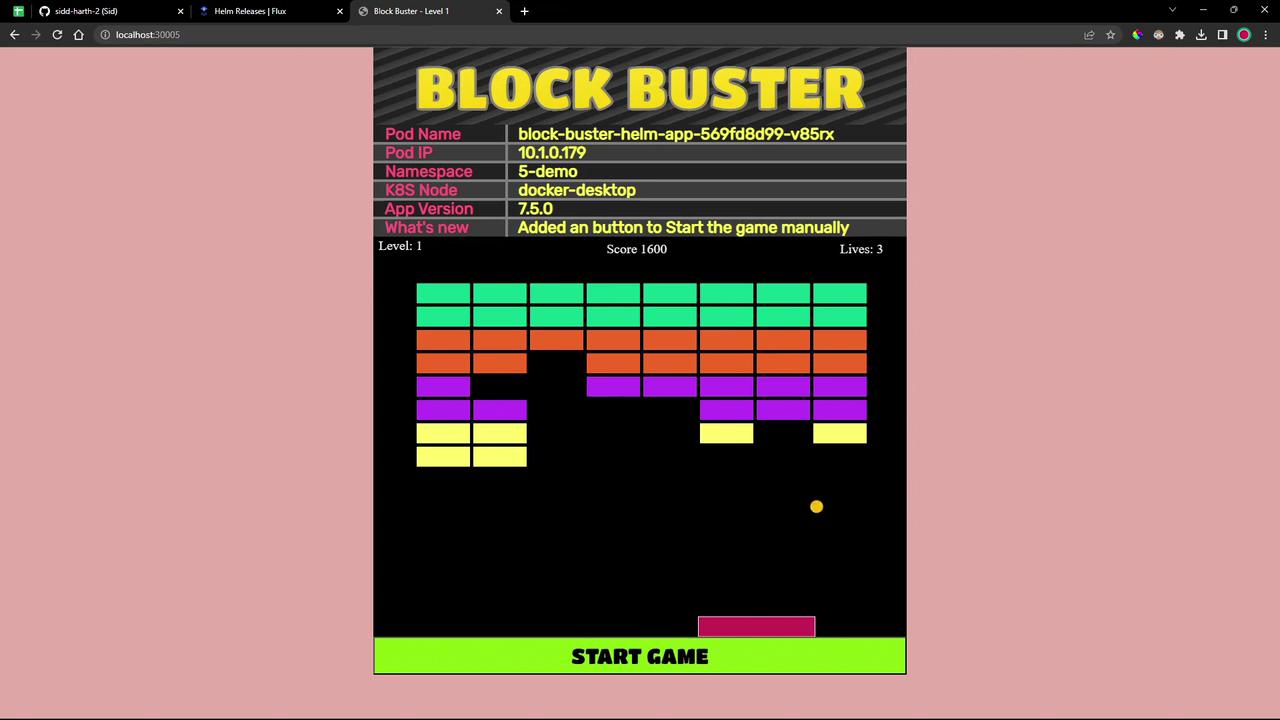
The image shows a "Block Buster" game interface with colorful blocks, a paddle, and a ball. It includes game details like pod name, IP, namespace, and version, with a "Start Game" button at the bottom.

References