

Overview
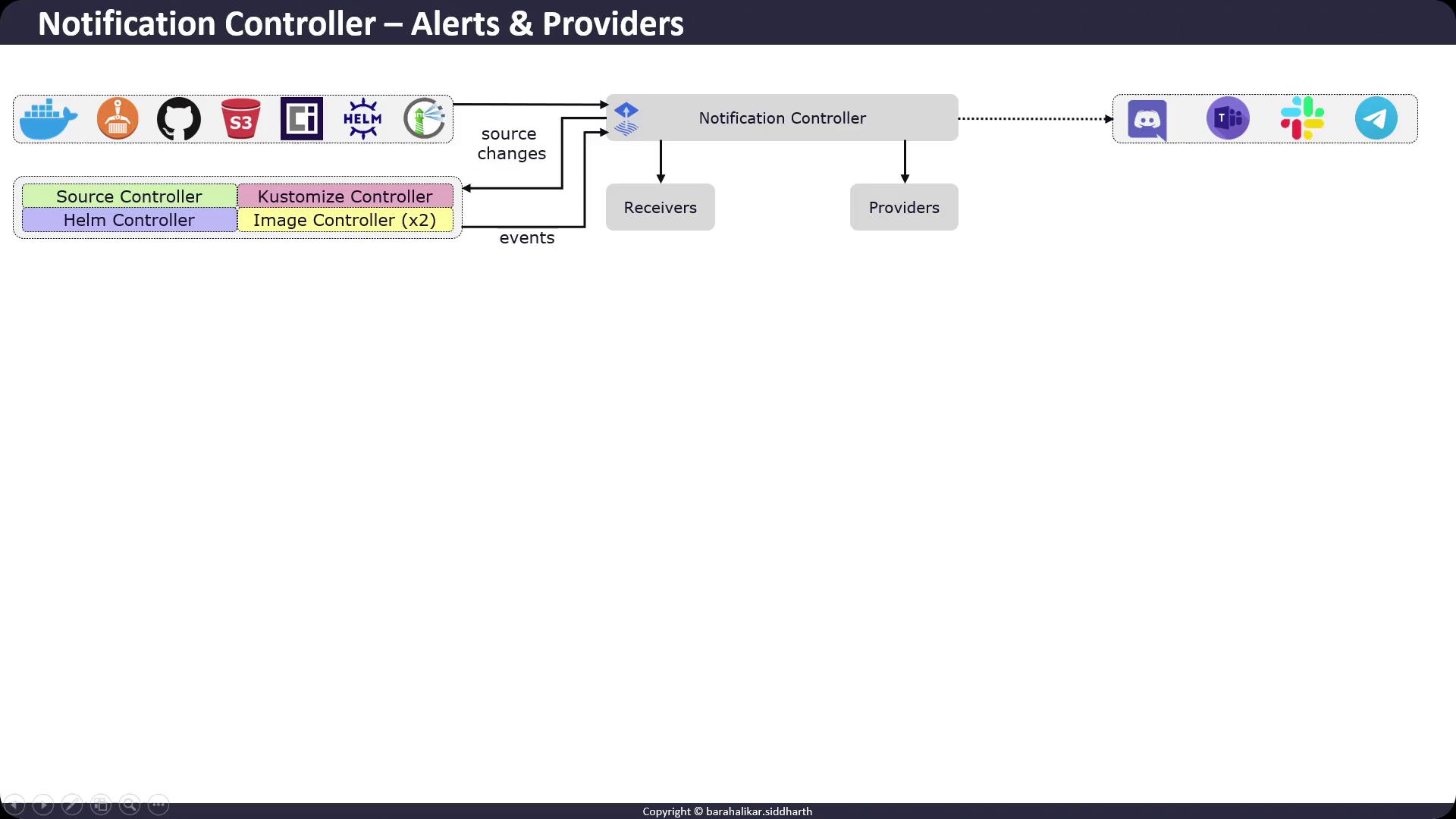
The Flux Notification Controller bridges external event sources (e.g., GitHub, S3 buckets, Helm repositories, Docker registries) with notification targets (Slack, Teams, Discord, Telegram). It comprises:- Receiver: Watches changes in external sources and informs Flux controllers.
- Provider: Encodes and delivers events to external systems based on defined channels and formats.
Configuring Slack Notifications
In this example, we’ll use Slack’s legacy incoming webhook API to post Flux events to a channel.1. Create the Slack Webhook Secret
Store your webhook URL in theflux-system namespace:
Ensure your Slack workspace has incoming webhooks enabled on the target channel. You can configure and rotate webhooks via Slack App Management.
2. Define an AlertProvider
Create anAlertProvider named slack-example of type slack, pointing at the general channel and referencing the slack-webhook secret:
3. Create an Alert
Define anAlert resource to filter and route events of info severity from all Flux controllers in flux-system:
Slack’s legacy incoming webhooks may be deprecated in favor of the newer Slack Apps & Block Kit APIs; plan to migrate when possible.