- The Docker daemon (
dockerd): a background service that manages Docker objects such as images, containers, volumes, and networks. - The Docker REST API: an HTTP API that clients (including the CLI) use to instruct the daemon. This API enables integration and automation with other tools.
- The Docker CLI (
docker): the command-line client that communicates with the daemon over the REST API.
-H/--host option.
Example: run an nginx container on a remote Docker host over TLS:
2376 or SSH. If you see examples using port 2375 without TLS, treat them as a security risk: 2375 exposes an unencrypted, unauthenticated Docker API that allows anyone who can reach it to control the host.
Port
2375 is the unencrypted, unauthenticated Docker API. Avoid it in production. Prefer 2376 with TLS or use SSH.The runtime layers: dockerd, containerd, and runc
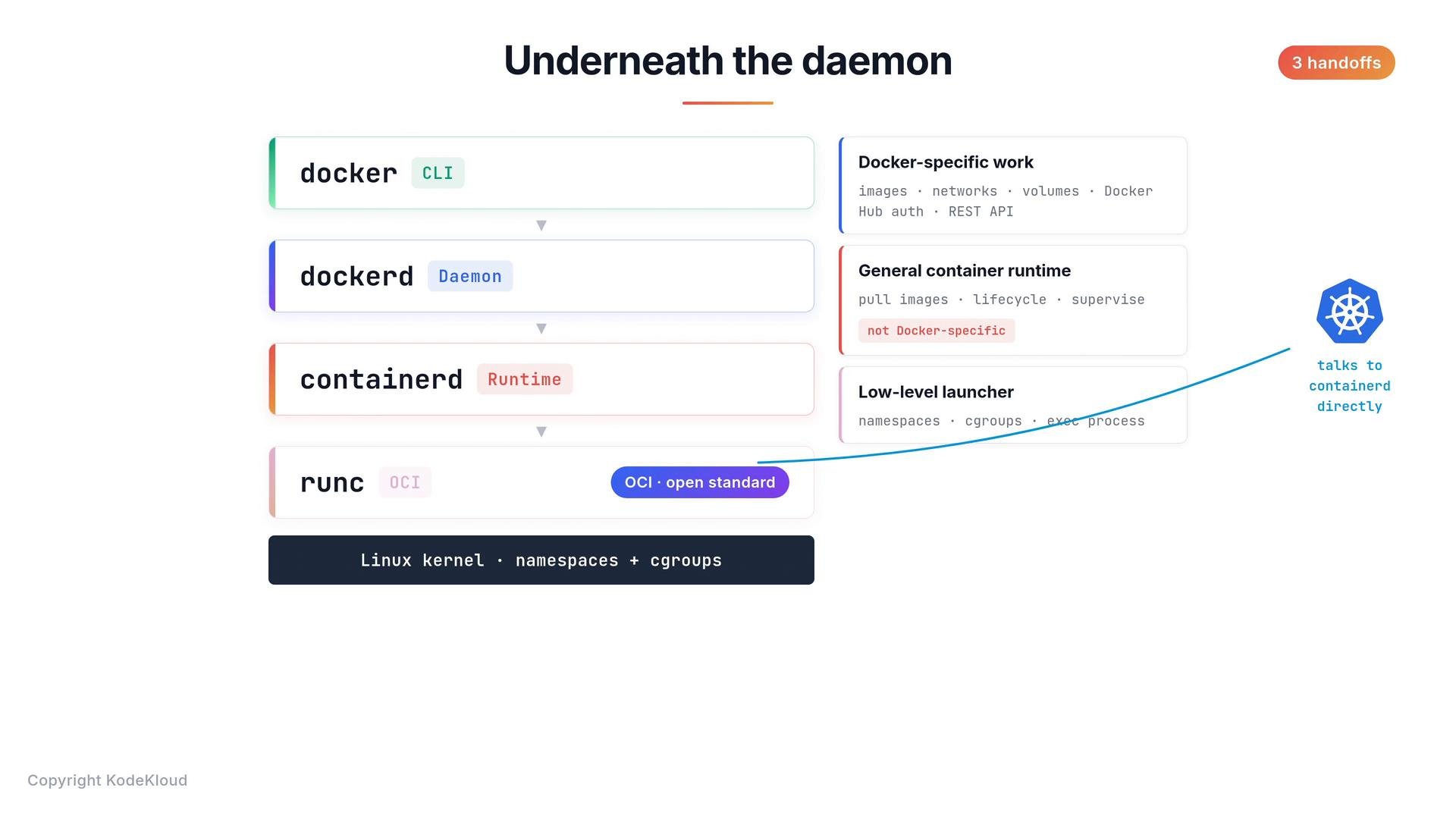
The Docker daemon does not perform the lowest-level container start operations itself. Starting and running containers involves two additional, focused components:- containerd: a general-purpose container runtime and supervisor. It pulls images from registries, manages container lifecycle (create, start, stop, delete), and supervises running containers. containerd is runtime-agnostic and widely used across the ecosystem.
- runc: the low-level OCI runtime that invokes the kernel to set up namespaces and cgroups, then starts the container process. runc implements the Open Container Initiative (OCI) runtime spec for how containers run on Linux.
docker run ...→ dockerd (Docker daemon)- dockerd → containerd (container runtime manager)
- containerd → runc (OCI runtime) → Linux kernel (namespaces + cgroups)
- dockerd: Docker-specific features (images, networks, volumes, registry auth, REST API).
- containerd: image pulling, storage, lifecycle management, supervising containers.
- runc: the final low-level setup with the kernel (namespaces, cgroups) and launching the container process.
You rarely need to interact directly with
containerd or runc for everyday Docker tasks. But knowing these layers helps when inspecting process lists, reading logs, or diagnosing runtime-level issues.Summary table: components and responsibilities
Why this matters
Understanding these components clarifies troubleshooting steps (e.g., which logs to check), security considerations (exposed APIs vs. SSH/TLS), and how higher-level platforms like Kubernetes interface with runtimes.