

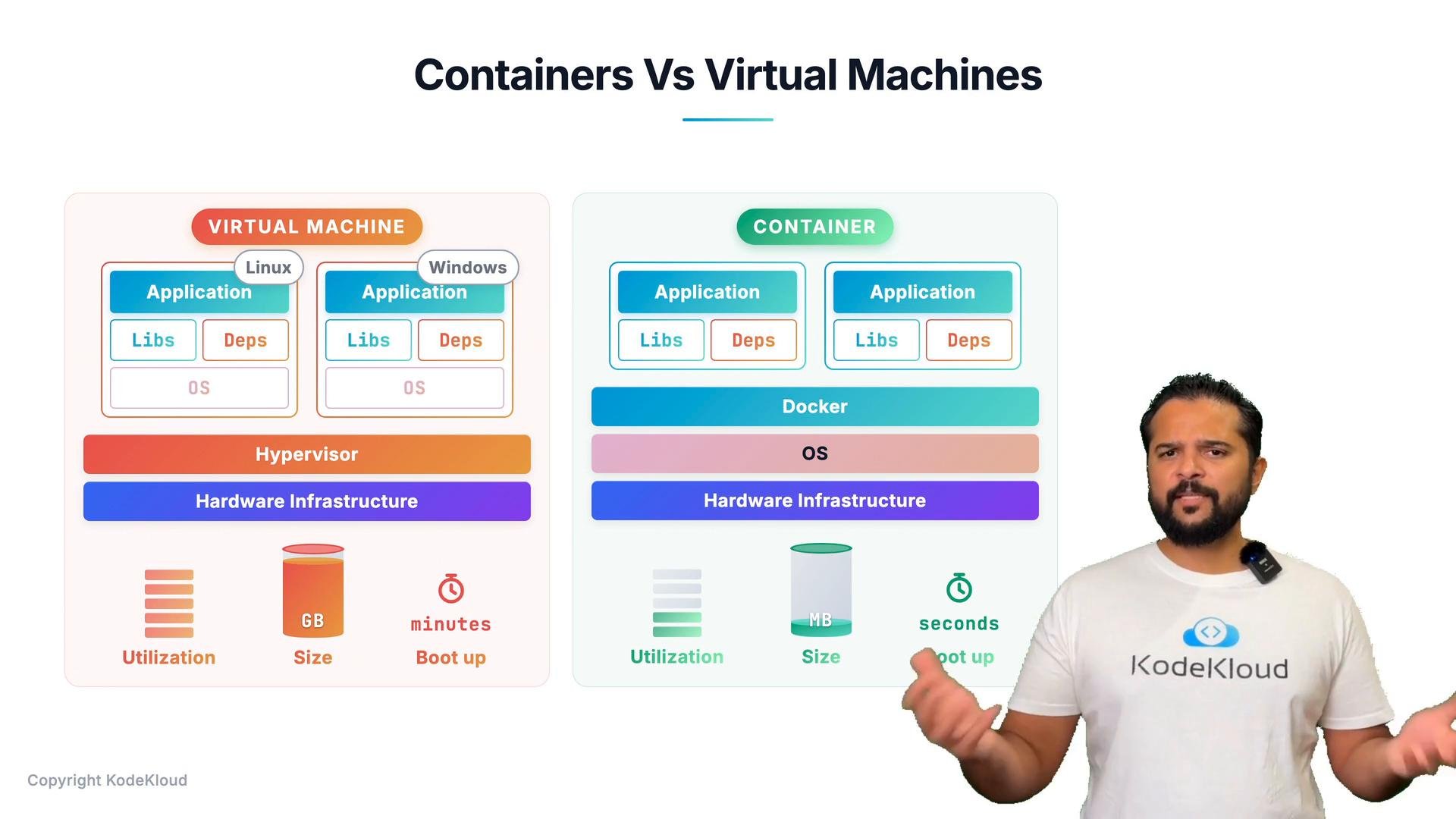
High-level architectures
Docker (containers)
- Hardware -> Host OS -> Docker Engine -> Containers
- Each container contains the application and only the libraries and dependencies required by that application (implemented as container images and runtime instances).
- Containers share the host kernel and many OS services, making them lightweight and efficient to run.
- Lower disk footprint (often measured in tens to hundreds of megabytes per image). Many layers are shared across containers.
- Fast startup times (seconds or less to start a runtime instance).
- Efficient resource utilization — there is no full guest OS per workload.
Virtual machines
- Hardware -> Hypervisor (e.g., ESXi) -> Virtual machines
- Each VM contains a full guest OS plus the application and its dependencies.
- Each VM runs its own kernel and OS, which introduces more overhead on CPU, memory, and disk.
- Larger disk images (often gigabytes per VM).
- Slower boot times (tens of seconds to minutes to boot a full OS, depending on optimizations).
- Stronger isolation: VMs provide kernel-level separation because each VM has its own OS.
Side-by-side comparison
Typical deployment patterns
It is not an either/or decision — containers and virtual machines are frequently used together.- Large environments commonly run containers on virtualized hosts. This combines the operational benefits of virtualization with the deployment and scaling benefits of containers.
- Use virtualization to provision or decommission Docker hosts quickly, and use containers to package, deploy, and scale applications rapidly.
- Instead of provisioning a VM per application (the older model), provision fewer VMs and run many containers on each VM. Each VM acts as a Docker host running multiple containerized applications. This reduces VM sprawl while preserving management and isolation benefits.
When to choose each technology
-
Choose containers when:
- You need fast, frequent deployments and rapid horizontal scaling.
- You want smaller images and efficient resource usage.
- Your applications are compatible with the host OS kernel.
-
Choose VMs when:
- You require stronger isolation at the kernel level.
- You need to run different guest OS types on the same physical host.
- Legacy applications require a full OS environment.
Practical example and operational tips
-
Typical production setup:
- Provision VMs (or cloud instances) as Docker/Kubernetes nodes.
- Run containerized services on those nodes to get fast scaling and packaging benefits.
- Use orchestration platforms (e.g., Kubernetes) to manage scheduling, health checks, and scaling across the VMs.
- Useful links:
For most production environments, running containers on virtual machines provides the best of both worlds: operational flexibility from virtualization and the lightweight, fast-scaling benefits of containers.