

Reconcile implementation (shortened)
Start with a representative Reconcile method (only the relevant parts are shown):Example of a buggy helper that builds a Deployment
This helper injects the WebApp’smetadata.resourceVersion into labels used for both the Deployment selector and the Pod template. Because resourceVersion changes on every write, the controller will generate a different selector on each pass:
Reproduce and capture logs
Start the manager with debug logging and capture the output. The live terminal shows what is happening now; the saved file is your evidence bag to grep through later. Example manager startup logs (captured):metadata.generation and metadata.resourceVersion side by side:
generationreflects user intent (changes to spec).resourceVersionreflects cluster record changes.
generation remains at 1 while resourceVersion keeps increasing, the controller is repeatedly writing the object—often a sign the controller is causing the writes.
Measure the noisy reconcile behavior with a quick grep of the operator log:
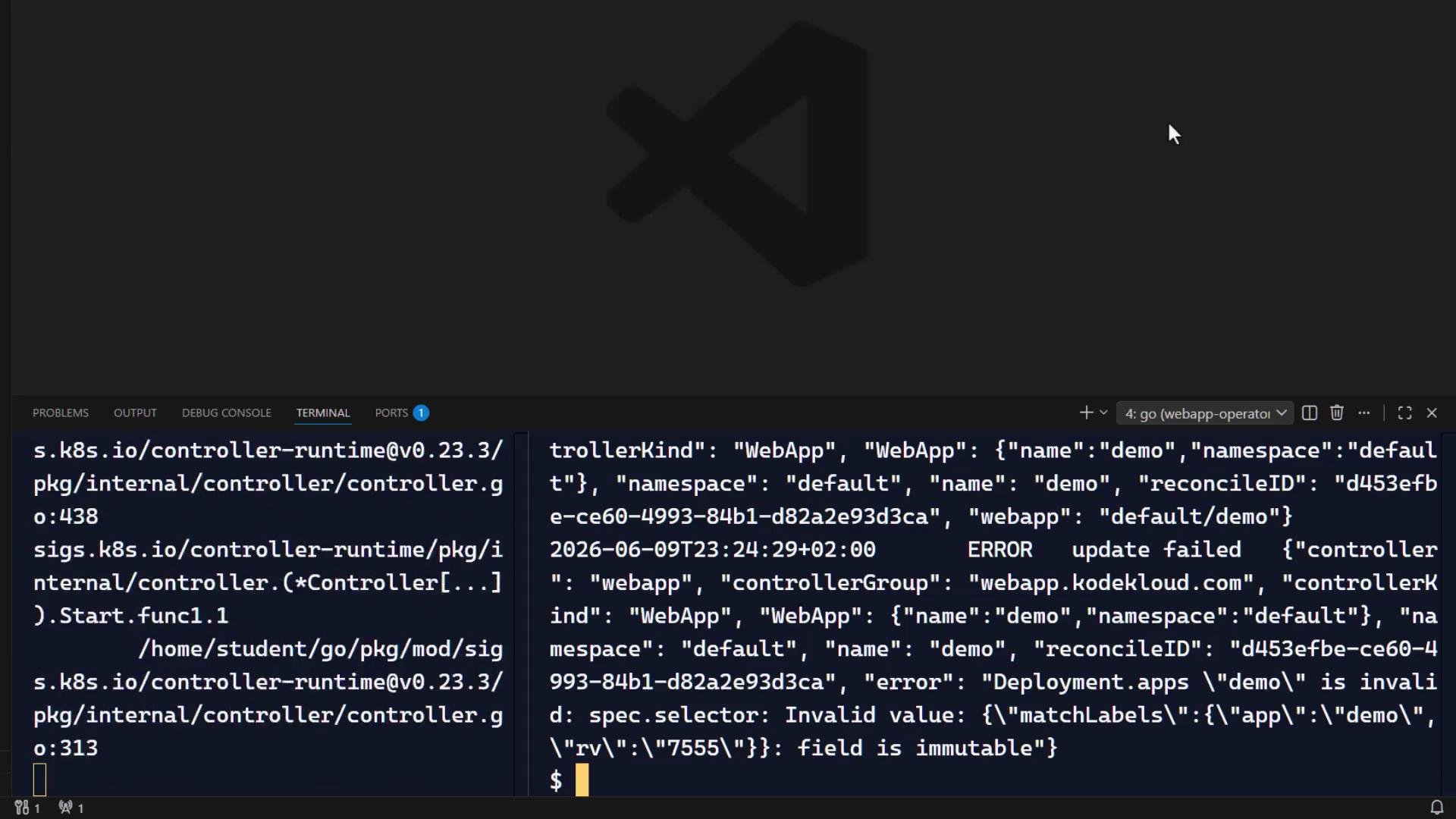
The failure in the logs
The top-level INFO logs look fine, but the debug/ERROR lines contain the root failure:metadata.resourceVersion in the Deployment selector. Since Kubernetes treats spec.selector as immutable after creation, each reconcile tries to update the selector to a new value and the API rejects it.
Fix: make selectors stable
Stop feeding a changing value into a stable identity field. RemoveresourceVersion (or any other constantly changing value) from the Deployment spec.selector and ensure the pod template labels are stable and match the selector.
Corrected helper (no resourceVersion in selector or pod labels):
Apply the fix safely (recommended procedure)
- Stop the manager.
- Edit the controller code to remove changing values from selectors/template labels.
- Rebuild and restart the manager.
- Observe operator logs and the WebApp resource; the reconcile count should drop to normal levels.
Important: Never put a changing cluster-controlled value (such as
metadata.resourceVersion) into a Deployment selector or any field that the API treats as immutable. Doing so will repeatedly trigger rejected updates and a tight reconcile loop.Quick triage checklist
Root cause summary
Root cause summary: never place a changing cluster-controlled value (like
metadata.resourceVersion) into a Deployment selector (or any field that the API treats as immutable). Keep selectors stable and match them to pod template labels that do not change across reconciles.- Start with the symptom.
- Separate user intent (
generation) from controller writes (resourceVersion). - Measure the behavior.
- Search logs for API refusals.
- Be suspicious when a stable identity field is fed changing data.
Links and references
- Kubernetes API conventions – Object Metadata
- Deployments — Immutable fields
- Controller-runtime docs: https://pkg.go.dev/sigs.k8s.io/controller-runtime