

$? holds the exit status of the last executed command, script, or function. Checking this value is essential for robust error handling in shell scripts.
Table of Contents
Part 1: Using $?
What Is an Exit Status?
Every command returns an integer exit status.- 0 means success.
- Non-zero indicates failure or a specific error condition.

If you redirect both stdout and stderr (e.g.,
> /dev/null 2>&1), you won’t see any output, but $? still reflects success or failure.Inspecting $? in Practice
-
Script with a typo:
Exit code 127 means “command not found.”
-
Successful command:
-
File-not-found error:
Common Exit Codes
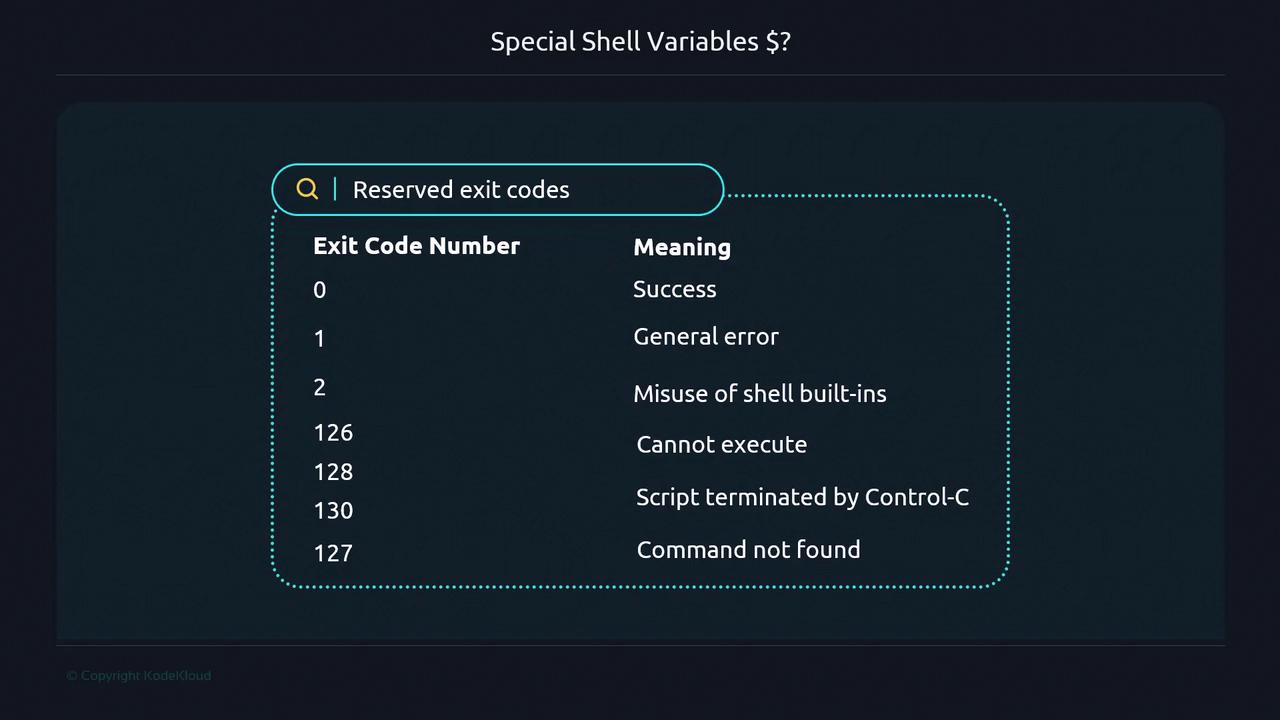
You can define custom exit codes (128 and above) to represent specific failure modes in your scripts.
Back-to-Back Commands
When you execute multiple commands,$? always reflects the last exit status:
Masking Errors
A trailingexit 0 can hide earlier failures:
Part 2: Writing Scripts That Leverage $?
To ensure your script stops on errors and reports accurate statuses, apply one of these techniques.
Technique 1: if After Each Command
Technique 2: OR Operator (||)
Technique 3: set -e
Using
set -e in an interactive shell will terminate your session on the first error.Custom Exit Codes and a terminate Function
Initial Script: server_appender.sh
fqdn.properties is empty, this outputs malformed hostnames.
Adding an Empty-File Check
Defining a terminate Function
set -e, custom exit codes, and a reusable terminate function, your Bash scripts will halt on failures and report meaningful statuses.