

Overview of Standard Streams
Linux programs use three primary standard streams:- Standard Input (stdin): Receives input data.
- Standard Output (stdout): Sends processed output.
- Standard Error (stderr): Outputs error messages.
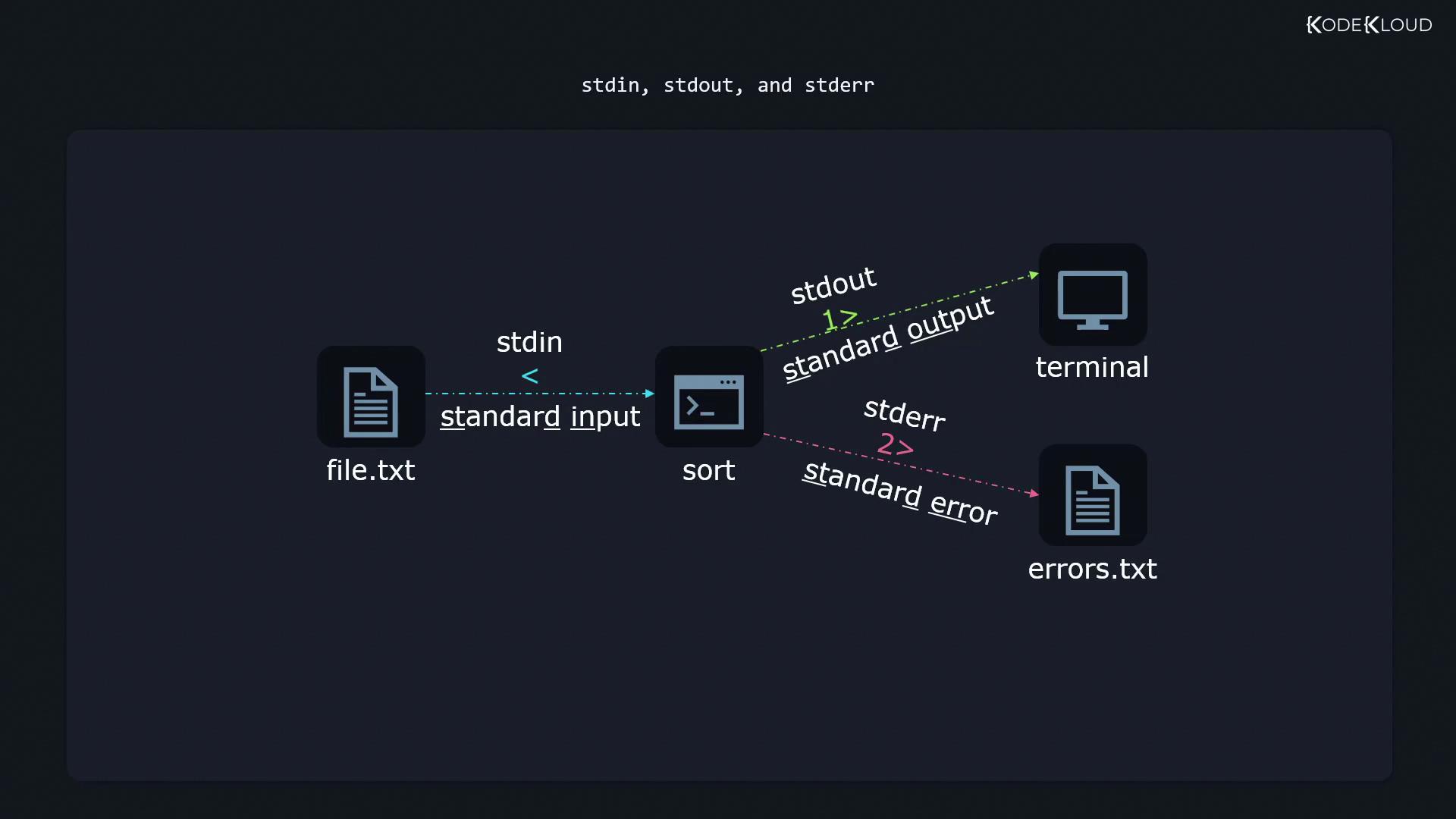
Redirecting Output
Redirecting to a File
Consider the utilitysort which arranges text after reading it from a file. For example, given a file named file.txt:
>:
The target file (
sortedfile.txt) is created automatically if it does not exist.Overwriting Versus Appending
Using a single> operator overwrites the contents of the target file. For example:
>> operator:
1>:
file.txt.
Input Redirection
Sometimes, rather than receiving input directly from the keyboard, programs can read data from a file using the< symbol. For example, to send the contents of emailcontent.txt to the sendemail command:
Redirecting Error Messages
Linux allows you to handle error messages separately by using the file descriptor2. For example, to redirect error messages to a file named errors.txt:
Be sure to differentiate between standard output and error messages. This helps in troubleshooting issues effectively.
/dev/null, a special file that discards input:
Redirecting Both Standard Output and Standard Error
At times, you might want to capture both standard output and error messages into a single file. You can achieve this by redirecting stdout to a file and then sending stderr to the same location:The2>&1operator redirects stderr to the current destination of stdout. Ensure you place2>&1after the stdout redirection to avoid errors being displayed in the terminal.
Here Documents and Here Strings
Here Documents
A here document is a way to provide inline input to commands. For example, sorting numbers using an inline document:EOF serves as a delimiter indicating where the input ends. You can choose any delimiter, but EOF is widely used.
Here Strings
A here string is used to pass a single line of input into a command:"1+2" available as input to bc.
Piping Output Between Commands
Linux’s philosophy of composing small utilities allows you to perform complex tasks by linking commands together using the pipe| operator. For example, to filter and format configuration settings:
grep -v '^#' /etc/login.defsremoves lines that start with#.sortarranges the remaining output.column -tformats the output into aligned, easy-to-read columns.
Summary
This guide introduced essential redirection and piping techniques in Linux:
That concludes our discussion on input and output redirection in Linux. With these techniques, you can manipulate data streams to suit various operational needs. Now it’s time to apply this knowledge in your hands-on labs and command-line experiments.