

terraform apply, Terraform turns that desired state into the necessary cloud API calls to create or modify real resources so the live environment matches your configuration.
What about duplicate or repeated resources? In the example above, count = 3 ensures Terraform will create three instances and manage them as a single logical resource block.
How Terraform Knows What Currently Exists
Terraform tracks resources it manages using a state file (by defaultterraform.tfstate). This JSON file maps resource blocks from your configuration to actual cloud resource IDs and metadata. Example snippet from a state file:
What terraform plan Does
terraform plan previews changes by comparing the configuration, the saved state, and the live resources. It reports what will be created, changed, or destroyed without making any modifications.
terraform apply so you can validate the intended changes.
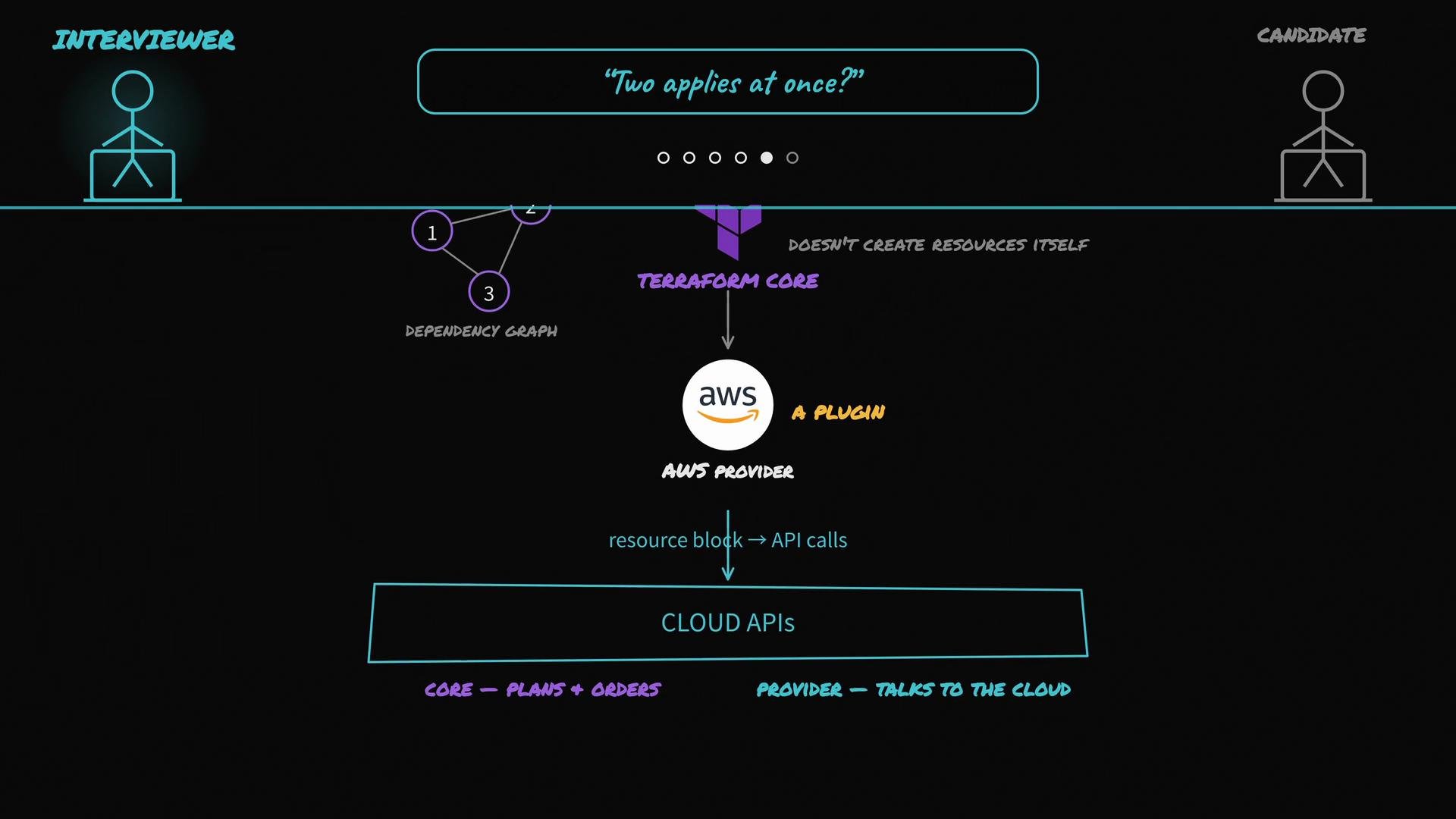
Terraform Core vs Providers
Terraform Core orchestrates the overall process; providers perform the actual API calls. Terraform Core:- Reads your HCL configuration
- Loads the saved state file
- Queries provider plugins for live resource states
- Builds a dependency graph of resources
- Computes a plan with the right operation order (create/update/delete)
- Invokes provider plugins in that order to enact changes
Collaboration: Remote State and Locking
When multiple engineers runterraform apply against the same infrastructure, you must avoid conflicting updates. Terraform supports remote backends and state locking to prevent race conditions.
Common remote backend patterns:
- S3 backend + DynamoDB for locking (AWS)
- Terraform Cloud / Terraform Enterprise
- Other supported remote backends with lock support
apply, any concurrent apply attempts will be blocked until the lock is released. This prevents concurrent modifications that could corrupt the shared state or the real infrastructure.
Use a remote backend with locking (for example, S3 + DynamoDB or Terraform Cloud) when multiple engineers collaborate on the same infrastructure to avoid race conditions.
Do not manually edit
terraform.tfstate. Manual edits can corrupt the state and lead to resource drift or accidental destruction. Use Terraform commands (taint, state subcommands, etc.) to manage state safely.Handling Manual Changes (Drift)
If someone modifies a managed resource outside Terraform (for example, via a cloud console), Terraform will not automatically adopt those changes. On the nextterraform plan or terraform apply, Terraform:
- Queries the live resource via the provider,
- Compares live state to the saved state and configuration,
- Reports any drift in the plan,
- And will update or recreate the resource during
applyto match your configuration (if required).
Quick Reference: Command Purposes
Summary
- Declare the desired end state in HCL.
- Terraform stores resource mappings in
terraform.tfstate. terraform plancompares configuration, state, and live resources and shows a preview.- Terraform Core builds the dependency graph and orchestrates the order of operations.
- Provider plugins perform the actual cloud API calls.
- Use remote state and locking to safely collaborate across teams.
- Drift (manual changes) is detected on the next plan/apply and corrected to match your configuration.