

Scenario: a slow checkout flow
Imagine:- A user clicks “buy”.
- The request flows through ~10 microservices (gateway → auth → cart → inventory → payment → order → …).
- Checkout used to finish in ~2s but now takes ~3s.
What is a span and a trace?
- A span is a single timing record: operation name, start time, duration (or end time), and metadata (attributes, status, events).
- A trace is a collection of spans that share the same trace ID. All spans produced while handling one request carry the same trace ID so you can reconstruct the full journey.
Instrument services with OpenTelemetry
Add OpenTelemetry instrumentation to each service. OpenTelemetry (OTel) is the de-facto standard for generating traces and spans across languages and frameworks. Instrumentation can:- Automatically create spans for incoming and outgoing requests.
- Propagate the trace context (trace ID and span context) across service boundaries so downstream services continue the same trace.
- Enrich spans with attributes (service name, route, HTTP status, etc.).
- OpenTelemetry: https://opentelemetry.io/
- OpenTelemetry SDK docs: https://opentelemetry.io/docs/
Make sure your services propagate the OpenTelemetry context (for HTTP, gRPC, etc.) and that sampling is configured consistently. If context propagation or sampling is misconfigured, spans from the same request may not get the same trace ID or may be dropped.
Collector deployment: one per node (DaemonSet)
Run the OpenTelemetry Collector as a Kubernetes DaemonSet so there is one collector instance on every node. Services on the same node forward spans to the local collector (commonly via OTLP over gRPC or HTTP). Benefits:- Local aggregation reduces cross-node traffic.
- Collector performs batching, processing, sampling, and enrichment (adds pod, node, or service resource attributes).
- Collector exports telemetry to one or more backends.
- OTLP (OpenTelemetry Protocol): https://opentelemetry.io/docs/reference/specification/protocol/
- Collector: https://opentelemetry.io/docs/collector/
Long-term storage: Grafana Tempo
For long-term trace storage, use Grafana Tempo. Tempo is a scalable, open-source trace store designed to minimize indexing and to rely on object storage (e.g., Amazon S3). Workflow:- Tempo receives traces (from the collector or other agents).
- Traces are packed into compressed blocks and written to object storage.
- When you request a trace by trace ID, Tempo fetches the relevant blocks from object storage, reconstructs the spans, and returns them.
- Low-cost storage by leveraging object stores like S3.
- Scales for large volumes of traces without heavy indexing.
- Grafana Tempo: https://grafana.com/oss/tempo/
- Amazon S3: https://aws.amazon.com/s3/
Visualize and explore traces in Grafana
Grafana provides the UI to search, fetch, and display traces from Tempo. With a trace ID (or search criteria), Grafana reconstructs the request timeline and displays spans across services so you can quickly spot which service(s) added latency.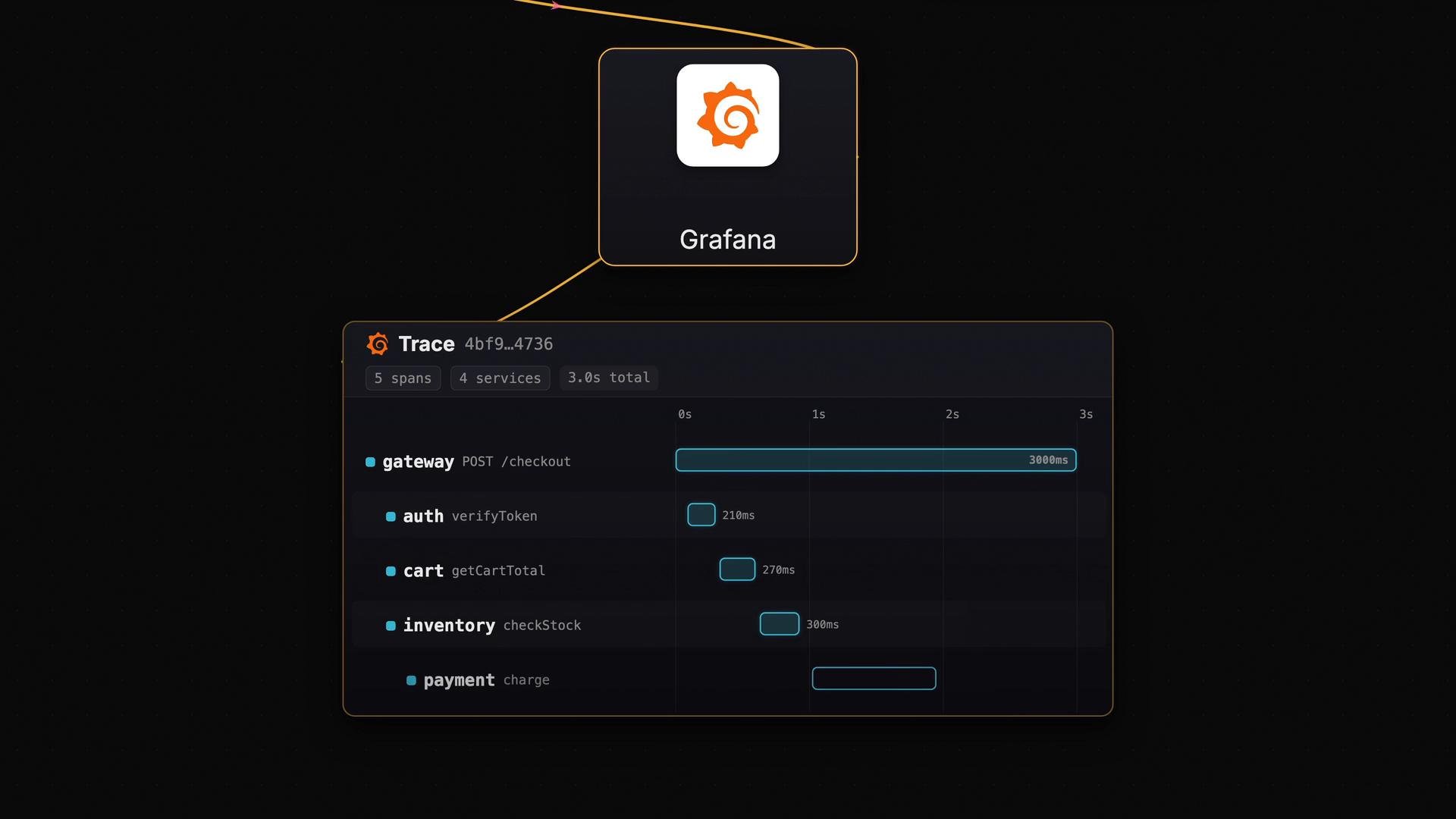
Components at a glance
How this helps debug latency
- Metrics (e.g., increased request duration) alert you that something changed.
- Logs give context about errors or exceptions.
- Traces show the full request path and which services contributed most to latency.
- Instrument all services with OpenTelemetry.
- Deploy a DaemonSet of OpenTelemetry Collectors to receive node-local telemetry.
- Export to Tempo with object storage for cost-effective long-term retention.
- Use Grafana for trace exploration and root-cause analysis.
Links and references
- OpenTelemetry: https://opentelemetry.io/
- OpenTelemetry Collector: https://opentelemetry.io/docs/collector/
- OTLP protocol: https://opentelemetry.io/docs/reference/specification/protocol/
- Kubernetes DaemonSet: https://kubernetes.io/docs/concepts/workloads/controllers/daemonset/
- Grafana Tempo: https://grafana.com/oss/tempo/
- Grafana: https://grafana.com/
- Amazon S3: https://aws.amazon.com/s3/