

httpd.service on RHEL-based distributions and apache2.service on Debian-based systems.
Understanding systemd Units
Systemd supports seven primary unit types: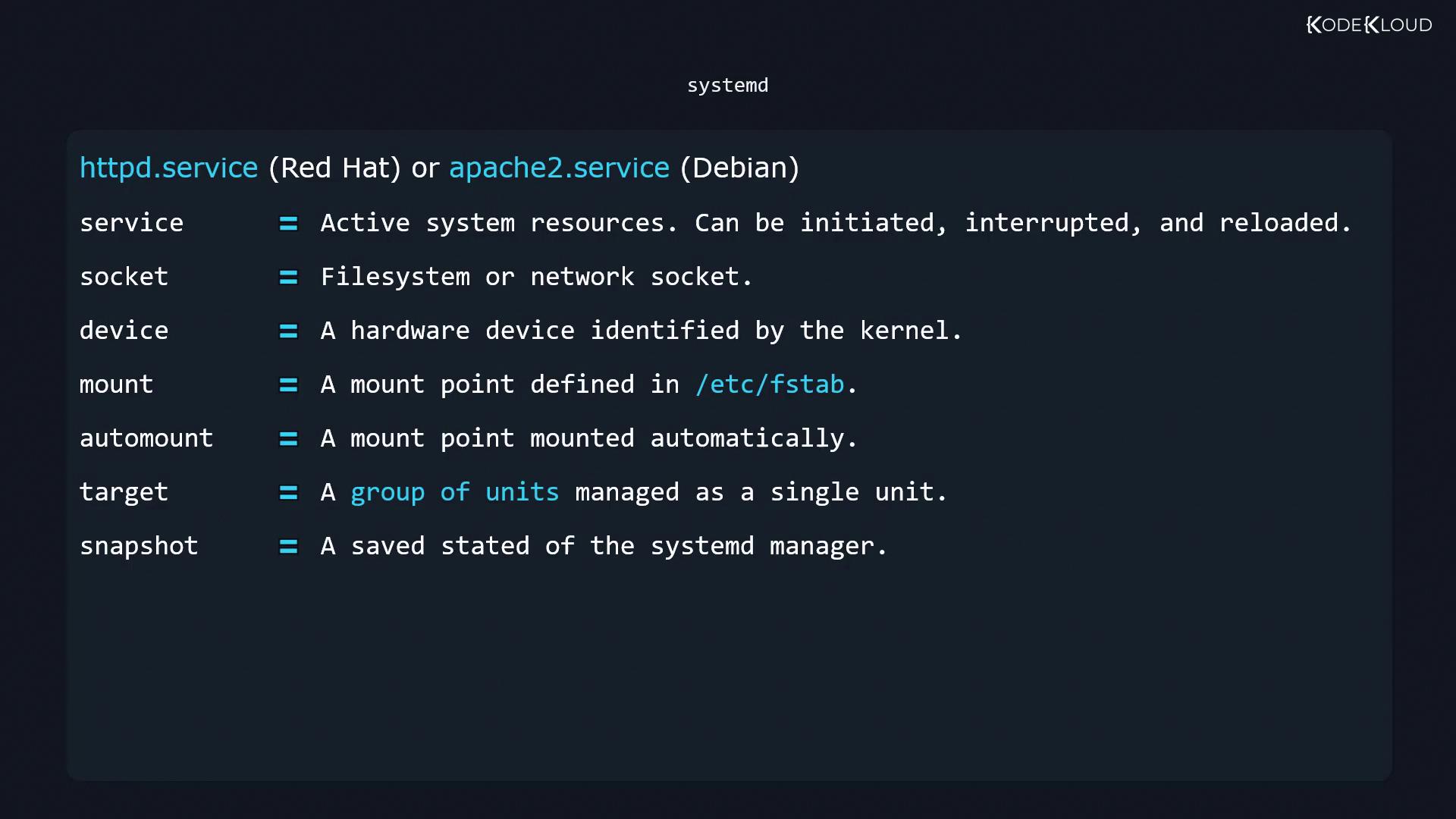
Managing Units with systemctl
Thesystemctl command is your primary interface to start, stop, reload, and query units. Replace unit.service with your target unit name.
Starting, Stopping, and Restarting Services
Checking Active State
Enabling and Disabling Services at Boot
Working with Targets (Runlevels)
Systemd targets correspond to traditional runlevels. For example,multi-user.target is like runlevel 3, while graphical.target maps to runlevel 5.
Never set the default target to
shutdown.target, as it will power off the system immediately after boot.Listing Unit Files and Active Units
- All unit files and their boot-time enablement state:
- Currently active units in this session:
Power Management with systemctl
Systemd can handle suspend and hibernate when no other power manager is running:Power-related settings live in
/etc/systemd/logind.conf and any drop-in files under /etc/systemd/logind.conf.d/. For finer control over ACPI events (lid close, battery thresholds, etc.), consider using the acpid daemon.Links and References
- systemctl Manual
- systemd Official Documentation
- Red Hat Enterprise Linux systemd Guide
- Debian systemd FAQ