

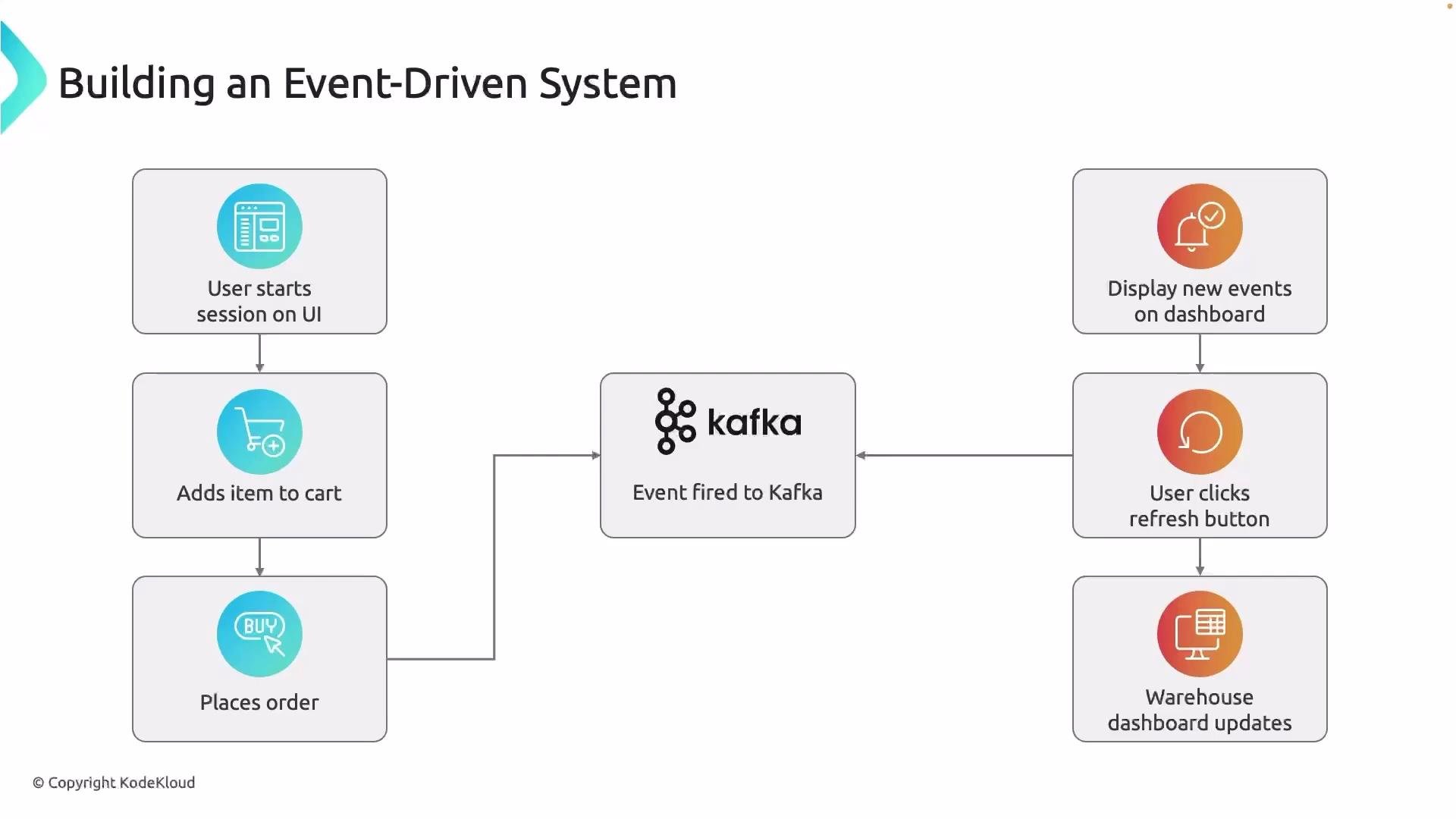
- A user opens the web UI and starts a session.
- The user adds items to a cart and eventually places an order.
- When the user places an order, the front-end triggers an “order placed” event that is produced to Kafka.
- Multiple independent consumers read the same event; for example:
- A warehouse dashboard updates so staff can begin packing.
- Fraud detection, analytics, and notification services independently consume the event.
- Each consumer processes events independently without interfering with one another.
- Producer (front-end / backend): Sends an
orders.placedevent to a Kafka topic. The producer can be invoked via a simple HTTP POST from the UI to a small backend service that writes to Kafka. - Kafka cluster (broker): Persists events in topics. Topics are append-only logs and can be partitioned for throughput and ordering guarantees.
- Consumers: Independent services that subscribe to the topic and process events. Examples include the warehouse dashboard, fraud detection, analytics, and notification services.
- Dashboard / UI: Subscribes to Kafka (directly or via a lightweight backend/websocket layer) and displays near-real-time order state.
Key technical concepts (practical tips)
- Topic naming: Use clear, intent-driven names like
orders.placedororders.events. - Ordering: If strict ordering is required per user, ensure events for that user use the same partition key (e.g., user ID) so they land in the same partition.
- Idempotency and deduplication: Consumers must handle retries and potential duplicate deliveries; design processors to be idempotent or to detect and discard duplicates.
- Consumer groups: Multiple instances of the same logical consumer can form a consumer group to share partitions (scale-out). Different logical consumers (warehouse vs fraud) should use different consumer group IDs so each receives all events.
This is a simplified end-to-end architecture. In production you will also consider schema management (e.g., Avro/Schema Registry), monitoring, security (TLS/auth), retention policies, and error-handling strategies (dead-letter queues, retries).
Ordering and idempotency are common pain points: if you need per-user ordering, consistently key events by user. For at-least-once delivery (Kafka default), make consumer processing idempotent or add deduplication logic to avoid processing the same event multiple times.
- Build a simple static website (HTML/CSS) with an “Place Order” action that triggers an HTTP request to the backend.
- Implement a lightweight backend (Python + Flask) that receives the UI request and produces an
orders.placedevent to Kafka.- Example flow: browser →
POST /orders→ Flask handler → Kafka producer → return success.
- Example flow: browser →
- Deploy Kafka and the services to an EC2 instance for a self-contained demo environment.
- Implement one or more consumers (Python) that read the
orders.placedtopic and:- Update a warehouse dashboard (via a backend + websockets or SSE).
- Optionally write to analytics stores or trigger notification services.
- Wire the dashboard to refresh in near real time as new events arrive.
- Python: producer and consumer logic (kafka-python or confluent-kafka)
- Flask: simple HTTP endpoint for receiving UI requests and producing events
- HTML/CSS: minimal front-end to trigger order events
- EC2: host Kafka cluster and demo services
- VS Code: development environment
- Topic:
orders.placed - Event payload (JSON): include
order_id,user_id,items,total,timestamp - Partition key: use
user_idif you require per-user ordering
- In the next article we will set up Kafka on an EC2 instance, create the
orders.placedtopic, and implement the Flask producer and Python consumer code to wire the end-to-end flow. - After that, we’ll add schema validation (Schema Registry + Avro), monitoring, and a production-ready deployment plan.
- Apache Kafka: https://kafka.apache.org/
- Kafka documentation: https://kafka.apache.org/documentation/
- Confluent Schema Registry: https://docs.confluent.io/platform/current/schema-registry/index.html
- Flask: https://flask.palletsprojects.com/
- AWS EC2: https://aws.amazon.com/ec2/