

Why packaging alone is often not enough
Packaging source code into distributable artifacts (JARs, wheels, gems, etc.) is necessary but not sufficient for reliable deployments. Operations teams or consumers still need to:- Ensure the correct runtime (Java, Python, Ruby, etc.) is installed on the target host.
- Install and configure application dependencies.
- Adjust configuration files and system services.
- Start and monitor the application correctly.
Common packaging examples
Below are common artifact types and the typical commands used to run or install them.Move runtime and setup into a Docker image
To make execution reproducible and remove manual setup, move installation and configuration instructions into a Dockerfile. Building a Docker image packages the application with its runtime and all required dependencies, producing a single executable image that can run anywhere Docker (or a compatible container runtime) is available.Example packaging and run workflow
Use the native packaging commands during development or for local distribution. For consistent deployment across environments, create a Docker image:Testing the image before release
After building the Docker image, automate tests to validate behavior before releasing:- Unit tests and integration tests should run against the build artifacts or within the image.
- Acceptance tests and end-to-end UI tests (e.g., Robot Framework, Selenium) can exercise the running container to verify end-to-end behavior.
- Include smoke tests in the CI pipeline to catch obvious runtime faults quickly.
Releasing and deploying images
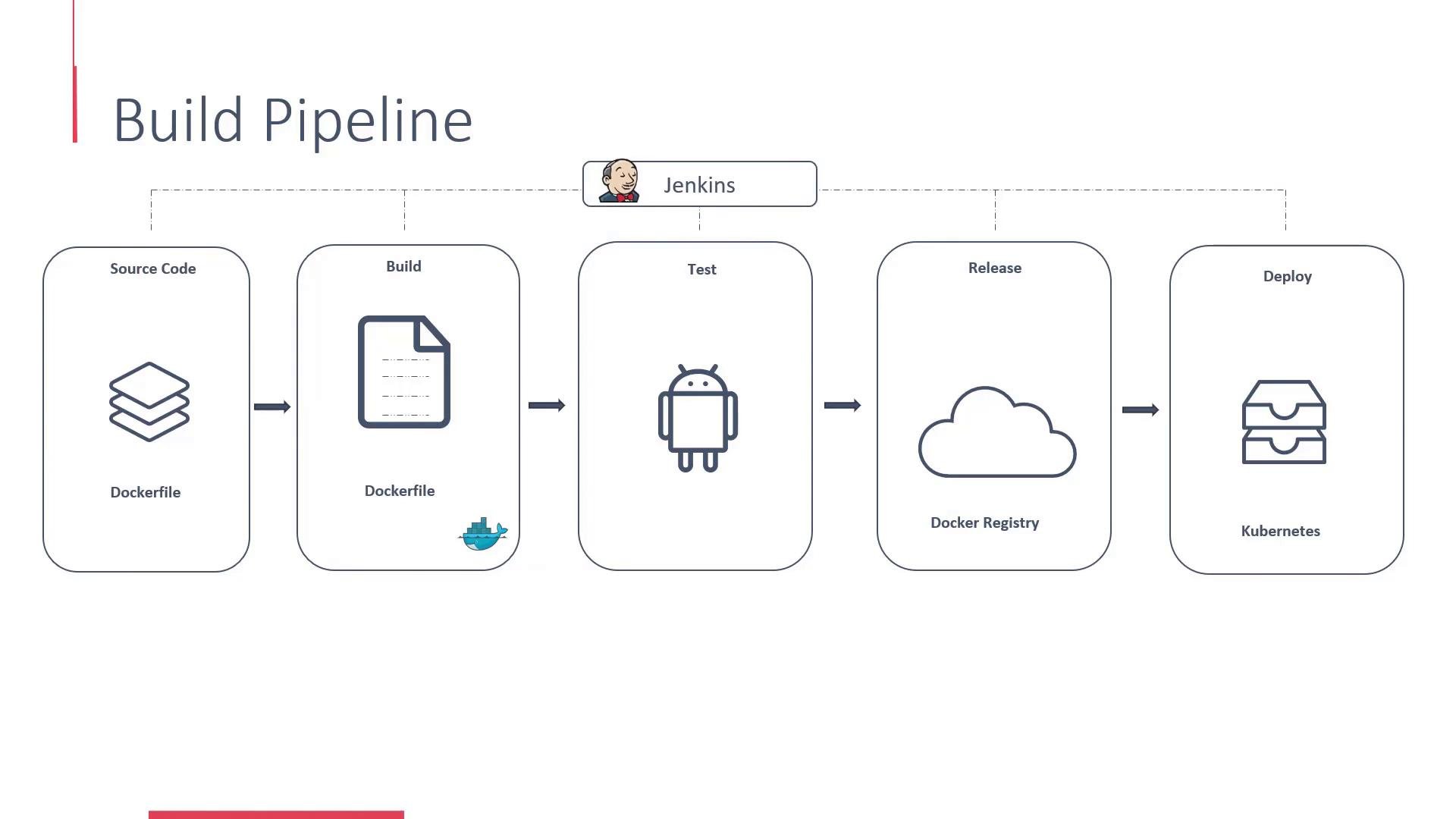
Once tests pass, push the Docker image to a registry (Docker Hub, a private registry, or a cloud registry). Deployment automation or consumers can then pull the image and deploy it to container hosts or orchestration platforms such as Kubernetes, OpenShift, or hosted container services.Build pipeline and automation
The typical CI/CD pipeline stages are:- Source: Commit or merge code into a repository (Git).
- Build: Compile code, build artifacts (JAR, wheel, gem).
- Image: Create a Docker image using a Dockerfile that includes runtime and dependencies.
- Test: Run automated test suites against the image and running containers.
- Release: Push approved images to a Docker registry.
- Deploy: Deploy images to orchestration platforms (Kubernetes/OpenShift) or other hosting environments.
Use containers to encapsulate runtime, dependencies, and configuration so deployments are reproducible across environments and remove manual setup steps from operations.
Summary
- Packaging produces distributable artifacts (JARs, wheels, gems), but does not guarantee reproducible deployments.
- Building Docker images encapsulates runtime, dependencies, and configuration for consistent execution anywhere containers run.
- Automate the pipeline (build → image → test → registry → deploy) with CI/CD tools to accelerate delivery and reduce manual errors.