

Core concepts — Kubernetes primitives + OpenShift features
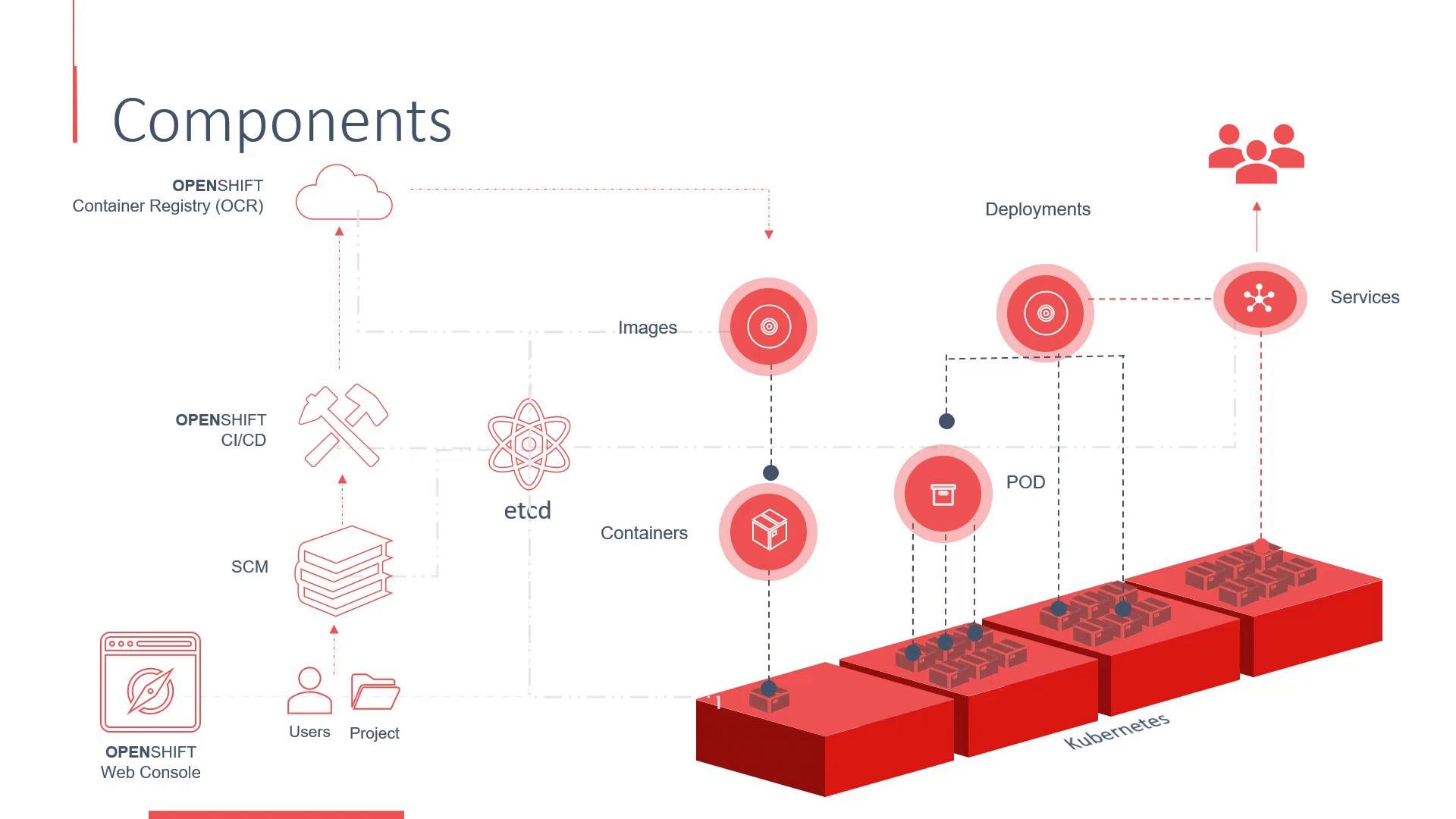
OpenShift is built on Kubernetes and inherits its core primitives for running containerized applications:- Containers — runtime instances of OCI-compatible images.
- Container images — stored in registries (public or private), used to create containers.
- Pods — the smallest deployable unit; one or more containers that share network and storage.
- Controllers (Deployments, ReplicaSets, etc.) — manage the desired number of pod replicas.
- Services — stable network endpoints to expose pods inside the cluster or externally.
- Integrated web console and CLI for developers and operators.
- Build and CI/CD primitives (BuildConfigs, ImageStreams, pipeline integrations) to import source, build images, and push them to a registry.
- Project-based organization that extends Kubernetes namespaces with access controls and metadata.
Build & deployment flow (high level)
Developers typically follow this flow:- Push or import source code into a repository integrated with OpenShift’s build system.
- A BuildConfig or pipeline builds the source into a container image.
- The image is pushed to the cluster registry (or an external registry).
- A Deployment or DeploymentConfig creates pods from the image.
- Services and Routes expose the application internally and externally.
- The control plane reconciles desired state, ensuring replicas and networking are maintained.
Cluster control plane and data store
At the center of cluster state is etcd, a distributed key-value store that holds the desired and current state for Kubernetes and OpenShift resources. Typical control plane (master) components:- API server (
kube-apiserverplus OpenShift aggregated APIs) — the central entry point for cluster operations and automation. - Controller manager — runs controllers that reconcile resources (replicas, endpoints, etc.).
- Scheduler — decides which worker node should run a pod.
- etcd — persistent datastore for all cluster state.
- Run the node agent (
kubelet) which manages pod lifecycle on each node. - Use a container runtime (for example,
containerdorCRI-O) to run containers. - Host network plugins, CSI drivers, and other node-level services.
Security, identity, and access control
OpenShift integrates authentication and authorization on top of Kubernetes:- Authentication integrates with identity providers (LDAP, OAuth, etc.).
- Role-Based Access Control (RBAC) defines permissions.
- The web console and CLI require authentication; projects (namespaces) enforce scoped access.
A “project” in OpenShift is a Kubernetes namespace with added metadata and access controls. Use projects to organize resources by application, team, or environment and to apply project-level policies.