Explains splitting complex n8n automations into modular subworkflows to simplify development, testing, debugging, reuse, and reduce failure impact.
In this lesson I’ll highlight a simple but powerful pattern for n8n and other workflow automation platforms: split complex automations into smaller, focused workflows (subworkflows). While it’s tempting to build everything inside a single, monolithic workflow, modularizing your automation makes development, testing, and troubleshooting far faster and less error-prone.When everything lives in one workflow and an error occurs, it can be difficult to isolate which section failed. By breaking the process into two or more smaller workflows you can run and debug each piece independently. That means when an error happens you can confidently identify which workflow is the source and inspect only the nodes and logs inside it.
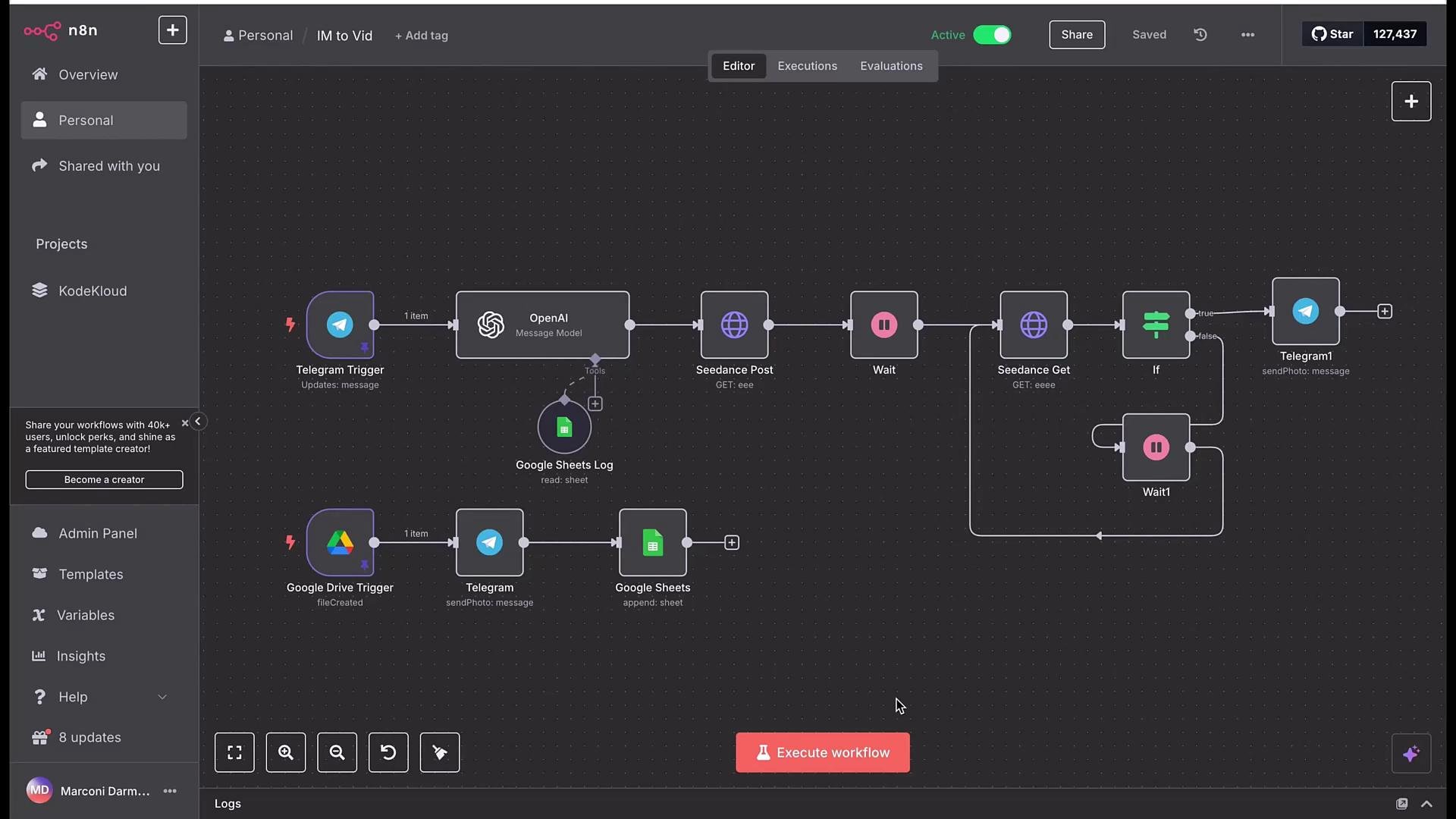
The diagram above illustrates a common pattern: separate your automation into functional areas — triggers (e.g., Telegram), processing (e.g., OpenAI), storage (e.g., Google Sheets), and action/decision nodes. Organizing your logic this way enables clear ownership of each piece and reduces the blast radius when something goes wrong.Key benefits of using subworkflows:
Isolate failures quickly — run and inspect one workflow at a time to confirm behavior.
Iterate faster — modify or test a single module without touching unrelated logic.
Reuse components — call a validated subworkflow from multiple parent workflows to avoid duplication.
Simplify permissions and connections — keep credentials and sensitive integrations scoped to specific workflows.
Approach
When to use it
Pros
Single large workflow
Very small automations or quick experiments
Simpler to set up initially
Modular subworkflows
Complex automations, multiple integrations, or shared components
Easier testing, faster debugging, and higher reuse
Split long or complex automations into modular workflows—use subworkflows to run, test, and debug each module independently. This reduces the surface area you need to inspect when something goes wrong.
If a workflow fails, open the relevant workflow and inspect its nodes, execution logs, and input/output data there. Focused inspection reduces time spent tracing errors across unrelated nodes, and makes it easier to add targeted unit tests or logging. For teams, modular workflows also make code reviews and CI/CD for automations more manageable.Links and references