

- A short introduction to n8n and its building blocks (nodes).
- The architecture of AI agents and the API flow inside n8n.
- A demo use case (email → website flow).
- How input formats and expressions work in n8n.
- How n8n represents and handles common data types.
What is n8n?
n8n (pronounced “n-eight-n”) is a free, open-source workflow automation platform (sometimes called “nodemation”). It’s designed to be a universal connector so you can visually compose workflows that pass data between apps, services, and AI models without heavy custom code. Key SEO-friendly terms: n8n workflow automation, visual workflow builder, connect apps and services.
Nodes: the building blocks
Everything in n8n is a node. Nodes come in two primary categories:
By connecting nodes you create reliable, repeatable automation flows.
AI agents inside n8n
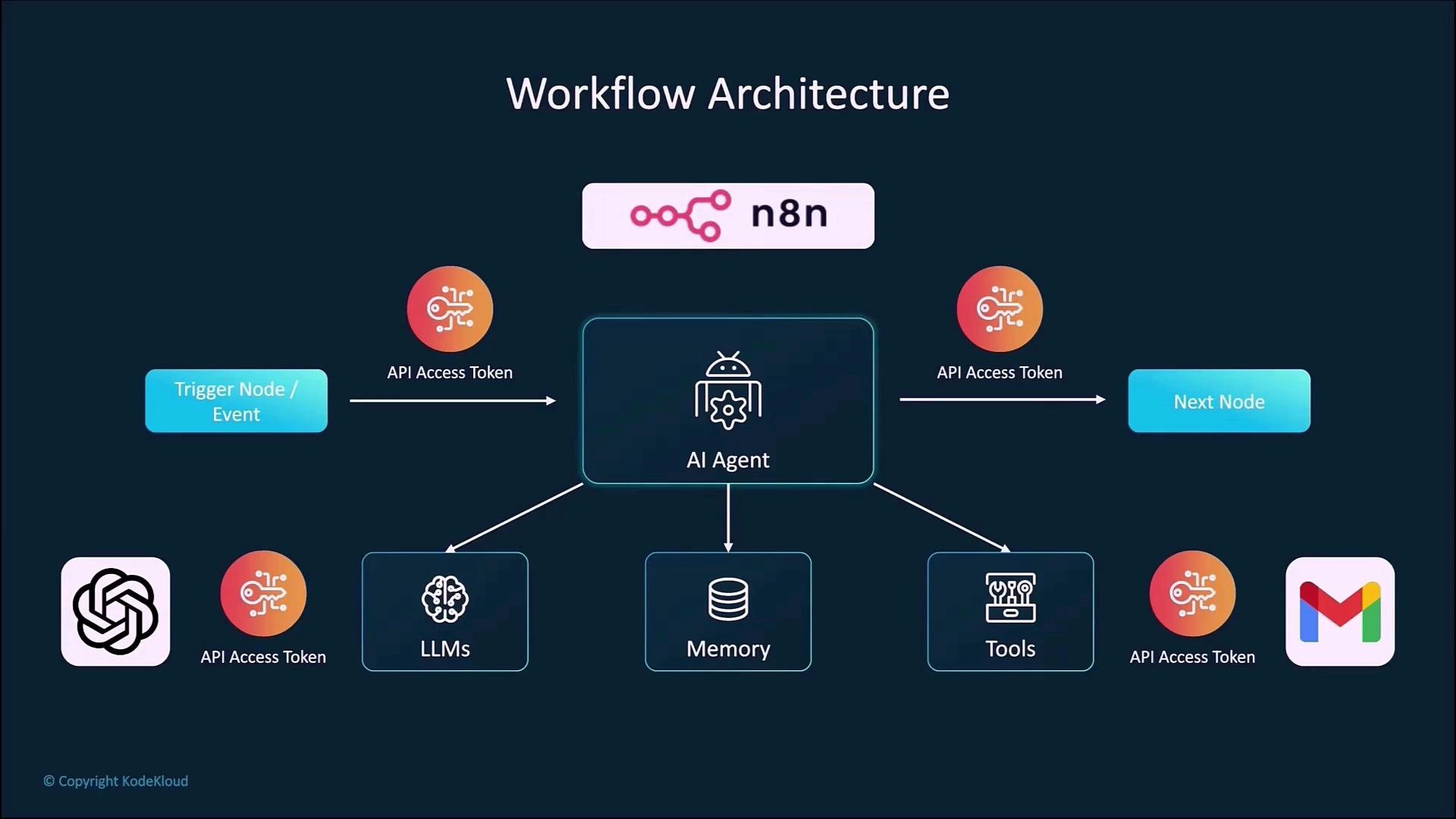
In n8n an AI agent is represented as a node. It integrates like any other node: it receives input, runs logic (via an LLM), optionally calls tools, and emits output downstream. Three core elements of an n8n AI-agent node:- LLM (the model): e.g., OpenAI, Anthropic (Claude), Meta Llama, or other models configured with API credentials.
- Context window (short-term memory): prompt history or conversation context passed to the model.
- Tools: external integrations the agent can call, such as Gmail, web scrapers, or other APIs.
How it works — example flow
Typical step-by-step behavior:- A trigger provides user input (for example, a chat message or webhook).
- The AI Agent node processes that input using the configured LLM and the provided context.
- If required, the agent calls connected tools via APIs (for example,
Gmailto read or send messages). - The agent returns a response that becomes the input for downstream nodes.
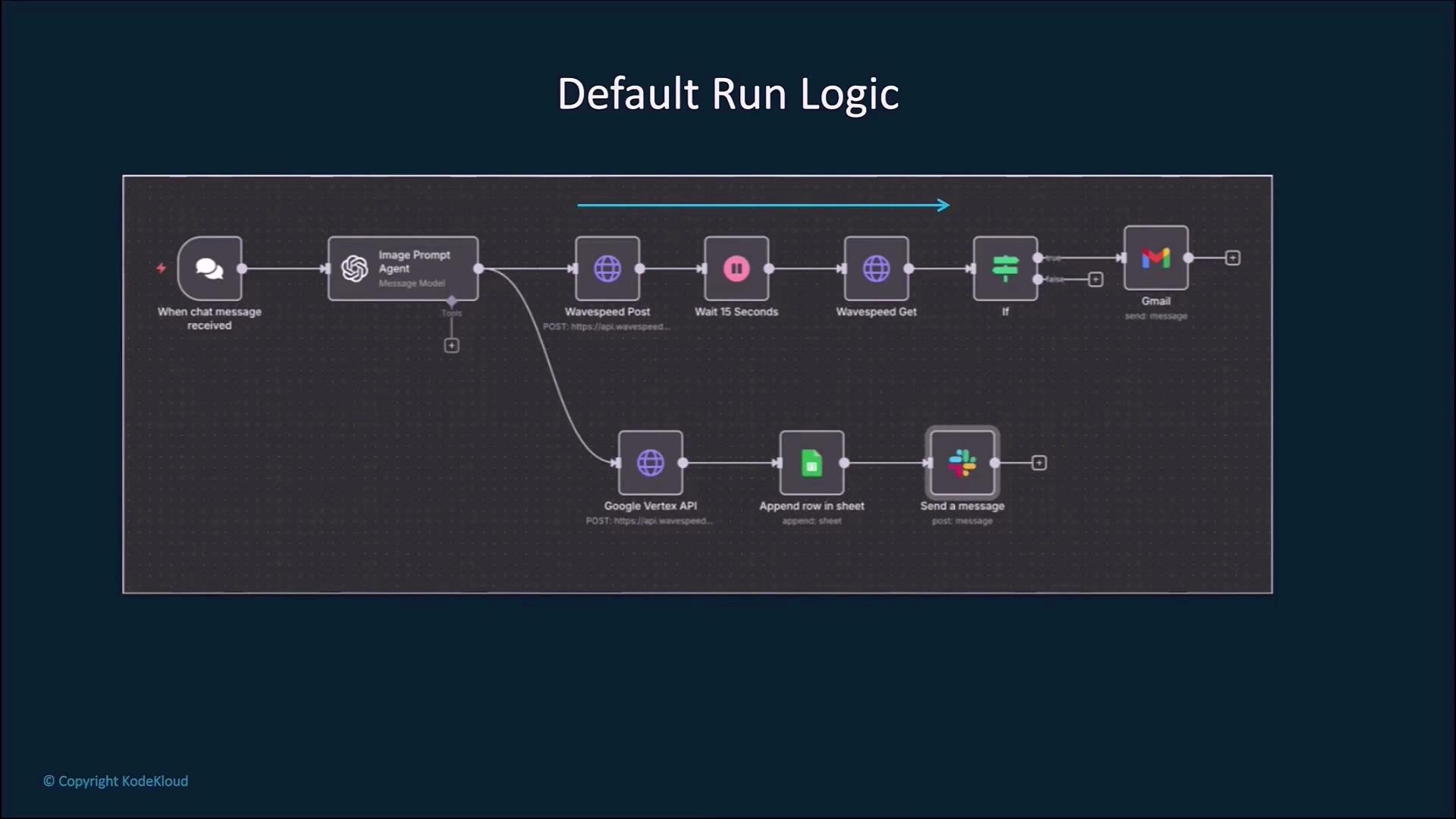
Default run logic (sequential execution)
When nodes are connected linearly, n8n executes them in order. If a node fails, the workflow will error by default unless you implement error handling (for example, enable “Continue On Fail”, add conditional logic, or configure dedicated error workflows).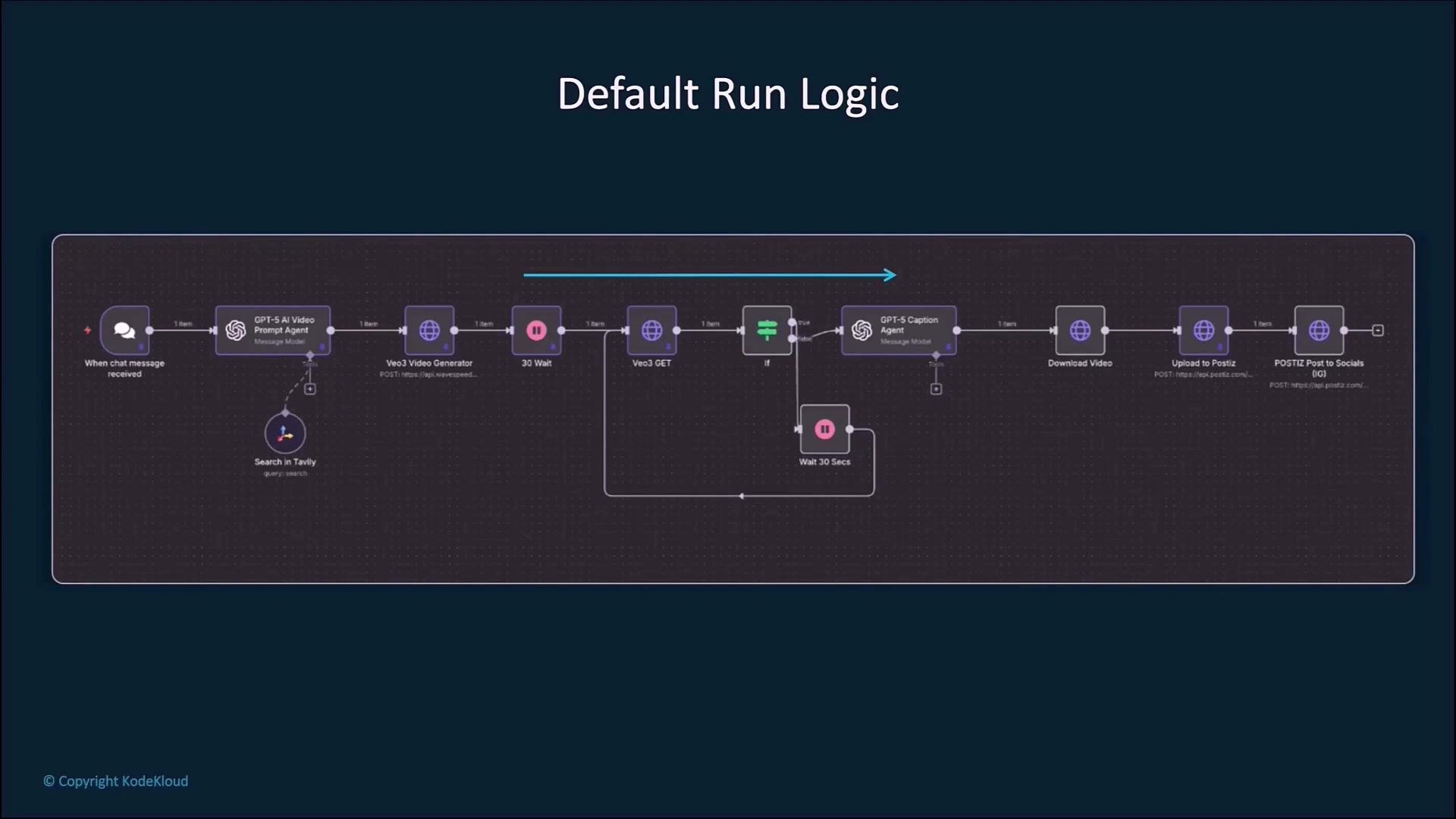
Design workflows with error handling and retries when calling external APIs. Use conditional nodes (
If) and the Continue On Fail option to avoid full workflow failures on intermittent errors.Optional tools and conditionals
Tools attached to an AI agent are optional — the agent can decide whether to invoke them based on instructions and context. Add conditionalIf nodes to skip slow or unavailable APIs, and use retry logic or backoff strategies for robustness.
Branching and parallel paths
A single trigger can branch into multiple independent paths. Branches run concurrently at the runtime level, and within each branch nodes execute sequentially. For example:- Branch A: post to Slack
- Branch B: send email
Memory for AI agents
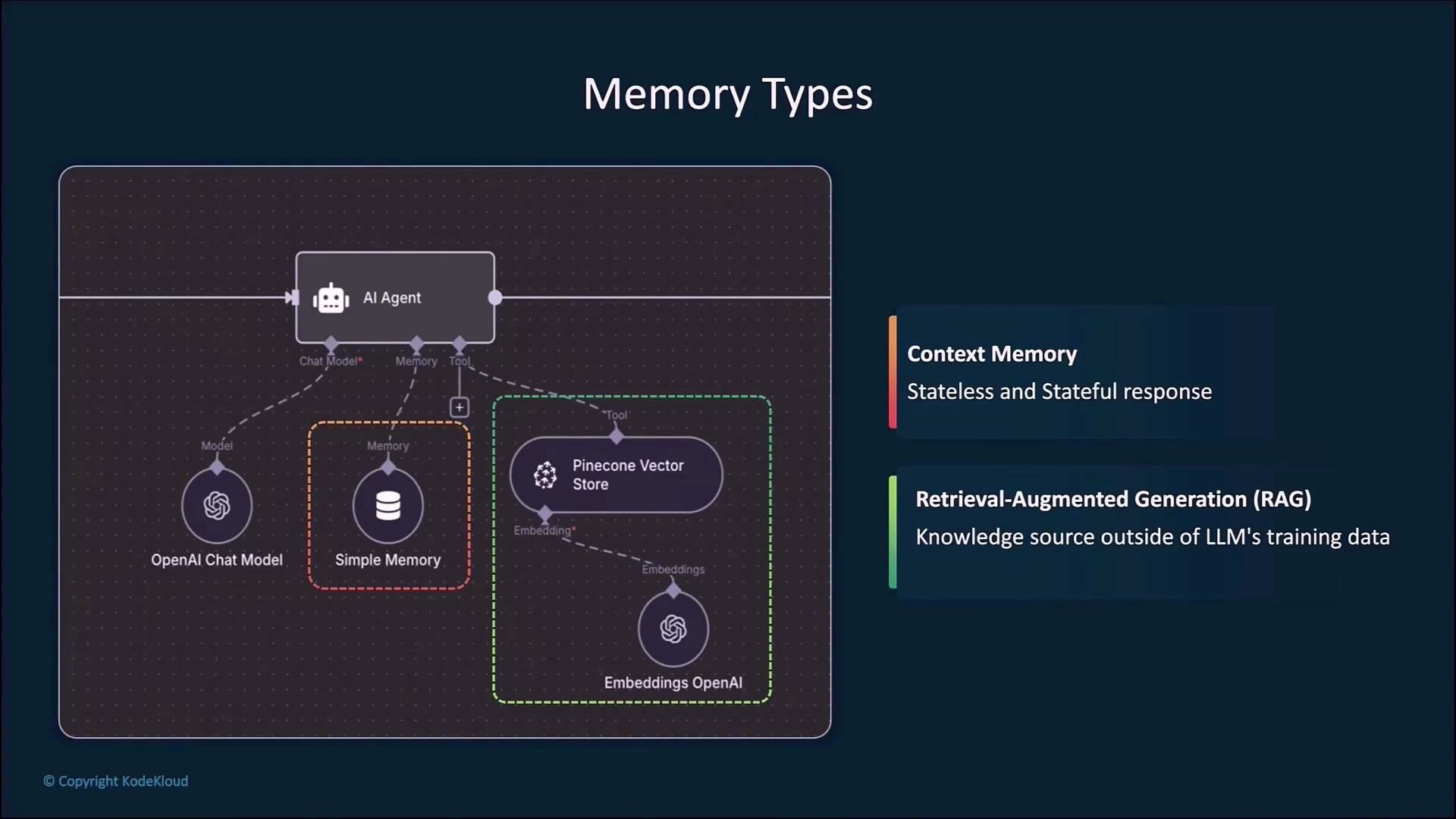
AI agents typically use two memory styles:
Using a vector store plus RAG lets agents access external knowledge beyond the LLM’s training data, improving recall and accuracy for domain-specific queries.
Inputs and outputs for nodes
Every node has an input and output. The input panel shows the payload received from the previous node; the output panel shows what the node returns (for example, the model’s JSON response).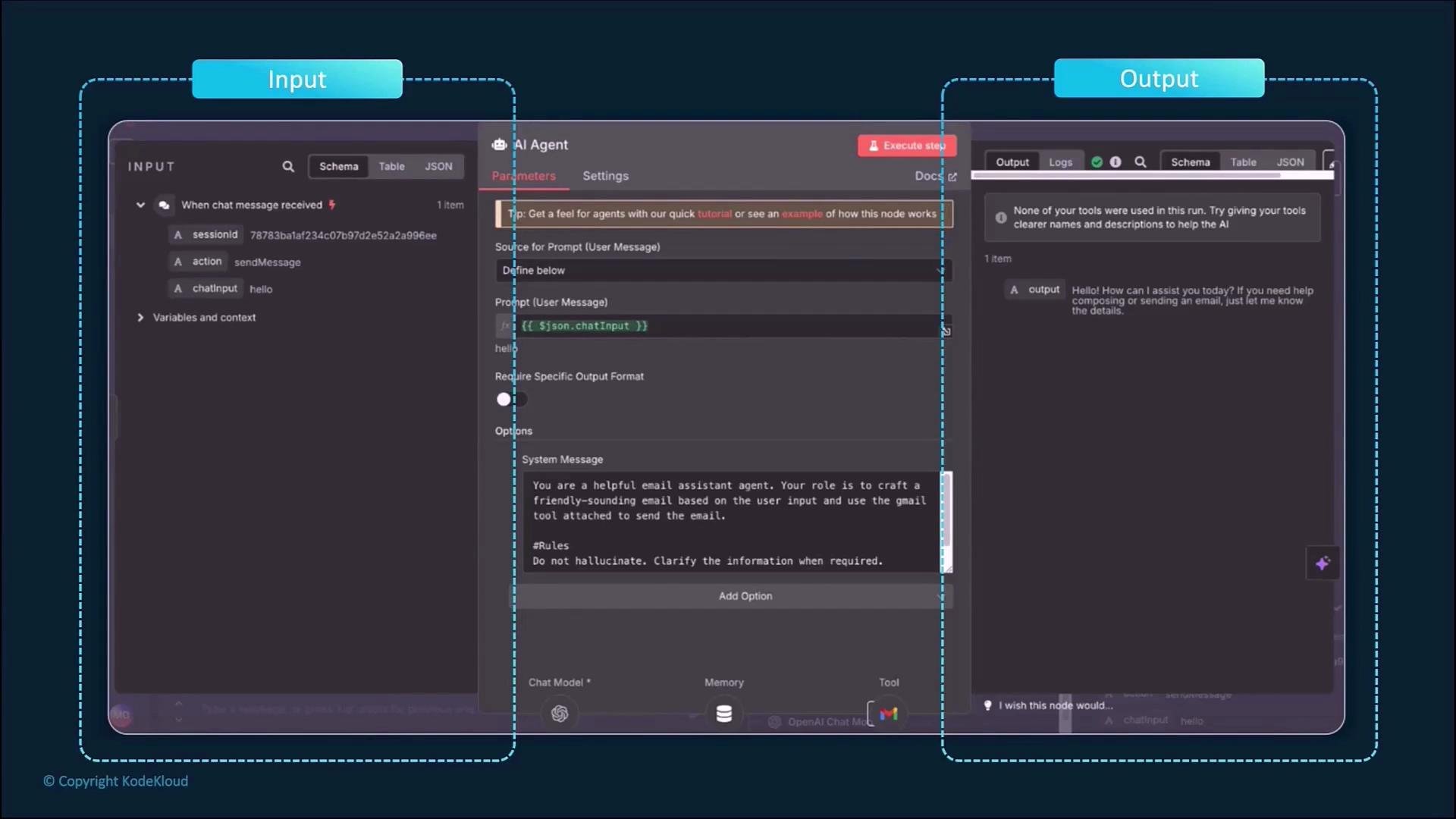
Data representations in n8n
n8n can display the same underlying data in multiple formats:- Schema: a structured definition for fields.
- Table: spreadsheet-like rows and columns.
- JSON: the most common structured representation for programmatic access.
- Binary: files such as images, PDFs, and other blob data.
Expressions and dynamic fields
Node fields accept:- Static values (fixed strings), or
- Expressions that reference earlier nodes or runtime data.
- Bracket notation:
{{ $json["chatInput"] }} - Dot notation:
{{ $json.user.name }}
When writing expressions or other snippets that contain braces or template syntax, wrap them in inline code or fenced code blocks so the MDX renderer does not attempt to evaluate them.
Data types used in n8n
Common data types you’ll encounter:
Array example:
{{ $json.user.name }}{{ $json['user']['email'] }}
Community nodes
n8n has a vibrant community that builds connectors (community nodes). If an integration you need is not included by default, there’s a good chance someone in the community has implemented it.Quick recap
- Workflows are composed from nodes: triggers and actions.
- AI agents are implemented as nodes and can call external tools (Gmail, Slack, etc.).
- Nodes pass structured data: the output of one node becomes the input to the next.
- Key data types: strings, numbers, booleans, arrays, objects.
- Use expressions for dynamic values and combine short-term context with RAG/vector stores for more capable AI agents.
Links and references
- n8n Documentation
- OpenAI
- Anthropic
- Pinecone (Vector DB)
- Retrieval-Augmented Generation (RAG) — Wikipedia