

Establishing a Secure Connection
Begin by creating a connection to your Azure Cache for Redis instance. Your connection string includes the Redis Cache name, password, and SSL settings to ensure a secure connection—similar to configuring a connection in the Redis CLI. Once connected, you can access a specific database and perform operations. For instance, the code below shows how to store and retrieve a key-value pair using theStringSet and StringGet methods:
The StackExchange.Redis library is widely used in .NET applications for seamless integration with Redis caches. Ensure your connection string is secure and properly stored.
Advanced Commands and Operations
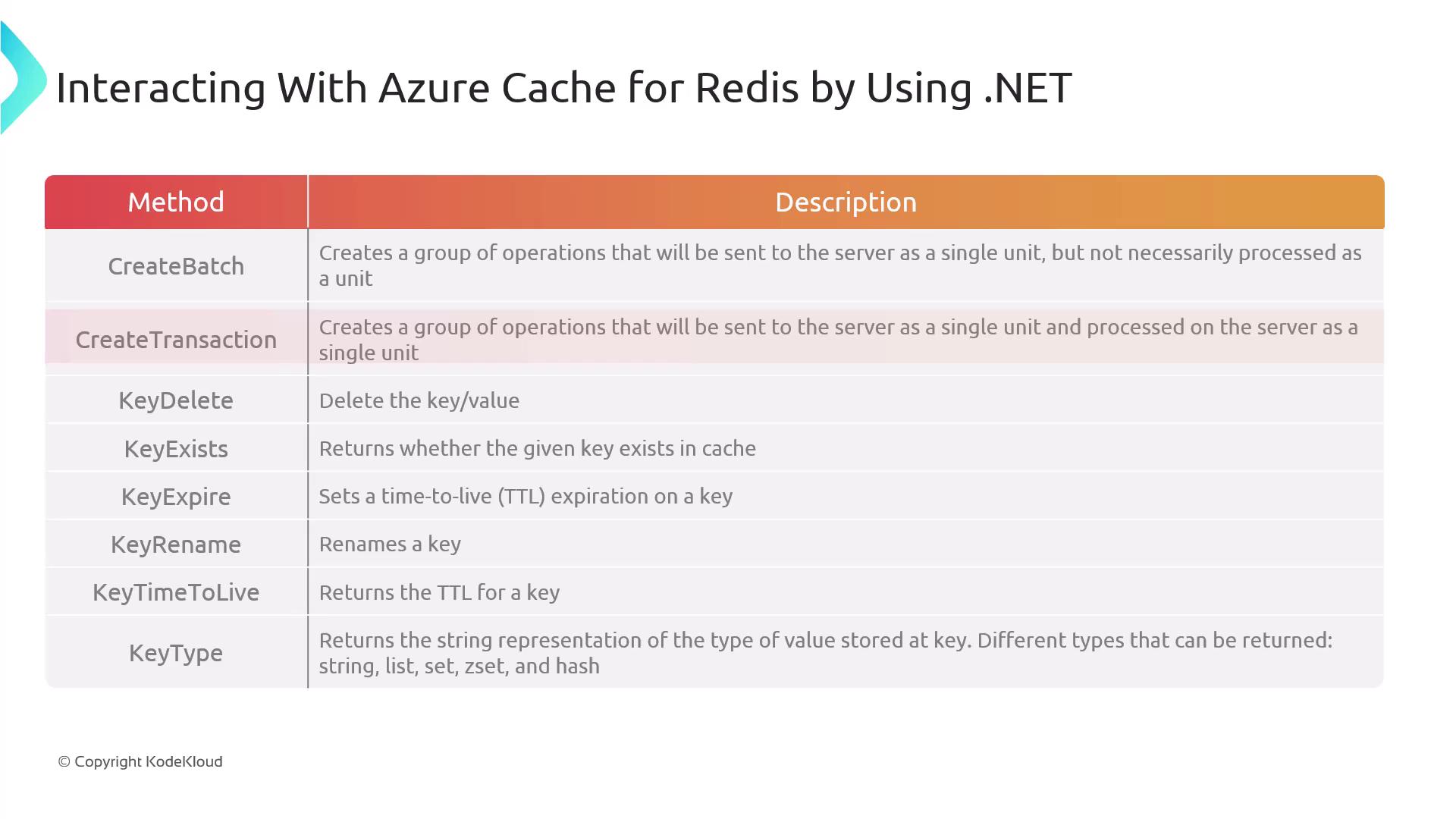
Beyond basic operations, Redis offers several advanced commands that are beneficial for complex caching scenarios:- Create Batch: Groups multiple operations and sends them as a single unit to the Redis server. (Note that these operations are not executed as a transaction.)
- Create Transaction: Ensures that grouped operations are executed atomically—all commands succeed or none are applied.
- Key Delete: Removes a key-value pair from the cache, which is useful for cleaning outdated or unnecessary data.
- Key Exists: Checks if a specific key exists, returning a Boolean result to verify data presence before further operations.
- Key Expire: Sets a Time-To-Live (TTL) for a key. Once the TTL expires, the key is automatically removed—ideal for managing data lifecycles.
- Key Rename: Renames an existing key without affecting the stored data.
- Key Time To Live: Retrieves the remaining TTL for a key. A return value of -1 indicates the key will persist indefinitely.
- Key Type: Identifies the data type stored at a specified key, assisting in managing various data structures such as strings, lists, and sets.
A Complete Example
Below is a complete example that walks you through:- Connecting to Azure Cache for Redis using a connection string.
- Generating a unique key with a GUID.
- Prompting the user to enter a value.
- Storing the value in the cache with a TTL of 30 seconds.
- Retrieving and displaying the stored value.
- Waiting for the key to expire and checking its status.
Ensure proper error handling and secure management of connection strings in production environments. Avoid exposing sensitive information in your source code.
Verifying Data with Redis CLI
You can verify data storage and expiration using the Redis CLI. For example, to list keys and retrieve a specific key’s value:get command for the same key will return nil, indicating the key has expired.
This concludes our walkthrough on interacting with Azure Cache for Redis using .NET. Next, we’ll explore another popular caching solution in Azure: Azure CDN.
For more information, you may find these resources useful: