This guide demonstrates a template-free way to manage Kubernetes manifests using Kustomize, and how to deploy those manifests with Argo CD in a GitOps workflow. You’ll learn how to structure a repository with a canonical base and environment-specific overlays, patch resources with strategic merges, and create Argo CD Applications that point to overlay paths to keep clusters in sync. Repository layout
  • The repo contains a manifest folder with two top-level directories: helm and kustomize.
  • Inside kustomize there are base and overlays folders. base holds canonical manifests (Deployment, Service, Namespace) and a kustomization.yml. overlays include environment-specific patches (e.g., dev, prod) that Kustomize applies on top of the base.
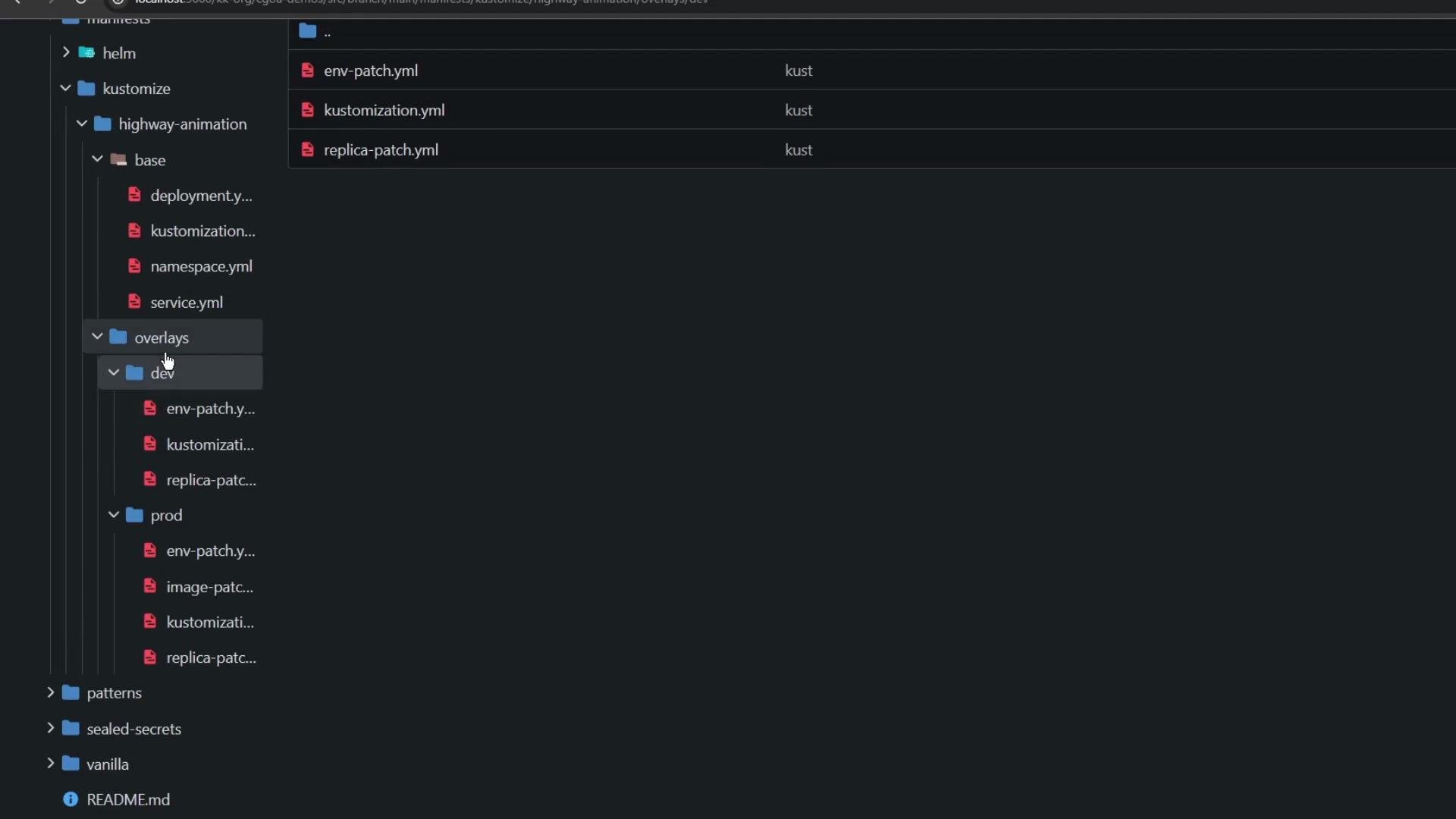
The image shows a directory structure of a project, likely involving Kubernetes configurations, with folders and YAML files under "base" and "overlays/dev" paths. It includes files like "deployment.yml," "service.yml," and other Kustomize-related files.
Base kustomization
  • The base/kustomization.yml lists the core manifests to be managed as the canonical source:
apiVersion: kustomize.config.k8s.io/v1beta1
kind: Kustomization
resources:
  - deployment.yml
  - service.yml
  - namespace.yml
Base Deployment (canonical)
  • base/deployment.yml defines the default configuration: image tag blue, labels, and a single replica:
apiVersion: apps/v1
kind: Deployment
metadata:
  name: highway-animation
spec:
  replicas: 1
  selector:
    matchLabels:
      app: highway-animation
  template:
    metadata:
      labels:
        app: highway-animation
    spec:
      containers:
        - name: highway-animation
          image: siddharth67/highway-animation:blue
          ports:
            - containerPort: 3000
          env:
            - name: POD_COUNT
              value: "1"
Overlays concept
  • Overlays reference the base and apply environment-specific changes using Kustomize patches and per-overlay kustomization files (for example, overlays/dev/kustomization.yml and overlays/prod/kustomization.yml).
  • Typical overlay changes include replica counts, environment variables, image tags, and namespace assignments.
Dev overlay
  • overlays/dev/kustomization.yml points to the base and applies two patches (replica and env), and forces resources into the kustomize-dev namespace:
apiVersion: kustomize.config.k8s.io/v1beta1
kind: Kustomization
resources:
  - ../../base
namespace: kustomize-dev
patches:
  - path: replica-patch.yml
    target:
      kind: Deployment
      name: highway-animation
  - path: env-patch.yml
    target:
      kind: Deployment
      name: highway-animation
Dev patch: replicas
  • overlays/dev/replica-patch.yml sets the dev replica count:
apiVersion: apps/v1
kind: Deployment
metadata:
  name: highway-animation
spec:
  replicas: 2
Dev patch: env
  • overlays/dev/env-patch.yml updates the container environment variable. Note that the container name must match the base so Kustomize can perform a strategic merge correctly:
apiVersion: apps/v1
kind: Deployment
metadata:
  name: highway-animation
spec:
  template:
    spec:
      containers:
        - name: highway-animation
          env:
            - name: POD_COUNT
              value: "2"
Kustomize performs a strategic merge when applying patches. Always include the container name in your patch when modifying container-level fields (env, image, ports, etc.) so Kustomize can match and update the correct container.
Prod overlay
  • overlays/prod/kustomization.yml references the same base, sets kustomize-prod as the namespace, and applies three patches (replicas, env, image):
apiVersion: kustomize.config.k8s.io/v1beta1
kind: Kustomization
resources:
  - ../../base
namespace: kustomize-prod
patches:
  - path: replica-patch.yml
    target:
      kind: Deployment
      name: highway-animation
  - path: env-patch.yml
    target:
      kind: Deployment
      name: highway-animation
  - path: image-patch.yml
    target:
      kind: Deployment
      name: highway-animation
Prod patches (examples)
  • Replica patch (overlays/prod/replica-patch.yml):
apiVersion: apps/v1
kind: Deployment
metadata:
  name: highway-animation
spec:
  replicas: 5
  • Env patch (overlays/prod/env-patch.yml):
apiVersion: apps/v1
kind: Deployment
metadata:
  name: highway-animation
spec:
  template:
    spec:
      containers:
        - name: highway-animation
          env:
            - name: POD_COUNT
              value: "5"
  • Image patch (overlays/prod/image-patch.yml):
apiVersion: apps/v1
kind: Deployment
metadata:
  name: highway-animation
spec:
  template:
    spec:
      containers:
        - name: highway-animation
          image: siddharth67/highway-animation:green
Deploying with Argo CD (GitOps)
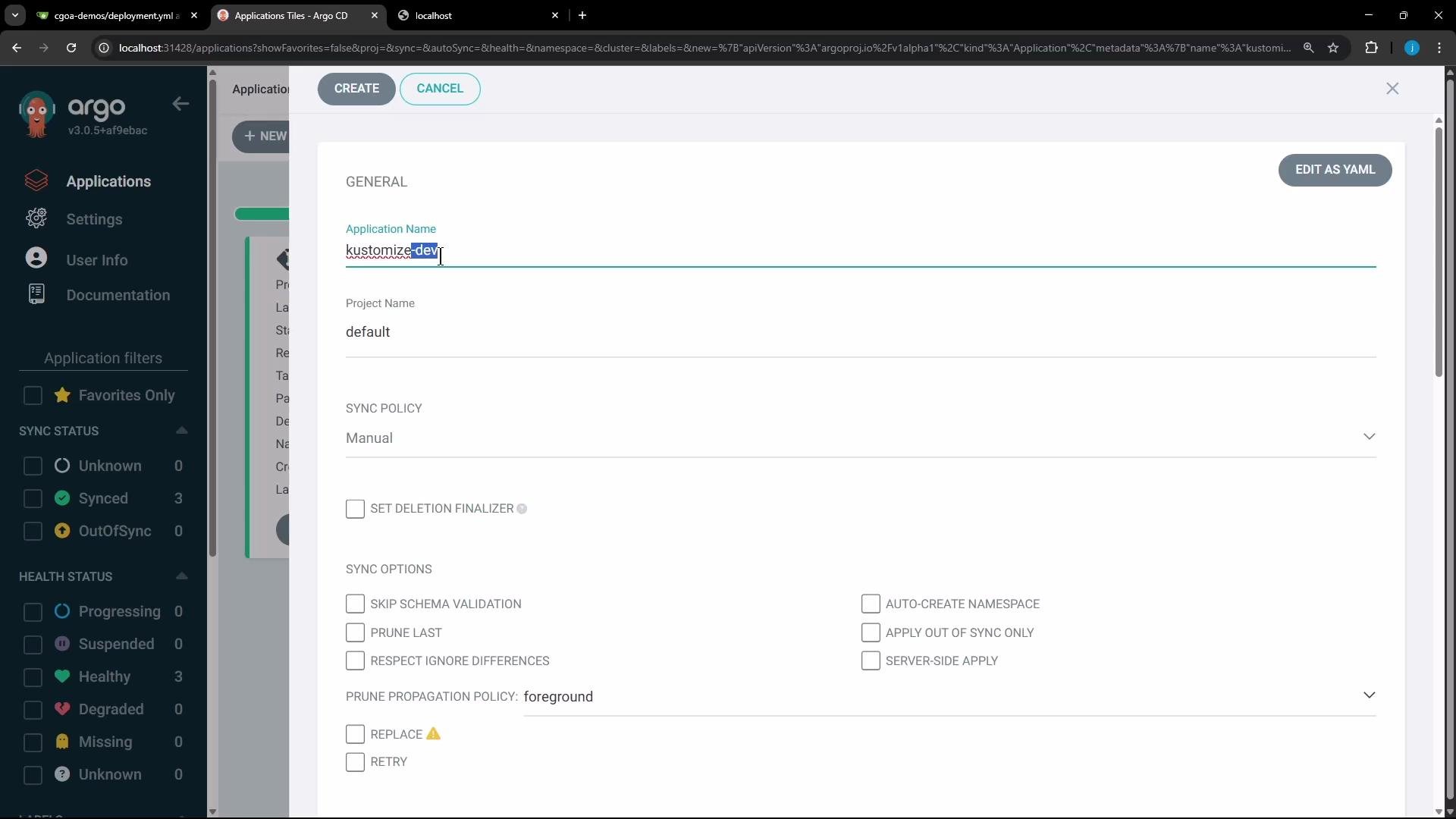
  • With overlays in Git, create an Argo CD Application per environment that targets the overlay path (for example, manifest/kustomize/overlays/dev for dev).
  • Recommended Argo CD settings:
    • App name: kustomize-dev (or kustomize-prod for production)
    • Repo path: manifest/kustomize/overlays/dev (or .../overlays/prod)
    • Sync policy: automatic (if you want continuous reconciliation)
    • Option: enable auto-create namespace (or let Kustomize create it via namespace.yml in base)
Argo CD will render the kustomization, apply the base plus selected overlays, and continuously reconcile the cluster to match Git state.
The image shows the Argo CD application interface, where a user is configuring an application with options for sync policy, project name, and various sync settings.
Dev application example (live)
  • Creating the Argo CD Application for overlays/dev results in Argo CD applying:
    • The base resources
    • The dev overlay patches (replicas and env)
    • The kustomize-dev namespace (if configured)
  • The Application should show as Synced and Healthy after the cluster converges.
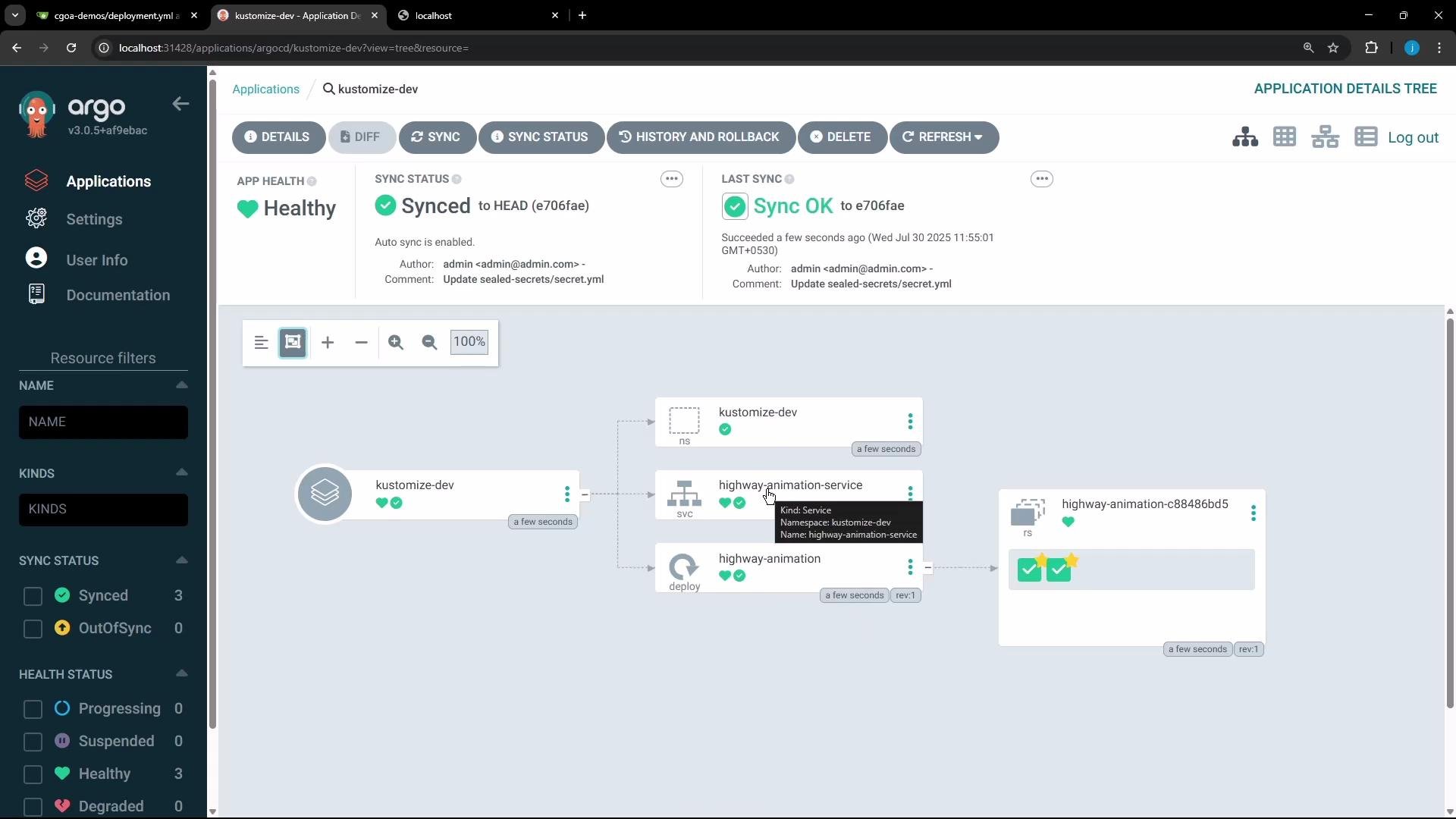
The image shows an Argo CD user interface displaying the status and structure of a Kubernetes application named "kustomize-dev." The application is healthy and synced, as depicted in a visual graph layout.
What you should observe
  • The base Deployment had replicas: 1 and POD_COUNT: "1".
  • The dev overlay patches change replicas to 2 and POD_COUNT to "2".
  • The prod overlay sets replicas to 5, POD_COUNT to "5", and updates the image to green.
Comparison at a glance
Resource / FieldBaseDev overlay resultProd overlay result
Namespacedefault (or none)kustomize-devkustomize-prod
replicas125
POD_COUNT env var"1""2""5"
Imagesiddharth67/highway-animation:bluesiddharth67/highway-animation:bluesiddharth67/highway-animation:green
Example NodePort (Service)30906 (example)30247 (example)
Live Deployment excerpt (dev)
  • The live Deployment in kustomize-dev will reflect the merged configuration:
spec:
  replicas: 2
  template:
    spec:
      containers:
        - name: highway-animation
          image: siddharth67/highway-animation:blue
          env:
            - name: POD_COUNT
              value: '2'
status:
  availableReplicas: 2
  readyReplicas: 2
  replicas: 2
  updatedReplicas: 2
Accessing the application
  • If the Service is exposed via NodePort, use the node IP and NodePort (for example, http://<NODE_IP>:30906) to reach the dev application.
  • Dev pods will use the blue image; prod pods will use green if the prod image patch is applied.
Production deployment notes
  • Create a separate Argo CD Application pointing at manifest/kustomize/overlays/prod. Argo CD will apply prod patches: replicas: 5, POD_COUNT: "5", and image: ...:green. The live prod Deployment will reflect these changes and scale accordingly.
Summary and best practices
  • Kustomize enables one canonical base with environment-specific overlays—no templating required.
  • Use strategic merge patches in overlays to modify the base; include containers[].name when patching container fields to ensure accurate merges.
  • Use Argo CD to point to overlay paths so each environment is an independent Argo CD Application that continuously reconciles Git → cluster (GitOps).
  • Organize overlays clearly (e.g., dev, staging, prod) and keep patches small and focused (replicas, env, image).
When writing Kustomize patches that modify container fields (env, image, etc.), include the container name in the patch so Kustomize can match and merge the correct container entry.
That’s all for now.

Watch Video