Explains using OCI registries as unified state stores for GitOps, hosting images, Helm charts, manifests, and policies with examples and best practices.
A State Store System is the canonical source for the desired state of your system: configurations, application manifests, and infrastructure definitions. In GitOps workflows this authoritative state is most commonly a Git repository because Git provides provenance, immutability, branching, and pull requests for collaborative change management.However, Git is not the only option. OCI (Open Container Initiative) registries can act as a unified state store for many artifact types used in Kubernetes ecosystems — container images, Helm charts, plain manifests, overlays, policy bundles, and more — letting you reuse the same registry, authentication, and access controls across those artifact types.Why use OCI as a state store?
Consolidates multiple artifact types into a single registry.
Reuses existing authentication/authorization and lifecycle tooling.
Enables GitOps operators (Flux, Argo CD) to pull artifacts from registries that support OCI artifacts.
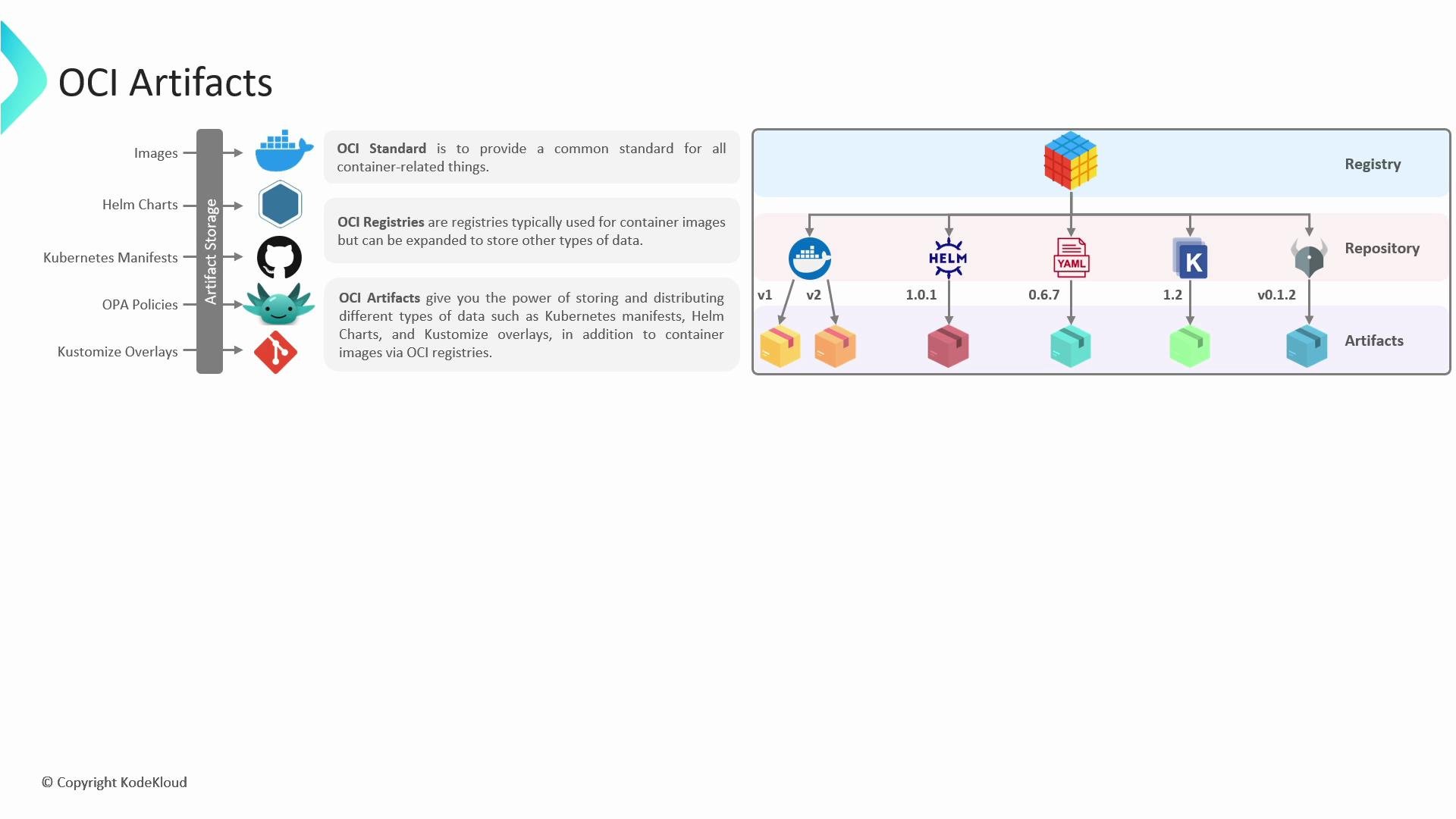
OCI defines standards for container image formats and runtimes. The OCI Artifact model extends container images so registries can store arbitrary artifact types (images, Helm charts, manifest bundles, policies) as first-class artifacts.
A single OCI registry can host multiple repositories; each repository can contain multiple artifacts and versions. Common OCI registry providers include GitHub Container Registry, Docker Hub, Azure Container Registry, and Google Artifact Registry.Table: Typical storage locations vs. OCI as a consolidated option
Manifest bundles pushed as OCI artifacts (Flux/others)
Policy bundles (e.g., OPA)
Policy stores / Git
Policies packaged and stored as OCI artifacts
Callouts
Using a single OCI registry for multiple artifact types simplifies access management: you can reuse the same credentials, RBAC rules, and audit trails for images, charts, and other artifacts.
Do not embed long-lived credentials in scripts. Prefer short-lived tokens, OIDC-based flows, or CI/CD secret managers. Always revoke or rotate Personal Access Tokens (PATs) used for registry access.
Below are practical examples showing how to push images, Helm charts, and plain Kubernetes manifests into an OCI-compliant registry. The examples use GitHub Container Registry (ghcr.io) but the commands and concepts apply to other OCI registries (Docker Hub, Azure Container Registry, Google Artifact Registry).
Authenticate to the registry (use a Personal Access Token or other secure credentials).
Tag the local image using the registry repository name.
Push the tagged image.
Example (replace <<GITHUB_PERSONAL_ACCESS_TOKEN>> with your token):
# Log in (one-time per host/session)$ docker login ghcr.io \ --username sidd-harth \ --password <<GITHUB_PERSONAL_ACCESS_TOKEN>>Login Succeeded# Confirm the local image (example: nginx)$ docker images nginxREPOSITORY TAG IMAGE ID CREATED SIZEnginx latest 8873639 8 days ago 142MB# Tag the local image with your registry path and version$ docker tag nginx ghcr.io/sidd-harth/nginx:1.1.0# Push the image to the OCI registry$ docker push ghcr.io/sidd-harth/nginx:1.1.06cffb086835: Pushed2d75b87993c: Pushedec43a899918: Pushedsha256:a4a4a4d...: digest: sha256:a4a4a4d... size: 1570
Once pushed, Kubernetes workloads (or other consumers) can pull the image using the ghcr.io/sidd-harth/nginx:1.1.0 reference provided they have access.
Modern Helm supports saving and pushing charts as OCI artifacts. Typical flow:
Create or have a chart (e.g., helm create app1).
Package the chart as a .tgz.
Login to the registry with Helm.
Save/push the chart as an OCI artifact.
Example (replace <<GITHUB_PERSONAL_ACCESS_TOKEN>> with your token):
# Create a chart scaffold$ helm create app1Creating app1# Package the chart to a tgz$ helm package app1Successfully packaged chart and saved it to: ./app1-1.0.0.tgz# Login to the registry using Helm$ helm registry login ghcr.io \ --username sidd-harth \ --password <<GITHUB_PERSONAL_ACCESS_TOKEN>>Login Succeeded# Save and push the chart as an OCI artifact (Helm >=3.7+)$ helm chart save ./app1-1.0.0.tgz ghcr.io/sidd-harth/app1:1.0.0$ helm chart push ghcr.io/sidd-harth/app1:1.0.0Pushed: ghcr.io/sidd-harth/app1:1.0.0Digest: sha256:81de917eaf38356b1145bdde2984dc2fdf14...
After pushing, consumers can pull the chart directly from the OCI registry using Helm’s OCI registry support.
Publishing plain Kubernetes manifests to an OCI registry (using Flux)
You can package a directory of Kubernetes manifests and push it as an OCI artifact. Flux provides flux push artifact to create a manifest bundle and push it to an OCI registry; a GitOps operator can then reference that bundle.Example using Flux (replace <<GITHUB_PERSONAL_ACCESS_TOKEN>> with your token):
# Ensure Docker login (if your registry requires it)$ docker login ghcr.io \ --username sidd-harth \ --password <<GITHUB_PERSONAL_ACCESS_TOKEN>>Login Succeeded# Example manifests tree$ tree nginx/nginx/└── manifests ├── deployment.yaml └── service.yaml# Push manifests as an OCI artifact with Flux$ flux push artifact oci://ghcr.io/sidd-harth/nginx-2:$(git rev-parse --short HEAD) \ --path="./nginx/manifests/" \ --source="$(git config --get remote.origin.url)" \ --revision="$(git branch --show-current)/$(git rev-parse HEAD)"pushing to ghcr.io/sidd-harth/nginx-2:1b31558artifact successfully pushed to ghcr.io/sidd-harth/nginx-2@sha256:235b486df4a38f0151...
Once the manifest bundle is published, configure your GitOps operator (e.g., Flux or Argo CD) to reference the OCI artifact location and reconciliation will apply those manifests to your cluster.