Hello — welcome to this lesson. You’ll learn how to locate, inspect, and validate TLS certificates used by Kubernetes control plane components so you can perform a cluster-wide certificate health check. Scenario: you’re a new administrator asked to audit certificates in an existing cluster. The first diagnostic step is to identify how the cluster was provisioned, because certificate storage and component invocation change depending on the provisioning method:
  • If the control plane runs as native systemd services (custom from-scratch installs), certificate file paths and TLS flags are visible from unit files or the running processes.
  • If the cluster was provisioned with kubeadm, control plane components run as static pods; manifests live under /etc/kubernetes/manifests and certificates are typically under /etc/kubernetes/pki.
Note: kubeadm places static manifests under /etc/kubernetes/manifests and certificates under /etc/kubernetes/pki by default.
When doing a certificate health check, create a simple spreadsheet (paths, CN, SANs, organization, issuer, expiry) to track the findings across all nodes. Use this spreadsheet format to guide your tracking.
Why inspect certificates?
  • Confirm each component presents the correct Subject Common Name (CN) for identity.
  • Ensure required Subject Alternative Names (SANs) — DNS and IP — are present.
  • Verify the issuer matches your expected CA.
  • Detect expired or soon-to-expire certificates to plan rotations and prevent outages.
How to identify certificate files used by control plane components
  1. Systemd-managed control plane
  • If the control plane is managed via systemd, inspect unit files (typically in /etc/systemd/system or /lib/systemd/system) to find flags pointing at cert/key files. Example unit excerpt for kube-apiserver:
$ cat /etc/systemd/system/kube-apiserver.service
[Service]
ExecStart=/usr/local/bin/kube-apiserver \
  --advertise-address=172.17.0.32 \
  --allow-privileged=true \
  --apiserver-count=3 \
  --authorization-mode=Node,RBAC \
  --bind-address=0.0.0.0 \
  --client-ca-file=/var/lib/kubernetes/ca.pem \
  --enable-swagger-ui=true \
  --etcd-cafile=/var/lib/kubernetes/ca.pem \
  --etcd-certfile=/var/lib/kubernetes/kubernetes.pem \
  --etcd-keyfile=/var/lib/kubernetes/kubernetes-key.pem \
  --event-ttl=1h \
  --kubelet-certificate-authority=/var/lib/kubernetes/ca.pem \
  --kubelet-client-key=/var/lib/kubernetes/kubernetes-key.pem \
  --kubelet-https=true \
  --service-node-port-range=30000-32767 \
  --tls-cert-file=/var/lib/kubernetes/kubernetes.pem \
  --tls-private-key-file=/var/lib/kubernetes/kubernetes-key.pem \
  --v=2
  1. kubeadm / static pod control plane
  • Inspect the static pod manifest for the kube-apiserver under /etc/kubernetes/manifests to find the exact certificate paths and filenames used by the control plane container:
$ cat /etc/kubernetes/manifests/kube-apiserver.yaml
spec:
  containers:
  - command:
    - kube-apiserver
    - --authorization-mode=Node,RBAC
    - --advertise-address=172.17.0.32
    - --allow-privileged=true
    - --client-ca-file=/etc/kubernetes/pki/ca.crt
    - --disable-admission-plugins=PersistentVolumeLabel
    - --enable-admission-plugins=NodeRestriction
    - --enable-bootstrap-token-auth=true
    - --etcd-cafile=/etc/kubernetes/pki/etcd/ca.crt
    - --etcd-certfile=/etc/kubernetes/pki/apiserver-etcd-client.crt
    - --etcd-keyfile=/etc/kubernetes/pki/apiserver-etcd-client.key
    - --etcd-servers=https://127.0.0.1:2379
    - --insecure-port=0
    - --kubelet-client-certificate=/etc/kubernetes/pki/apiserver-kubelet-client.crt
    - --kubelet-client-key=/etc/kubernetes/pki/apiserver-kubelet-client.key
    - --kubelet-preferred-address-types=InternalIP,ExternalIP,Hostname
    - --proxy-client-cert-file=/etc/kubernetes/pki/front-proxy-client.crt
    - --proxy-client-key-file=/etc/kubernetes/pki/front-proxy-client.key
    - --requestheader-allowed-names=front-proxy-client
    - --requestheader-client-ca-file=/etc/kubernetes/pki/front-proxy-ca.crt
    - --requestheader-extra-headers-prefix=X-Remote-Extra-
    - --requestheader-group-headers=X-Remote-Group
    - --requestheader-username-headers=X-Remote-User
    - --secure-port=6443
    - --service-account-key-file=/etc/kubernetes/pki/sa.pub
    - --service-cluster-ip-range=10.96.0.0/12
    - --tls-cert-file=/etc/kubernetes/pki/apiserver.crt
    - --tls-private-key-file=/etc/kubernetes/pki/apiserver.key
Once you have the certificate file list, inspect each certificate to extract metadata (subject CN, SANs, issuer, validity, etc.). How to decode and inspect certificates
  • Use openssl to read a PEM certificate and inspect its fields:
$ openssl x509 -in /etc/kubernetes/pki/apiserver.crt -text -noout
Certificate:
    Data:
        Version: 3 (0x2)
        Serial Number: 3147495682089747350 (0x2bae26a58f090396)
    Signature Algorithm: sha256WithRSAEncryption
        Issuer: CN=kubernetes
        Validity
            Not Before: Feb 11 05:39:19 2019 GMT
            Not After : Feb 11 05:39:20 2020 GMT
        Subject: CN=kube-apiserver
        Subject Public Key Info:
            Public Key Algorithm: rsaEncryption
            Public-Key: (2048 bit)
            Modulus:
                00:d9:69:38:80:68:3b:b7:2e:9e:25:00:e8:fd:01:
            Exponent: 65537 (0x10001)
    X509v3 extensions:
        X509v3 Key Usage: critical
            Digital Signature, Key Encipherment
        X509v3 Extended Key Usage:
            TLS Web Server Authentication
        X509v3 Subject Alternative Name:
            DNS:master, DNS:kubernetes, DNS:kubernetes.default,
            DNS:kubernetes.default.svc, DNS:kubernetes.default.svc.cluster.local, IP
            Address:10.96.0.1, IP Address:172.17.0.27
What to verify for each certificate
  • Subject CN matches the component (e.g., CN=kube-apiserver).
  • Expected DNS and IP SANs are present.
  • Issuer is the expected CA (kubeadm typically uses CA with CN=kubernetes).
  • Certificate validity period is current (check the Not After date for expiry).
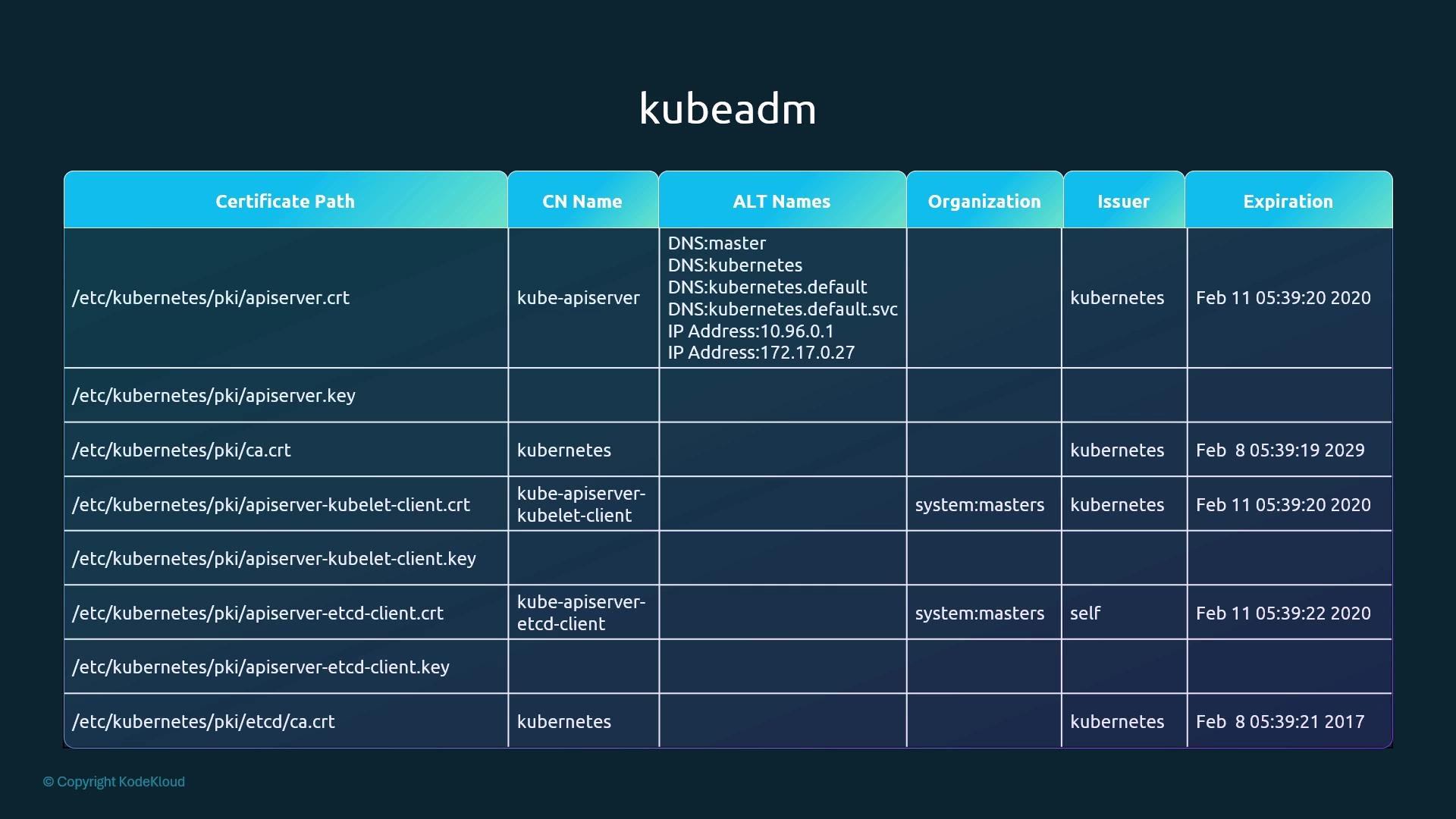
Use the table in the first figure below as a pattern for your spreadsheet: include certificate path, CN, SANs, organization, issuer, and expiration.
A dark-themed slide titled "kubeadm" showing a table of Kubernetes certificate files with columns for certificate path, CN name, ALT names (DNS/IP SANs), organization, issuer, and expiration dates. It lists entries like /etc/kubernetes/pki/apiserver.crt, ca.crt, kubelet-client and etcd client certificates with their SANs and expiry timestamps.
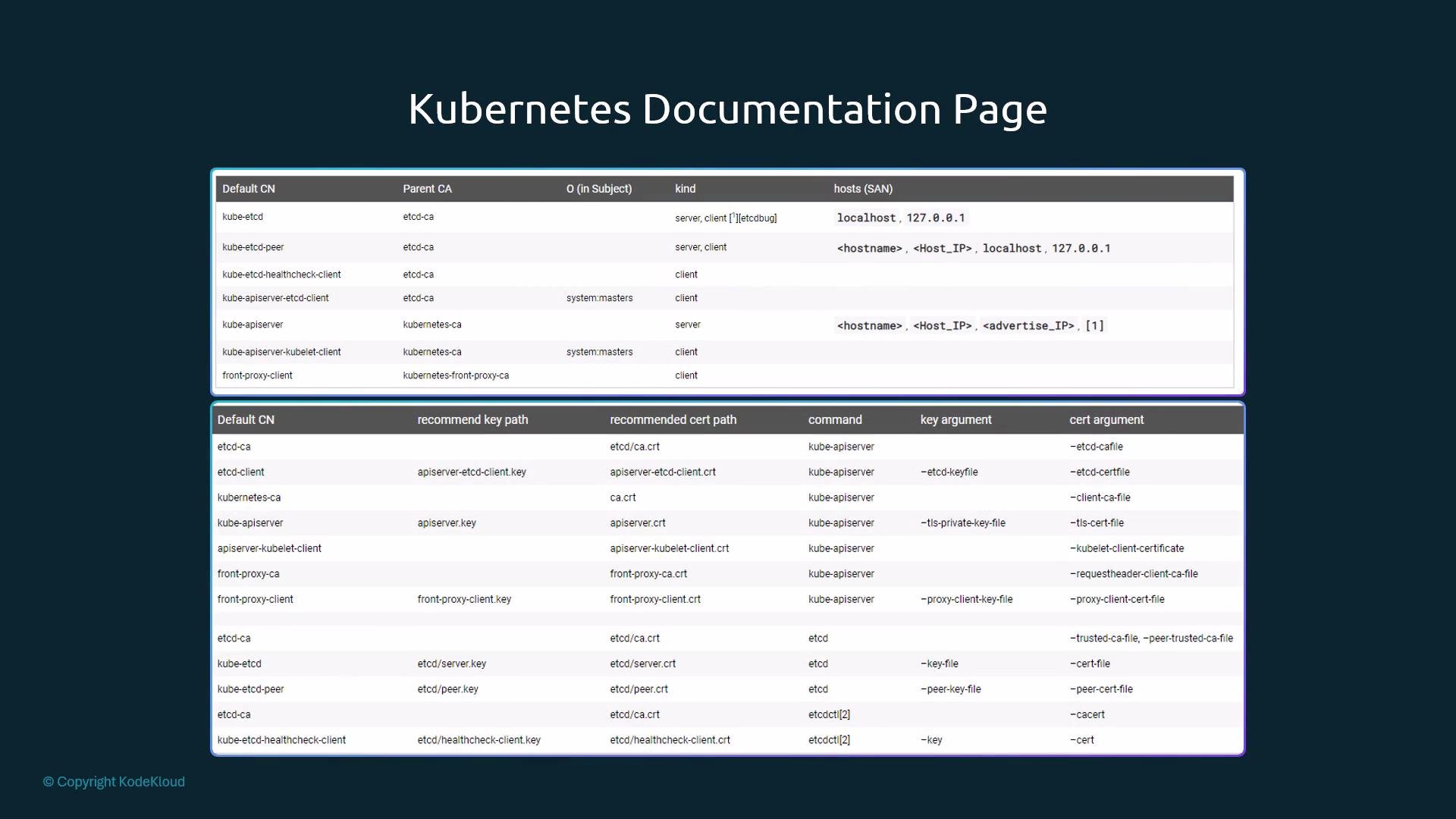
Reference the official Kubernetes documentation for recommended certificate CNs, default paths, and component requirements: https://kubernetes.io/docs/concepts/cluster-administration/certificates/. The docs include tables of default CNs and expected parent CA relationships.
A slide titled "Kubernetes Documentation Page" showing two tables that list default CNs, parent CAs, recommended key/cert paths, commands and cert/key arguments for Kubernetes components. The content is on a dark teal background with a small "© Copyright KodeKloud" notice in the corner.
Checking logs when certificates fail
  • If components run under systemd, start with the system journal to find TLS handshake and certificate errors:
$ journalctl -u etcd.service -l
Example etcd log snippets showing TLS configuration and handshake failure:
2019-02-13 02:53:28.144631 I | etcdmain: etcd Version: 3.2.18
2019-02-13 02:53:28.185588 I | embed: ClientTLS: cert = /etc/kubernetes/pki/etcd/server.crt, key = /etc/kubernetes/pki/etcd/server.key, ca = , trusted-ca = /etc/kubernetes/pki/etcd/old-ca.crt, client-cert-auth = true
2019-02-13 02:53:30.080130 I | etcdserver: published {Name:master ClientURLs:[https://127.0.0.1:2379]} to cluster
WARNING: 2019/02/13 02:53:30 Failed to dial 127.0.0.1:2379: connection error: desc = "transport: authentication handshake failed: remote error: tls: bad certificate"; please retry.
  • If control plane components are running as static pods (kubeadm), view pod logs with kubectl. Replace <etcd-pod> with the actual pod name and add -n kube-system if necessary:
$ kubectl logs <etcd-pod> -n kube-system
Example pod log output (you may see TLS/handshake errors similar to the systemd example above).
  • If the control plane is down and kubectl cannot reach the API server, check the container runtime logs directly:
    • For CRI-based runtimes (containerd/crio) use crictl:
$ crictl ps -a
$ crictl logs <container-id>
  • For Docker runtime:
$ docker ps -a
$ docker logs <container-id>
What to do with findings
  • Missing SANs: reissue the certificate including the correct DNS/IP SANs.
  • Expired certificates: rotate/reissue them. Kubeadm provides certificate management helpers (see kubeadm certs docs).
  • Unexpected issuer: investigate whether a certificate was manually replaced or issued by an unknown CA.
Quick verification checklist
CheckCommand / MethodExpected result
Locate kube-apiserver cert flagsInspect systemd unit or static manifestFlags point to cert/key paths under /etc/kubernetes or /var/lib/kubernetes
Read certificate metadataopenssl x509 -in /path/to/cert -text -nooutCN, SANs, issuer and Not After present and correct
Check certificate expiryopenssl x509 -in /path/to/cert -noout -datesNot After should be in the future
Search component TLS errorsjournalctl -u <service> -l or kubectl logs <pod>TLS handshake errors or bad certificate messages indicate issues
Inspect container logs if control plane downcrictl logs / docker logsDetermine why the control plane cannot present or validate certs
Useful links and references Closing notes
  • Collect findings into the spreadsheet described in the callout to track certificate path, CN, SANs, issuer, and expiry across nodes.
  • Test these steps in a lab environment before running them on production clusters to avoid accidental outages.

Watch Video