

Quick refresher: virtual machines vs containers
Virtual machines provide strong isolation because each VM runs a full guest operating system and its own kernel on top of a hypervisor. Containers, by contrast, share the host kernel and isolate processes using kernel mechanisms such as namespaces and cgroups. That architecture difference is critical when evaluating attack surfaces and escape risks.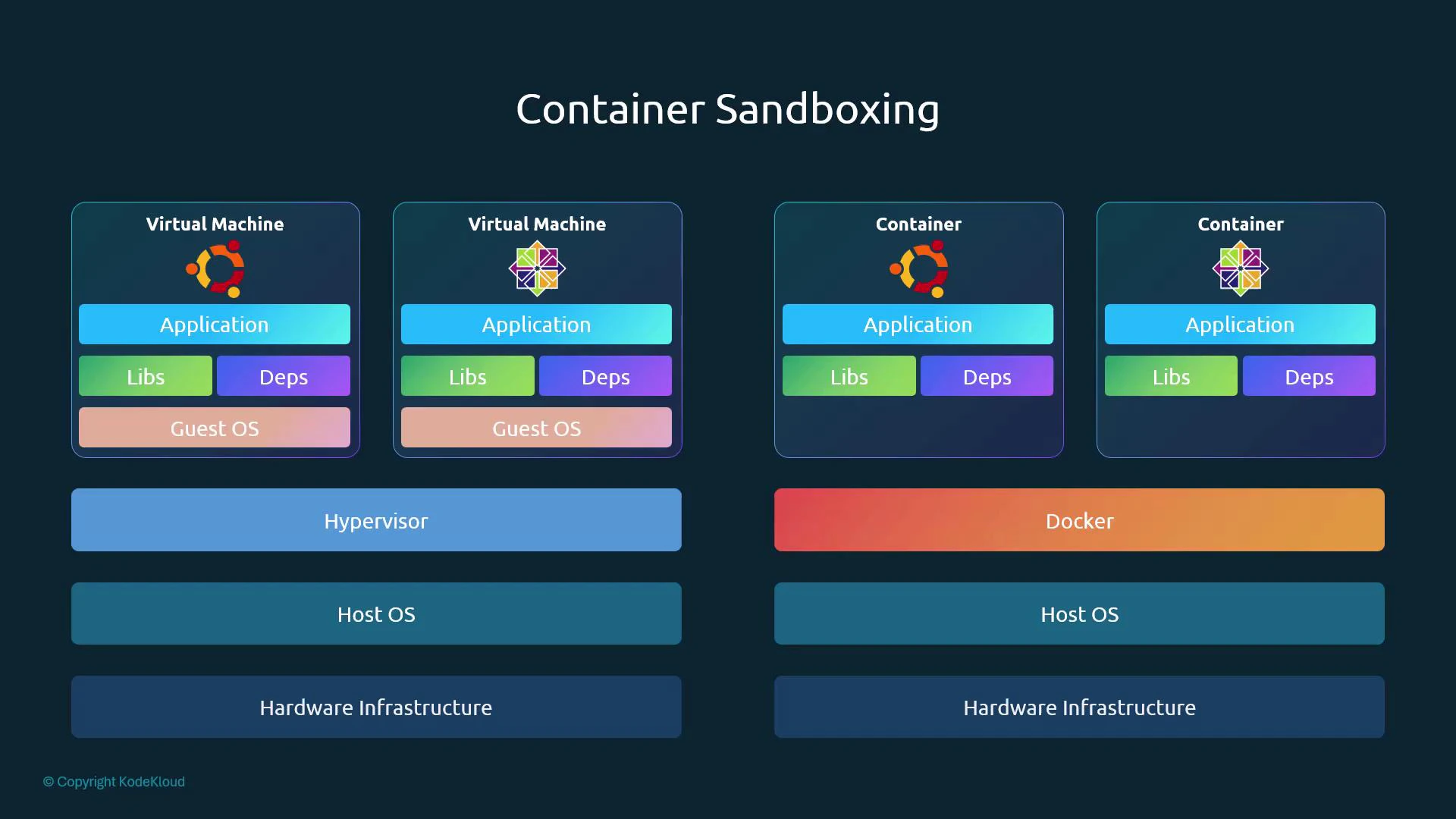
PID namespaces: a simple example
Containers map process IDs into a PID namespace. Inside the container, a process can appear as PID 1, while on the host it has a different PID. This demonstrates logical process isolation but also shows that the host can still observe and terminate the underlying host PID. Example (run a BusyBox container that sleeps for 1000 seconds):Containers share the host kernel. If the kernel has a vulnerability (for example, a local privilege escalation like Dirty COW), a compromised container process can potentially exploit the kernel and affect the host and other containers.
How containerized processes interact with the kernel
Applications (in containers or on bare OS) run in user space and make system calls to access hardware and privileged services. Since containers use the host kernel, restricting system call access and other kernel-visible actions is a key hardening strategy. Two widely used kernel-level sandboxing controls are seccomp and AppArmor (or SELinux).- Seccomp: restricts the set of system calls a process may invoke.
- AppArmor: enforces path- and capability-based access controls for files and other resources.
Example sandboxing configurations
Example seccomp profile (whitelist-style — deny by default, allow a small syscall set):Whitelist vs blacklist approaches
When feasible, prefer whitelist-based restrictions (e.g., seccomp profiles) to minimize the kernel functionality exposed to containerized applications. Use blacklists when you need broader compatibility and then complement them with other controls.
Practical guidance for production workloads
- Small, homogeneous fleets: Create strict, minimal seccomp and AppArmor/SELinux profiles for each service (for example, many Nginx or MySQL instances). This gives strong protection with manageable maintenance.
- Large, heterogeneous fleets: Use a layered approach — namespaces + cgroups + capability drops + seccomp + LSMs (AppArmor/SELinux) — and focus on automation to generate and roll out profiles.
- Follow the principle of least privilege: drop Linux capabilities your process does not need and restrict filesystem and network access.
- Monitor and iterate: use runtime observability and profiling to generate accurate whitelists and to find false positives/negatives before enforcing strict policies.
Advanced sandboxing / microVM alternatives
If the shared-kernel model is unacceptable for your threat model, consider technologies that provide stronger kernel isolation by running containers inside lightweight VMs or alternative kernels:
These projects trade some density and complexity for stronger separations between workloads and the host kernel.
Further reading and references
- Seccomp man page: https://man7.org/linux/man-pages/man2/seccomp.2.html
- AppArmor project: https://apparmor.net/
- Dirty COW vulnerability: https://en.wikipedia.org/wiki/Dirty_COW
- gVisor: https://gvisor.dev/
- Kata Containers: https://katacontainers.io/
- Firecracker: https://firecracker-microvm.github.io/