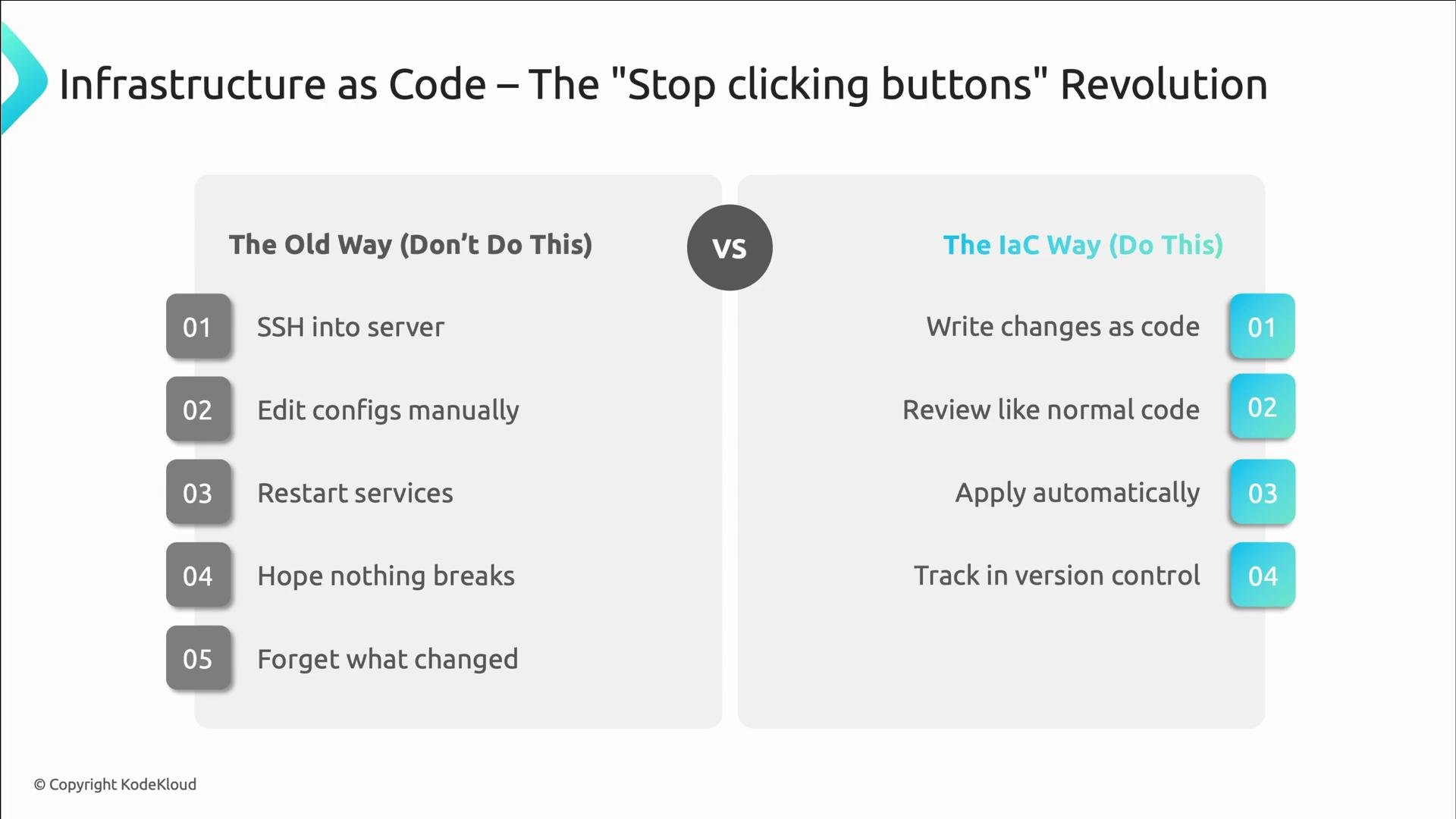
Welcome back. This lesson covers Infrastructure as Code (IaC): the practice of defining and managing infrastructure using the same engineering workflows as application code — version control, code review, automated testing, and repeatable deployments. IaC transforms provisioning from a manual, error-prone activity into a reliable, auditable, and testable process. In the past, provisioning meant SSHing into machines, editing configs by hand, restarting services, and hoping nothing broke. That produced infrastructure drift, inconsistent environments, and no reliable history of changes. IaC flips that model: you declare the desired state in files, keep them in Git, review changes via pull requests, preview their effects, and apply them automatically. The result: consistent environments, auditable change history, and the ability to test updates before they reach production.
A slide titled "Infrastructure as Code – The 'Stop clicking buttons' Revolution" comparing the old manual server workflow (SSH, edit configs, restart services, hope nothing breaks, forget what changed) with the IaC approach (write changes as code, review, apply automatically, track in version control). The left side lists the old five-step manual process and the right side shows the four-step automated IaC process.
Why SRE teams adopt IaC
  • No more snowflake servers — the same code builds identical systems.
  • Predictable disaster recovery: rebuild full environments from code.
  • Full, auditable change tracking — know who changed what and when.
  • Test infrastructure updates before they reach production to avoid surprises and late-night incidents.
A presentation slide titled "Infrastructure as Code – The 'Stop clicking buttons' Revolution" showing four colorful cards explaining why SREs love IaC. The cards list: "No snowflake servers," "Disaster recovery," "Change tracking," and "Test before deploy," with a small "© KodeKloud" footer.
Core IaC tools
ToolPurposeNotes
TerraformMulti-cloud provisioning via declarative HCLWidely used, supports modules and backends
AWS CloudFormationAWS-native infrastructure as codeDeep AWS integration; YAML/JSON templates
PulumiCode-first IaC using familiar languagesUse TypeScript, Python, Go, etc.
IaC best practices
  • Version control everything — if it’s not in Git, it’s not managed.
  • Use variables; avoid hard-coded values to make configs reusable.
  • Embrace modules and DRY principles to prevent copy-paste errors.
  • Treat infrastructure changes like app changes: require pull requests, preview plans, and run automated checks.
A presentation slide titled "IaC Best Practices" showing a vertical checklist with green checkmarks for "Version Control Everything", "Use Variables, Not Hardcoded Values", and "Modules: Don't Repeat Yourself", plus an unchecked "Review Everything". A faded sidebar lists related tips like "Pull requests for all changes", "Preview with terraform plan", "Require peer approval", and "Automated tests for IaC".
Always keep your infrastructure code as the single source of truth. Use pull requests and plan previews so reviewers can see intended changes before apply.
Example: keep all infrastructure files in Git (good) and avoid making manual changes directly in the cloud console (bad).
# Good: All infrastructure code in Git
git add main.tf variables.tf
git commit -m "Add production database with backup retention"

# Bad: Making manual changes through the AWS console
# (Those are not captured in version control)
Use variables instead of hard-coded values:
# Good: Flexible and reusable
variable "environment" {
  description = "Environment name"
  type        = string
}

resource "aws_instance" "web" {
  instance_type = var.environment == "prod" ? "t3.large" : "t3.micro"
  tags = {
    Environment = var.environment
  }
}
Avoid copy-pasting resource definitions — prefer modules:
# Good: Reusable web server module
module "web_server" {
  source         = "./modules/web-server"
  environment    = "production"
  instance_count = 3
  instance_type  = "t3.large"
}
Automated validation and previewing changes
  • Preview changes before applying them. For Terraform, run terraform plan.
  • Add linting and static checks (tflint, tfsec) and run those in CI.
# Preview changes
terraform plan
# Validate syntax
terraform validate
# Lint for best practices
tflint
# Security scanning
tfsec .
Example CI snippet (GitHub Actions) — show plan, run a security scan, and require manual approval for production-affecting changes:
# .github/workflows/terraform-plan-and-scan.yml
name: Terraform Plan and Scan

on:
  pull_request:

jobs:
  terraform:
    runs-on: ubuntu-latest
    steps:
      - name: Checkout code
        uses: actions/checkout@v3

      - name: Setup Terraform
        uses: hashicorp/setup-terraform@v2

      - name: Terraform Init
        run: terraform init

      - name: Terraform Plan
        run: terraform plan -out=tfplan

      - name: Security Scan
        run: tfsec .

      - name: Require Approval for Prod
        if: contains(github.event.pull_request.title, 'prod')
        uses: trstringer/manual-approval@v1
Policy as code Policy-as-code tools such as Open Policy Agent (OPA) and HashiCorp Sentinel let you encode guardrails (for example: “no public S3 buckets,” “EC2 instances must have a backup tag,” or “production changes require explicit approval”) and evaluate them automatically as part of CI.
A presentation slide titled "Testing Infrastructure Changes" showing "Policy as Code" with Open Policy Agent and HashiCorp Sentinel logos. It lists three policies: no publicly readable S3 buckets, all EC2 instances must have backup tags, and production resources require approval.
Real-world example: automating AWS IAM user creation Manually creating many IAM users is slow and error-prone — people forget MFA, skip tags, and introduce inconsistencies. Instead, define users in code and let Terraform create them consistently.
A slide titled "Real-World Example: Automating AWS IAM User Creation" showing a seven-step circular flowchart of the repetitive manual process for creating IAM users (log in, click Add User, forget to enable MFA, realize mistake, navigate to IAM, set permissions manually, repeat 50 times). A callout notes the manual way is slow and error-prone for a growing company.
Define a simple list of usernames in terraform.tfvars:
# terraform.tfvars
aws_region = "eu-north-1"

iam_usernames = [
  "iamuser-pablo",
  "iamuser-julia",
  "iamuser-diego",
]
Top-level module usage — pass managed policies and an optional inline policy document:
module "iam_users" {
  source = "./modules/iam-user"

  managed_policy_arns = [
    "arn:aws:iam::aws:policy/IAMUserChangePassword"
  ]

  inline_policy_document = jsonencode({
    Version = "2012-10-17"
    Statement = [
      {
        Action = [
          "s3:ListAllMyBuckets",
          "s3:GetBucketLocation",
        ]
        Effect   = "Allow"
        Resource = "*"
      },
      {
        Action = [
          "s3:List*",
          "s3:Get*",
        ]
        Effect   = "Allow"
        Resource = [
          "arn:aws:s3:::dev-bucket",
          "arn:aws:s3:::dev-bucket/*",
        ]
      },
      {
        Action = [
          "s3:ListBucket",
          "s3:GetObject",
          "s3:PutObject",
          "s3:DeleteObject"
        ]
        Effect = "Allow"
        Resource = [
          "arn:aws:s3:::${aws_s3_bucket.terraform_state.bucket}",
          "arn:aws:s3:::${aws_s3_bucket.terraform_state.bucket}/*"
        ]
      },
    ]
  })
}
Note: the managed policy IAMUserChangePassword permits users to change their own passwords. Enforcing MFA is a separate concern — you can require MFA via IAM conditions (aws:MultiFactorAuthPresent), AWS Organizations SCPs, or other account-level controls. Choose an MFA strategy that matches your organization’s security posture. Module internals — example implementation This module loops over usernames, creates users and access keys, attaches managed policies, and creates an inline policy if provided:
# modules/iam-user/main.tf
resource "aws_iam_user" "new_users" {
  for_each = toset(var.iam_usernames)
  name     = each.value
  path     = "/"

  # If these users might be pre-existing and you don't want Terraform to modify them,
  # ignore lifecycle changes that would attempt updates.
  lifecycle {
    ignore_changes = all
  }
}

resource "aws_iam_access_key" "user_keys" {
  for_each = aws_iam_user.new_users
  user     = each.value.name
}

resource "aws_iam_user_policy_attachment" "user_policy_attachments" {
  for_each = {
    for pair in setproduct(keys(aws_iam_user.new_users), var.managed_policy_arns) : "${pair[0]}-${pair[1]}" => {
      user       = pair[0]
      policy_arn = pair[1]
    }
  }

  user       = aws_iam_user.new_users[each.value.user].name
  policy_arn = each.value.policy_arn
}

resource "aws_iam_user_policy" "inline_policy" {
  for_each = var.inline_policy_document != null ? aws_iam_user.new_users : {}
  name     = "${each.value.name}-inline-policy"
  user     = each.value.name
  policy   = var.inline_policy_document
}
Working with a real repo and CI/CD Typical workflow with a sample repo (kodekloud-records-terraform-infrastructure):
  • Fork and clone the repo.
  • Create a feature branch (for example: dev-test).
  • Edit variables (like terraform.tfvars) to add the IAM users you want.
  • Run terraform plan locally or rely on CI to preview changes.
  • Commit and push to trigger GitHub Actions which run Terraform.
A presentation slide titled "Let's Get Our Hands Dirty!" showing a colorful chevron timeline of steps for a Terraform workflow — fork and clone a repo, run terraform plan, edit variables to create IAM users, apply changes to build infrastructure, modify IAM policies for S3, and use Git version control.
Project layout example — you’ll typically see directories for environments, modules, and workflows.
A dark-theme screenshot of a GitHub repository page for "kodekloud-records-terraform-infrastructure," showing the main branch, a list of files and folders (e.g., .github/workflows, environments/dev, modules/iam-user) and recent commit messages. The right sidebar displays repository metadata (no description, stars/watchers/forks) and action buttons like Code, Issues, and Pull requests.
Create and switch to a branch locally:
# From repository root
git checkout -b dev-test
Backend and state handling Remote state storage (for example, S3) is common for Terraform. If you create the backend bucket after your first apply, reconfigure with:
terraform init -reconfigure
Example S3 backend and state bucket (abbreviated):
terraform {
  required_version = ">= 1.3.0"

  backend "s3" {
    key     = "global/terraform.tfstate"
    region  = "eu-north-1"
    encrypt = true
    # bucket will be set during terraform init with -backend-config
    # bucket = "terraform-state-kodekloud-jake-page"
  }
}

resource "random_id" "bucket_suffix" {
  byte_length = 4
}

resource "aws_s3_bucket" "terraform_state" {
  bucket = "terraform-state-${random_id.bucket_suffix.hex}"

  lifecycle {
    prevent_destroy = true
  }
}

resource "aws_s3_bucket_versioning" "versioning" {
  bucket = aws_s3_bucket.terraform_state.id
  versioning_configuration {
    status = "Enabled"
  }
}

resource "aws_s3_bucket_server_side_encryption_configuration" "encryption" {
  bucket = aws_s3_bucket.terraform_state.id

  rule {
    apply_server_side_encryption_by_default {
      sse_algorithm = "AES256"
    }
  }
}

resource "aws_s3_bucket_public_access_block" "public_access" {
  bucket                  = aws_s3_bucket.terraform_state.id
  block_public_acls       = true
  block_public_policy     = true
  ignore_public_acls      = true
  restrict_public_buckets = true
}
If you pre-create the S3 bucket in the console for demos, the repo backend can point to that bucket. For production deployments, prefer creating and configuring state storage via IaC when possible.
A screenshot of the Amazon S3 console showing the "General purpose buckets" view with a list of two buckets. The page shows columns for bucket name, AWS Region (Europe/Stockholm), and creation dates, plus the left navigation and a "Create bucket" button.
CI/CD and secrets When running Terraform from GitHub Actions, supply AWS credentials via repository secrets or use OIDC-based workflows. Example apply workflow that runs on pushes to selected branches:
# .github/workflows/terraform-apply.yml
name: Terraform Apply

on:
  push:
    branches:
      - main
      - dev-test

jobs:
  terraform:
    name: Terraform Apply
    runs-on: ubuntu-latest

    steps:
      - name: Checkout code
        uses: actions/checkout@v3

      - name: Setup Terraform
        uses: hashicorp/setup-terraform@v2

      - name: Terraform Init
        run: terraform init
        env:
          AWS_ACCESS_KEY_ID: ${{ secrets.AWS_ACCESS_KEY_ID }}
          AWS_SECRET_ACCESS_KEY: ${{ secrets.AWS_SECRET_ACCESS_KEY }}
          TF_VAR_aws_access_key_id: ${{ secrets.AWS_ACCESS_KEY_ID }}
          TF_VAR_aws_secret_access_key: ${{ secrets.AWS_SECRET_ACCESS_KEY }}

      - name: Terraform Apply
        run: terraform apply --auto-approve
        env:
          AWS_ACCESS_KEY_ID: ${{ secrets.AWS_ACCESS_KEY_ID }}
          AWS_SECRET_ACCESS_KEY: ${{ secrets.AWS_SECRET_ACCESS_KEY }}
          TF_VAR_aws_access_key_id: ${{ secrets.AWS_ACCESS_KEY_ID }}
          TF_VAR_aws_secret_access_key: ${{ secrets.AWS_SECRET_ACCESS_KEY }}
Set repository secrets in GitHub: Settings → Secrets and variables → Actions.
Never store secrets in plaintext within the repository. Prefer repository secrets, environment-level secrets, or OIDC for short-lived credentials.
A screenshot of a GitHub repository Settings page (Secrets and variables → Actions) showing no environment secrets and two repository secrets listed: AWS_ACCESS_KEY_ID and AWS_SECRET_ACCESS_KEY. A "New repository secret" button is visible on the right.
Triggering workflows Push your branch to trigger apply workflows. Monitor runs in the Actions tab and inspect logs if anything fails.
A screenshot of a GitHub repository's Actions page showing Terraform workflow runs. The list shows recent workflow jobs with names, branches, statuses and timestamps, and a left sidebar with workflow and management options.
Successful apply example
A screenshot of a GitHub Actions run showing a successful "trigger a run to create users with terraform" workflow (Terraform Apply) for the repo "kodekloud-records-terraform-infrastructure," with status "Success" and total duration 34s. The left sidebar displays the Summary and job details.
Cleanup workflows Provide a safe destroy workflow that requires explicit confirmation (for example, typing the word “destroy”) to avoid accidental destruction of resources.
A GitHub Actions page for a repository showing the "Terraform Destroy" workflow and a list of workflow runs. A run dialog is open asking the user to type "destroy" to confirm before running the workflow.
Infrastructure drift Drift happens when live resources diverge from IaC configurations (for example, someone makes a one-off console change). Detect drift by running:
# Preview changes
terraform plan

# Detect configuration drift (exit codes indicate differences)
terraform plan -detailed-exitcode
echo "Exit code: $?"

# Exit codes:
# 0 → No changes
# 1 → Error
# 2 → Changes present (e.g., drift or a planned change)
When you detect drift, you can:
  • Accept and codify the manual change into IaC (update the code and commit).
  • Revert the manual change by applying the IaC.
  • Import the manual resource into Terraform state so it becomes managed:
terraform import aws_iam_user_policy.manual_policy pablo:manual-cloudwatch-access
Monitoring, alerts, and policy-as-code can help reduce manual modifications to live resources. Example IAM policy JSON snippet used for monitoring permissions:
{
  "Version": "2012-10-17",
  "Statement": [
    {
      "Effect": "Allow",
      "Action": [
        "cloudwatch:GetMetricStatistics",
        "cloudwatch:ListMetrics"
      ],
      "Resource": "*"
    }
  ]
}
Wrap-up Infrastructure as Code is a fundamental SRE practice. It reduces manual toil, enforces consistency, and brings infrastructure under the same engineering controls as application code. Keep your Git repository as the source of truth, add automated validation and policy checks, and monitor for drift so code and live infrastructure stay aligned. Configuration management — managing software and system settings on provisioned infrastructure — is closely related and often complements IaC. Links and references