

1. Cluster Provisioning Methods
First, determine how your control-plane is deployed. This affects where certificate files live and how services reference them.1.1 Manual Deployment (Native OS Services)
When Kubernetes components are managed by systemd, certificate flags appear in each service unit. For example, view the API server unit:1.2 kubeadm Deployment (Static Pods)
With kubeadm, control-plane components run as static pods. Check the manifest under/etc/kubernetes/manifests/kube-apiserver.yaml:
2. Gather Certificate Paths
Extract every file path ending in.crt, .key, or .pem from service units or manifests.
Track each certificate’s path along with its Common Name (CN), Subject Alternative Names (SANs), issuer, organization (O), and expiration date.
3. Inspect Certificates with OpenSSL
For each certificate file, run:- Subject: confirms the CN (e.g.,
CN=kube-apiserver) - X509v3 Subject Alternative Name: ensure all required IPs/DNS entries exist
- Issuer: usually the Kubernetes CA (
O=kubernetes) - Validity: check
Not BeforeandNot Afterdates for expiry
Expired or misconfigured certificates can prevent API server communication. Always verify the
Not After date to avoid downtime!4. Document Certificate Metadata
Organize certificate details in a spreadsheet or table for easy tracking. An example layout: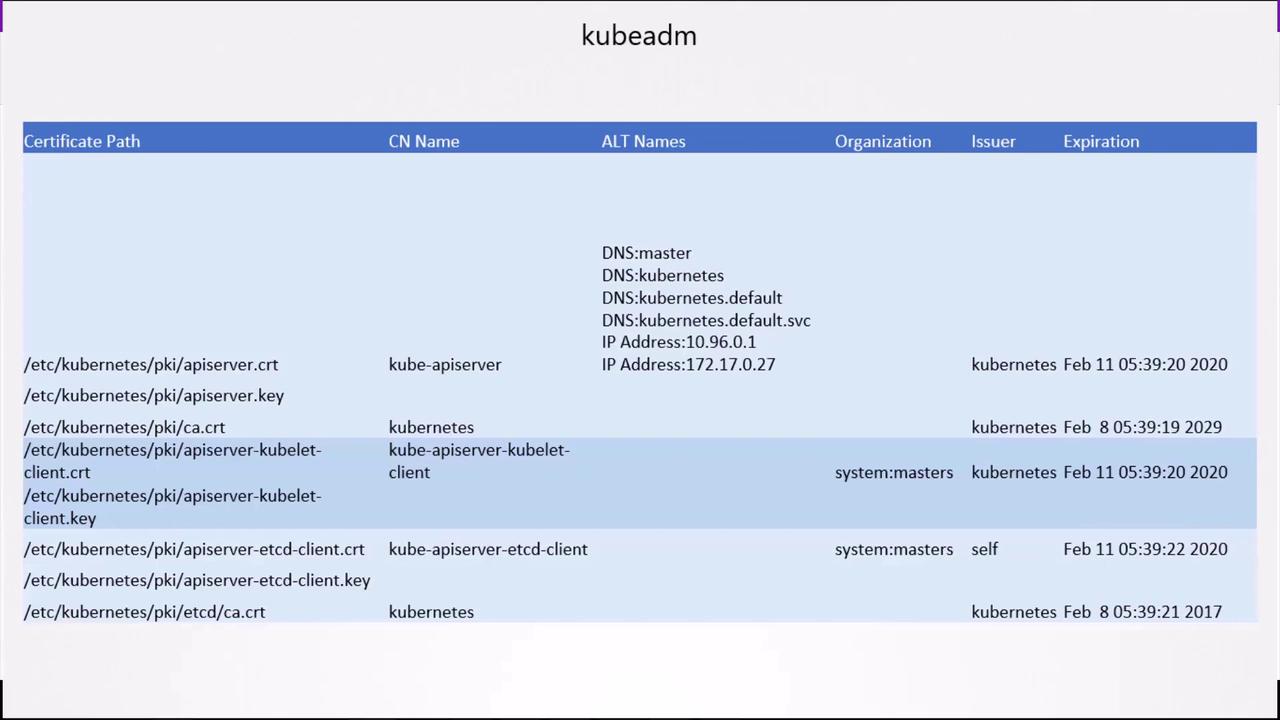
5. Troubleshooting and Logs
If a component fails due to certificate issues, view logs to pinpoint TLS errors.5.1 Native Services
5.2 kubeadm (Static Pods)
Fetch API server logs:kubectl is unavailable, use Docker: