

Prerequisites
- A running Kubernetes cluster
- Falco installed on each node (via systemd or DaemonSet)
kubectlconfigured to communicate with your cluster
1. Verifying Falco Installation
First, ensure Falco is active on each node. If you installed Falco directly on the host:If Falco is deployed as a DaemonSet, use
kubectl get pods -n falco-driver-loader to verify all Falco pods are running.2. Deploying and Testing with nginx
-
Deploy an nginx pod
Expected response:
-
Check pod status and its node
-
Stream Falco logs
In a separate terminal, SSH into the node running the nginx pod: -
Trigger an alert
Back in your first terminal, open a shell inside the nginx container:Inside the container, read a sensitive file:
3. Falco Architecture
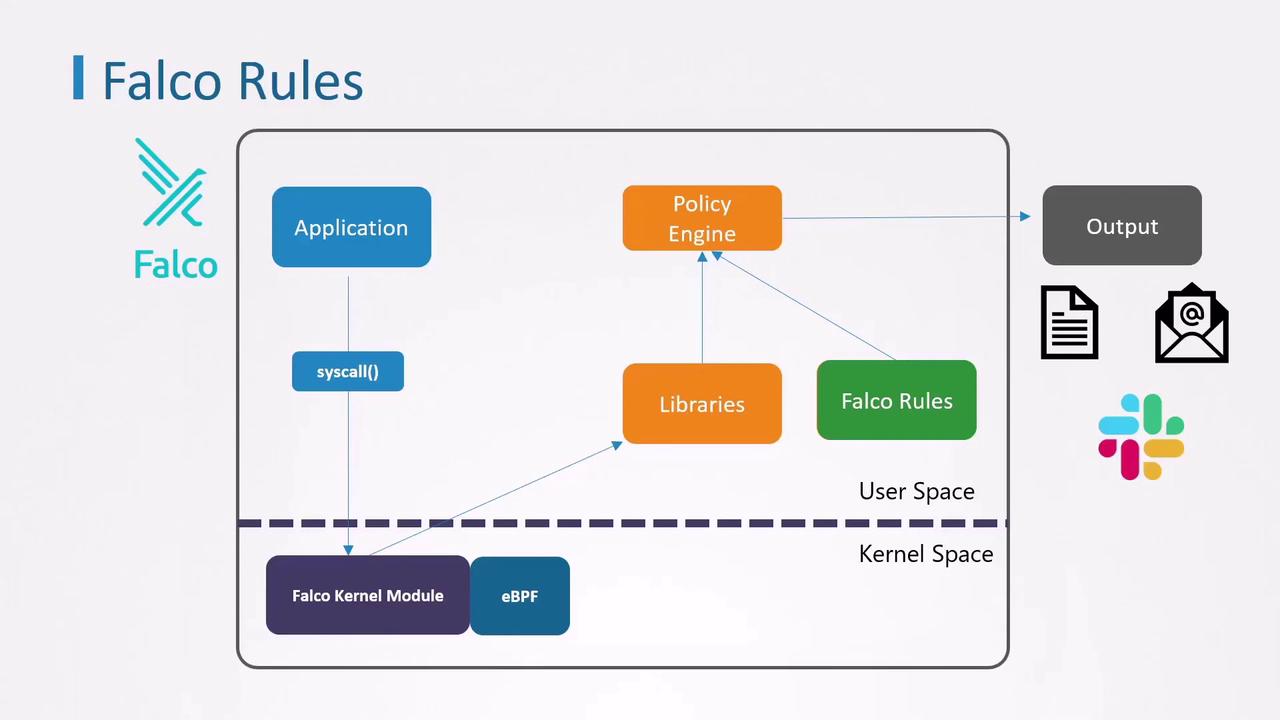
- Applications generate system calls
- Falco’s kernel module/eBPF captures events
- Libraries forward events to the policy engine
- Rules define alert conditions
- Outputs include stdout, alerts, notifications
4. Falco Rules Overview
Falco rules are defined in a YAML file. Each file can include:rules: Alert definitionslists: Named collections of valuesmacros: Reusable filter expressions
4.1 Anatomy of a Rule
Every rule requires these five keys:Built-in rule that detects a shell inside a container:
5. Creating a Custom Rule
Let’s write a simple rule to catch any shell launched in a container:6. Sysdig Filters Reference
Falco evaluates these filters against each captured system event.
7. Extending Detection with Lists
To monitor multiple shell types, define a list:8. Simplifying with Macros
Falco’s built-in macrocontainer is shorthand for container.id != host. Use it to make rules more concise: