

Overview of API Organization
Kubernetes organizes everything under its API into API groups (e.g., apps, extensions, networking). Each API group can support multiple versions. A version labeled as “v1” typically indicates a generally available (GA) and stable release. Other labels like v1beta1 or v1alpha1 denote beta or alpha stages respectively. Let’s break down what each of these stages means.API Version Stages
Alpha
An alpha version represents the initial development stage of an API. Once an API is added to the Kubernetes code base and included in a release for the first time, it is marked as alpha (for example, v1alpha1, v1alpha2). At this stage, the API is not enabled by default, may lack comprehensive end-to-end tests, and could contain bugs. For instance, at the time of recording, the API groupinternal.apiserver.k8s.io (which includes the StorageVersion resource) exists only in its alpha form.
If you attempt to create an object using the following YAML:
Beta
After addressing major bugs in the alpha API and adding comprehensive tests, the API advances to beta (e.g., v1beta1, v1beta2). Beta APIs are enabled by default and include end-to-end tests. While minor bugs might still exist, there is a commitment from the community to advance these APIs to GA. For example, the flow-control group is currently in the beta stage.GA (Stable)
An API promoted to GA has successfully navigated the beta phase, undergone multiple releases, and received numerous bug fixes. The version number drops any alpha or beta suffix, appearing simply as “v1.” GA APIs are reliably enabled by default and become part of conformance tests. Most API groups, such as apps, authentication, authorization, certificates, and coordination, are now available in their GA versions.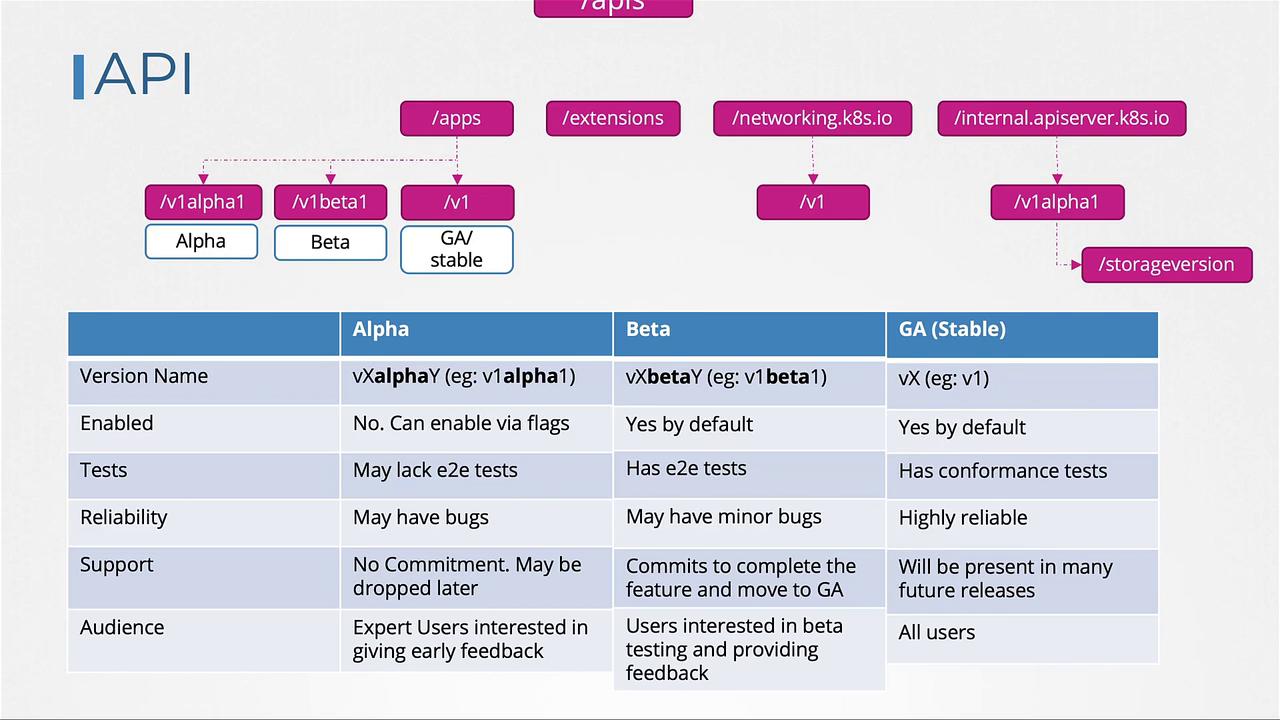
For production environments, always ensure you use GA versions of the APIs to maintain a stable and supported deployment.
Supporting Multiple Versions in an API Group
An API group can support several versions simultaneously. For example, the apps group might offer v1, v1beta1, and v1alpha1, allowing you to reference any of these versions in your YAML file. Below are examples of a Deployment resource defined using different API versions:kubectl get deployment or kubectl explain deployment. Furthermore, only one version—the storage version—is used to persist objects in etcd. If you create an object using a non-preferred version (like apps/v1alpha1 or apps/v1beta1), Kubernetes will automatically convert it to the storage version (typically apps/v1) before saving.
For example, after creating a Deployment using any API version, running these commands will show that it is stored as apps/v1:
Determining the Preferred and Storage Versions
When multiple API versions are available within a group, the preferred version is listed in the API group details. For example, querying the batch API group might return:Enabling or Disabling Specific API Versions
To modify which API versions are enabled, adjust the--runtime-config parameter of the kube-apiserver. For instance, if you need to enable alpha APIs that aren’t enabled by default, update the kube-apiserver’s service configuration. Below is an example ExecStart configuration for kube-apiserver:
--runtime-config parameter), restart the kube-apiserver service for the changes to take effect.
Always back up your configuration and validate your changes in a non-production environment before applying them to production.