

Overview of the Canary Deployment Process
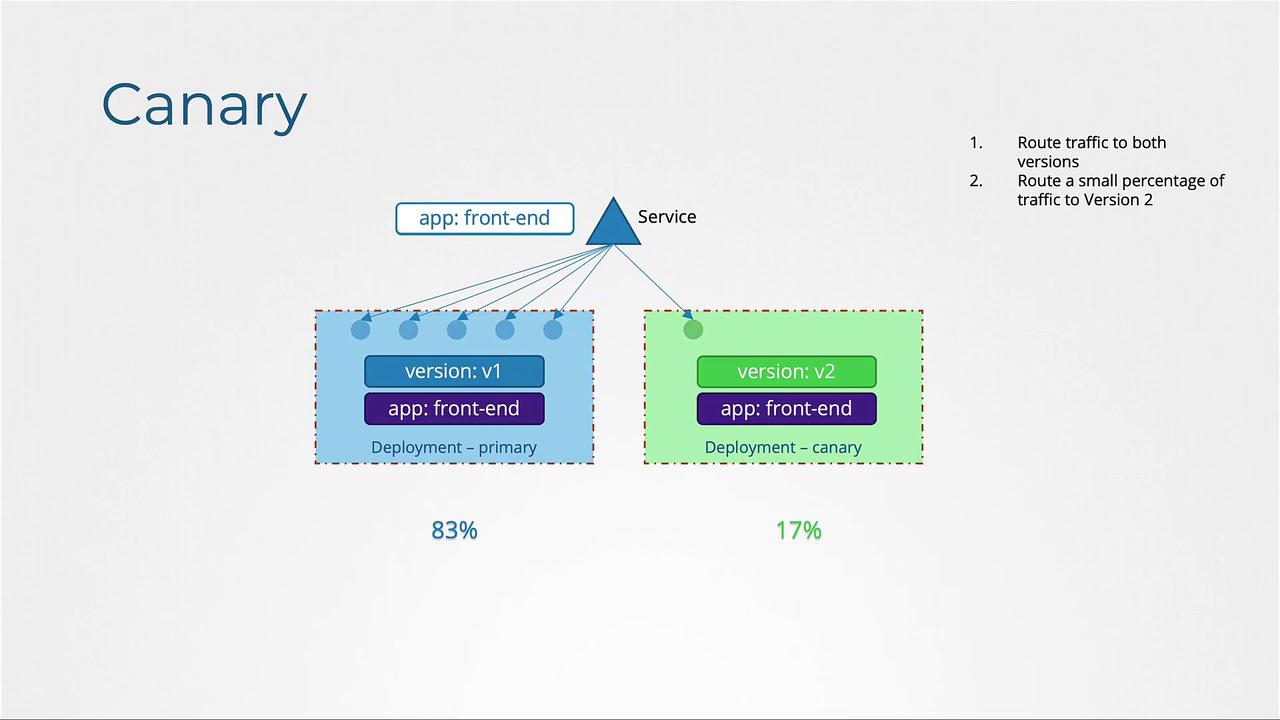
Begin by deploying the primary version of your application. In this configuration, the primary deployment runs five pods, and a Kubernetes Service routes traffic to these pods. A label, for example,version: v1, is assigned to the pods to facilitate proper routing.
Next, deploy a secondary deployment for the canary version. Initially, all traffic is directed to version v1. The canary deployment tests the new version (version v2) by ensuring that only a small portion of traffic is routed to it. If the new version meets expectations, you can later update the primary deployment and retire the canary.
The key steps include:
- Using a single Service to route traffic to both deployments by leveraging a common label (e.g.,
app: front-end). - Setting a lower replica count for the canary deployment (e.g.,
replicas: 1) so that a limited percentage of traffic reaches version v2. - Once testing is successful, upgrading the primary deployment to the new version and removing the canary deployment.
Implementation Details
Primary Deployment and Service
The primary version of the application is deployed using a Kubernetes Deployment. A corresponding Service directs traffic to the pods, which are marked with the labelapp: front-end to ensure correct routing.
Canary Deployment
A separate deployment is created for the canary version, which uses a new image (e.g., version 2.0) and labels the pods withversion: v2. Although both deployments share the common label app: front-end, setting the canary deployment’s replica count to 1 ensures that only a minor portion of traffic is routed to the new version.
Keep in mind that the percentage of traffic routed to each version is directly influenced by the number of pod replicas. The inherent traffic distribution mechanism in Kubernetes spreads traffic evenly across all pods.
Limitation
One limitation of this Kubernetes-only setup is that traffic distribution is solely determined by the number of pods in each deployment. For example, if you want an exact percentage split (e.g., precisely 1% to the canary), Kubernetes alone may not suffice unless you have a very high number of pods. For more granular control, consider using a service mesh like Istio Service Mesh, which allows for precise, percentage-based traffic routing regardless of pod count.Code Example
Below are examples of Kubernetes configuration files to define your primary and canary deployments alongside a Service.- The primary deployment (
myapp-primary.yml) operates with five replicas of version v1. - The Service (
service-definition.yaml) targets pods with the common labelapp: front-end. - The canary deployment (
myapp-canary.yml) runs a single replica of version v2, allowing only a fraction of traffic to test the new version.