Understanding the Need for Services
Imagine you’ve deployed a pod running a web application. While pods can communicate internally over the cluster network, external access presents a challenge. Consider this scenario:- The Kubernetes node’s IP address is 192.168.1.2.
- Your laptop’s IP address is 192.168.1.10 (on the same network).
- The internal pod network falls under the 10.244.0.0/24 range, and the pod’s IP is 10.244.0.2.
10.244.0.2 won’t work.
One workaround is to SSH into the Kubernetes node and then access the pod using a command like:
Using SSH to access node-hosted pods is not ideal for production environments
due to security and management challenges.
Introducing the Kubernetes Service
Rather than relying on SSH, Kubernetes services provide a robust solution. A service acts as an intermediary by listening on a designated port on the node and forwarding requests to the respective pod. For instance, if you run:Types of Kubernetes Services
Kubernetes supports multiple service types:| Service Type | Description | Example Use Case |
|---|---|---|
| NodePort | Exposes a pod on a port on each node. | External access to a web server. |
| ClusterIP | Creates a virtual IP inside the cluster to facilitate pod-to-pod communication. | Inter-service communication between front-end and back-end. |
| LoadBalancer | Provisions a load balancer from supported cloud providers for distributing traffic. | Production environments requiring high availability. |
How NodePort Works
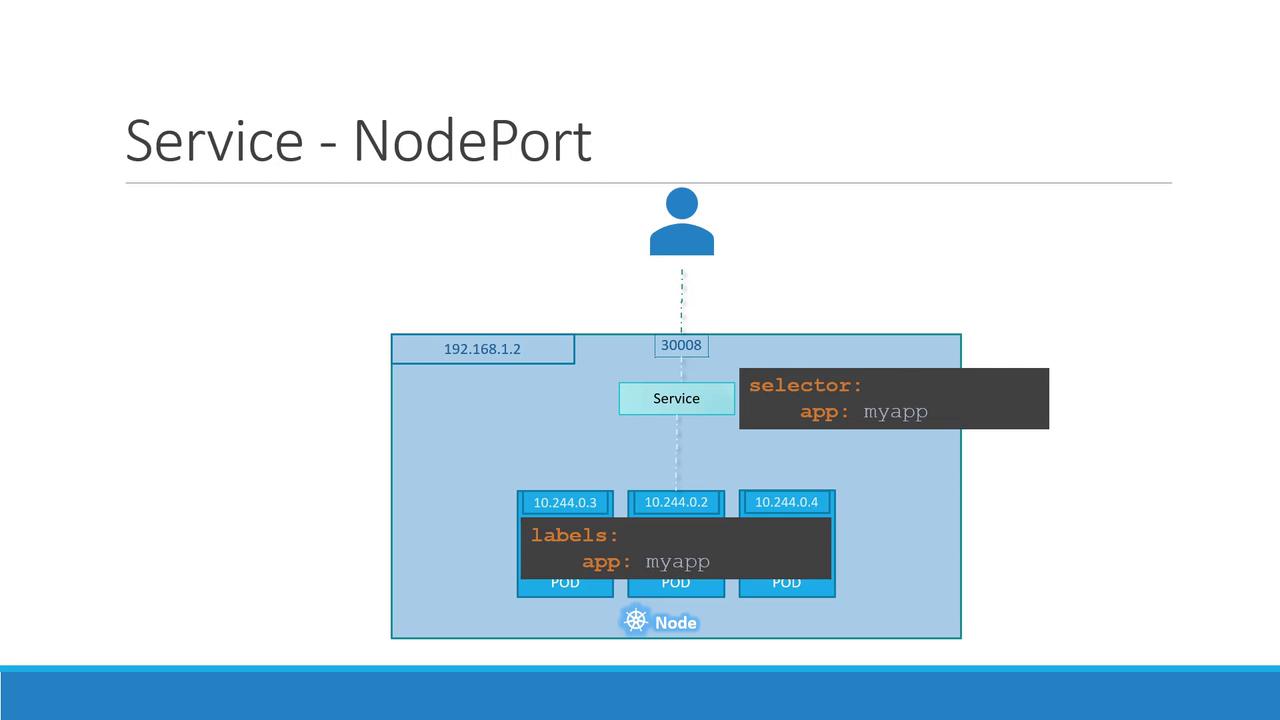
A NodePort service maps three key ports:- Target Port: The port on the pod where the web server is running (e.g., port 80).
- Service Port: The port defined on the service object (typically also set to 80).
- Node Port: The port on the Kubernetes node used for external access (e.g., 30008).
Node ports must be within the valid range of 30000 to 32767.
Creating a NodePort Service
To create a NodePort service, define its configuration in a YAML file. This file should include key components such as:- API version
- Kind
- Metadata
- Spec (including service type, ports, and selectors)
Service Definition (service-definition.yml)
Pod Definition (pod-definition.yml)
app: myapp and type: front-end).
Deploying and Verifying the Service
After preparing the YAML files, deploy the service with the following command:Scaling and Production Considerations
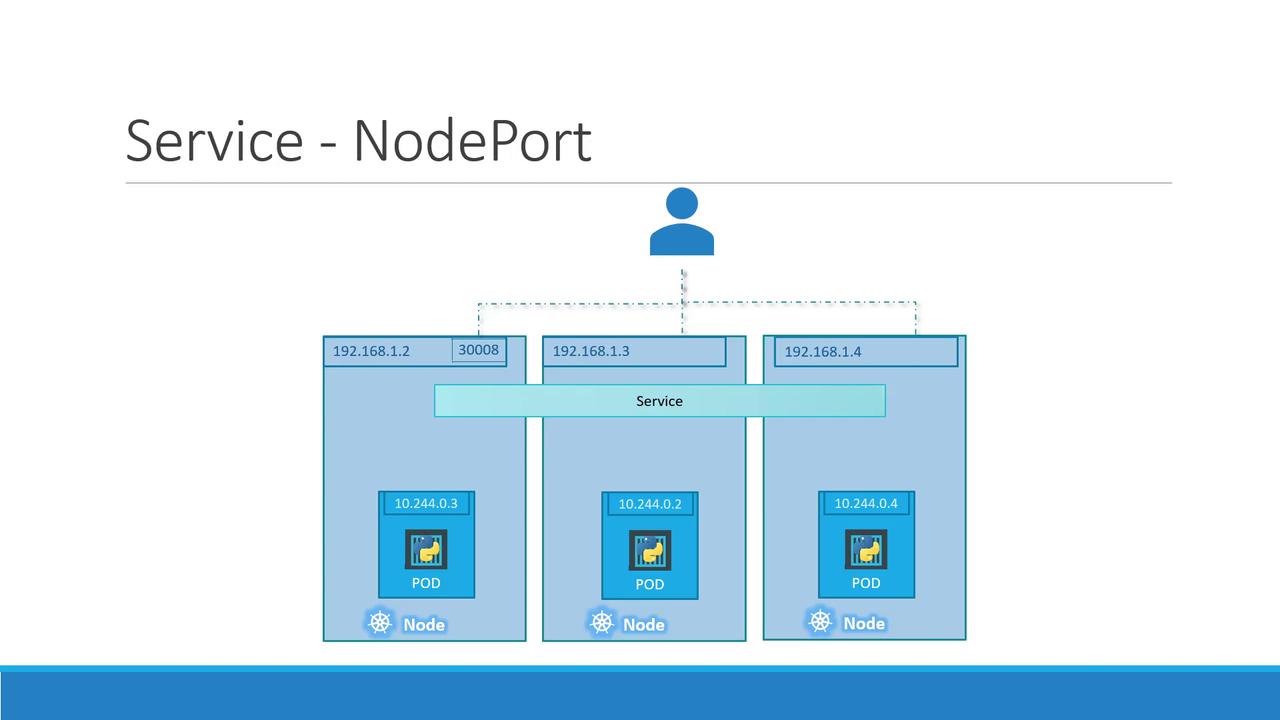
In production, you might run multiple instances of your web application to ensure high availability and load distribution. When pods with the same labels (e.g.,app: myapp) are running across several nodes, the NodePort service will distribute requests randomly among them.
Kubernetes automatically updates the service endpoints as pods are added or removed. Moreover, when pods are deployed across multiple nodes, the same node port is accessible on all nodes. This ensures that you can use any node’s IP address with the defined port to reach your application.
Whether you have a single pod on one node or multiple pods spread across
several nodes, the service definition remains the same. This flexibility is at
the heart of Kubernetes’ design, enabling dynamic scaling and simplified load
balancing.
Next Steps
This concludes our detailed lesson on Kubernetes services with a focus on NodePort. Now, let’s move on to the demonstration where you’ll see these concepts in action.