This article explains how to bypass specific warnings during dynamic application security testing with OWASP ZAP in CI/CD pipelines.
In this article, we explain how to bypass specific warnings during dynamic application security testing (DAST) with OWASP ZAP. Previously, a DAST run terminated because of an unexpected content type warning. While the ideal approach is to resolve the issue in your application code, this guide demonstrates how you can ignore such warnings for testing purposes.
To ignore specific warnings during a scan, create a configuration file that uses the “ignore” tag for designated warnings. The following command runs the scan while ignoring errors:
Copy
Ask AI
#### REPLACE below with Kubernetes http://IP_Address:30000/api-docs/ ######chmod 777 $(pwd)docker run -v $(pwd):/zap/wrk ghcr.io/zaproxy/zap-api-scan.py -t http://134.209.155.222:8080/
Remember: Always consult the OWASP ZAP documentation to decide which findings can be safely ignored.
You must create a configuration file to specify the warnings you wish to ignore. When executing the Docker command, pass the configuration file using the -c option. You can generate a default configuration file using the -g option. Below is an excerpt from a sample configuration file:
Copy
Ask AI
# zap-api-scan rule configuration file# Change WARN to IGNORE to ignore a rule or FAIL to fail if the rule matches.# Active scan rules set to IGNORE will not run, which speeds up the scan.# Only the rule identifiers are used—the names are provided for informational purposes.# You can append your custom messages after a tab on each line.0 WARN (Directory Browsing - Active/release)10010 WARN (Cookie No HttpOnly Flag - Passive/release)10011 WARN (Cookie Without Secure Flag - Passive/release)10012 WARN (Password Autocomplete in Browser - Passive/release)10015 WARN (Incomplete or No Cache-control and Pragma HTTP Header Set - Passive/release)10016 WARN (Web Browser XSS Protection Not Enabled - Passive/release)10017 WARN (Cross-Domain JavaScript Source File Inclusion - Passive/release)10020 WARN (Content-Type Header Missing - Passive/release)10030 WARN (X-Frame-Options Header Scanner - Passive/release)10031 WARN (X-Content-Type-Options Header Missing - Passive/release)10032 WARN (Information Disclosure - Debug Error Messages - Passive/beta)10033 WARN (Information Disclosure - Sensitive Informations in URL - Passive/beta)10034 WARN (Information Disclosure - Sensitive Information in HTTP Referrer Header - Passive/beta)10035 WARN (HTTP Parameter Override - Suspicious Comments - Passive/beta)10036 WARN (Information Disclosure - Passive/beta)10037 WARN (Viewstate Scanner - Passive/beta)10038 WARN (Secure Pages Include Mixed Content - Passive/release)10040 WARN (Source Code Disclosure - /WEB-INF folder - Active/beta)10041 WARN (Remote Code Execution - Shell Shock - Active/beta)10042 WARN (Backup File Disclosure - Passive/beta)10043 WARN (Weak Authentication Method - Passive/beta)10044 WARN (Presence of Anti-CSRF Tokens - Passive/beta)
Each line in the file consists of:
Rule ID
Action (IGNORE, WARN, or FAIL)
Additional informational text (optional)
Save this file (e.g., as zap_ignore_rules) and reference it in your Jenkins pipeline.
Below is an example snippet from a Jenkinsfile which shows different pipeline stages. Notice the use of the configuration file in the “DAST - OWASP ZAP” stage:
Copy
Ask AI
stage('Integration Testing - [AWS EC2](https://learn.kodekloud.com/user/courses/amazon-elastic-compute-cloud-ec2)') { // Integration testing steps...}stage('K8S - Update Image Tag') { // Kubernetes image update steps...}stage('K8S - Raise PR') { // Steps to raise a pull request...}stage('App Deployed?') { when { branch 'PR*' } steps { timeout(time: 1, unit: 'DAYS') { input message: 'Is the PR merged and ArgoCD Synced?', ok: 'YES! PR is Merged and ArgoCD Applied' } }}stage('DAST - OWASP ZAP') { // DAST steps using ZAP}post { always { // Cleanup actions... }}
After creating the configuration file, update the Docker command in your pipeline as shown below:
This command executes the ZAP scan and generates several reports (HTML, Markdown, JSON, and XML). The HTML report is eventually published in the pipeline, as illustrated below:
In your front-end application, you can add visual cues to indicate status updates. For instance, the index page includes a button with rocket icons representing the application’s status:
Once the pipeline is triggered, it pauses at the “App Deployed?” stage for manual confirmation. After merging the pull request and synchronizing ArgoCD, the pipeline resumes and deploys the updated application. You should see console messages similar to the following:
If executed correctly, the output confirms that 112 tests passed while ignoring the designated warning. For example:
Copy
Ask AI
PASS: Cross Site Scripting (Persistent) [40016]PASS: SQL Injection [40018]...IGNORE-NEW: Unexpected Content-Type was returned [100001] x 83HTTP/134.209.155.82:8080 (200 OK)...FAIL-NEW: @ INFO: 0 | WARN-INPROG: @ INFO: 0 | IGNORE: 1 | PASS: 112
If you encounter an error like:Failed to load config file /zap/wrk/zap_ignore_rules Unexpected number of tokens on line - there should be at least 3, tab separated: 100001 IGNOREit indicates that your ignore file does not follow the proper format. Edit the file with a reliable text editor (e.g., vi) to ensure each line has at least three tab-separated tokens.
For example, use the following commands in your terminal:
Copy
Ask AI
cd solar-system/vi zap_ignore_rules
After updating and committing the corrected file, re-run the pipeline build. When successful, the DAST stage generates the expected reports, and the OWASP ZAP scan completes without errors.
By following this configuration, you can integrate OWASP ZAP into your CI/CD pipeline, effectively ignore specific warnings during DAST, and generate comprehensive security scanning reports.
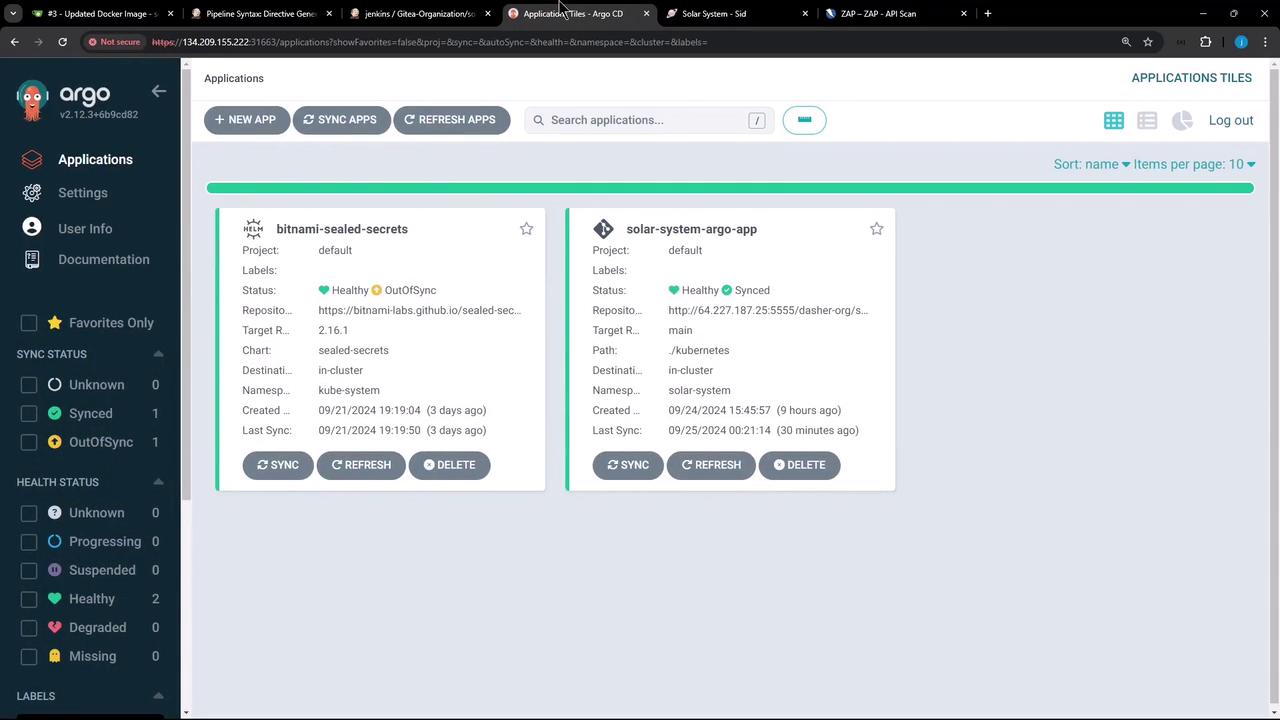
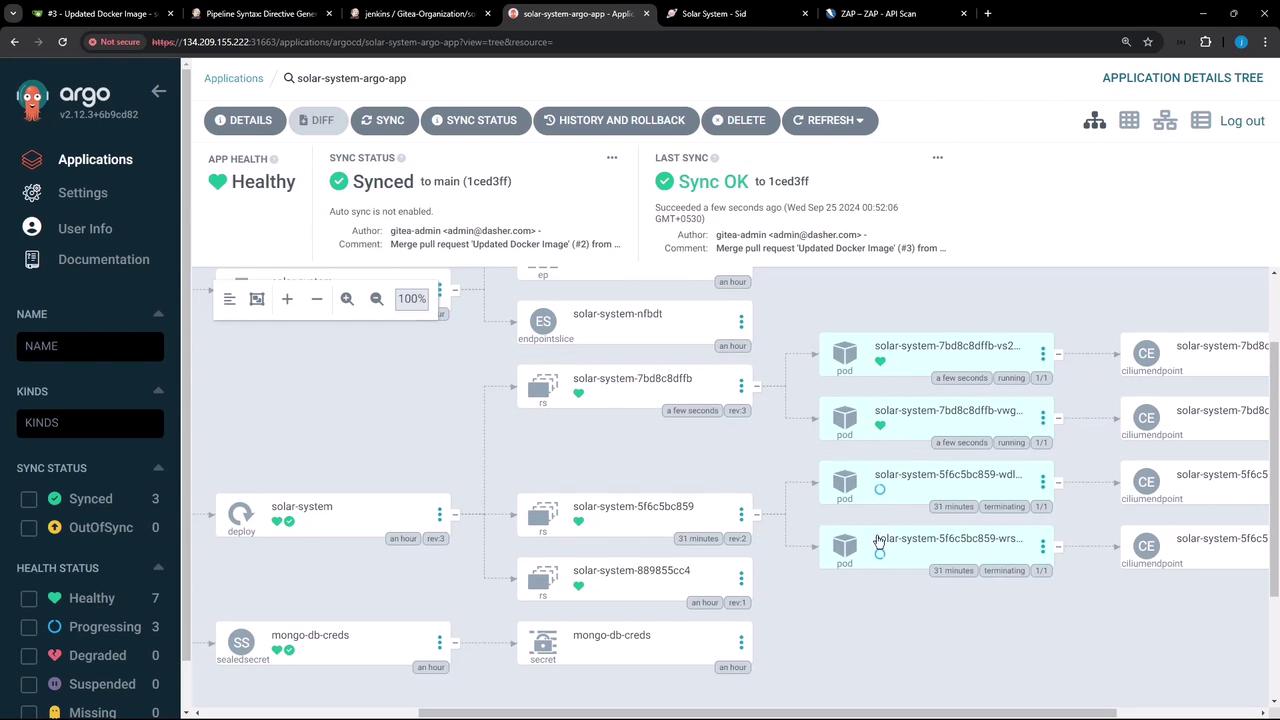
After synchronizing Argo CD, you should see a new replica set and multiple pods being created as the application is updated. The deployment dashboard may resemble the following:
Finally, the Jenkins pipeline interface presents various build stages and includes a prompt to confirm that the pull request has been merged and ArgoCD is synchronized:
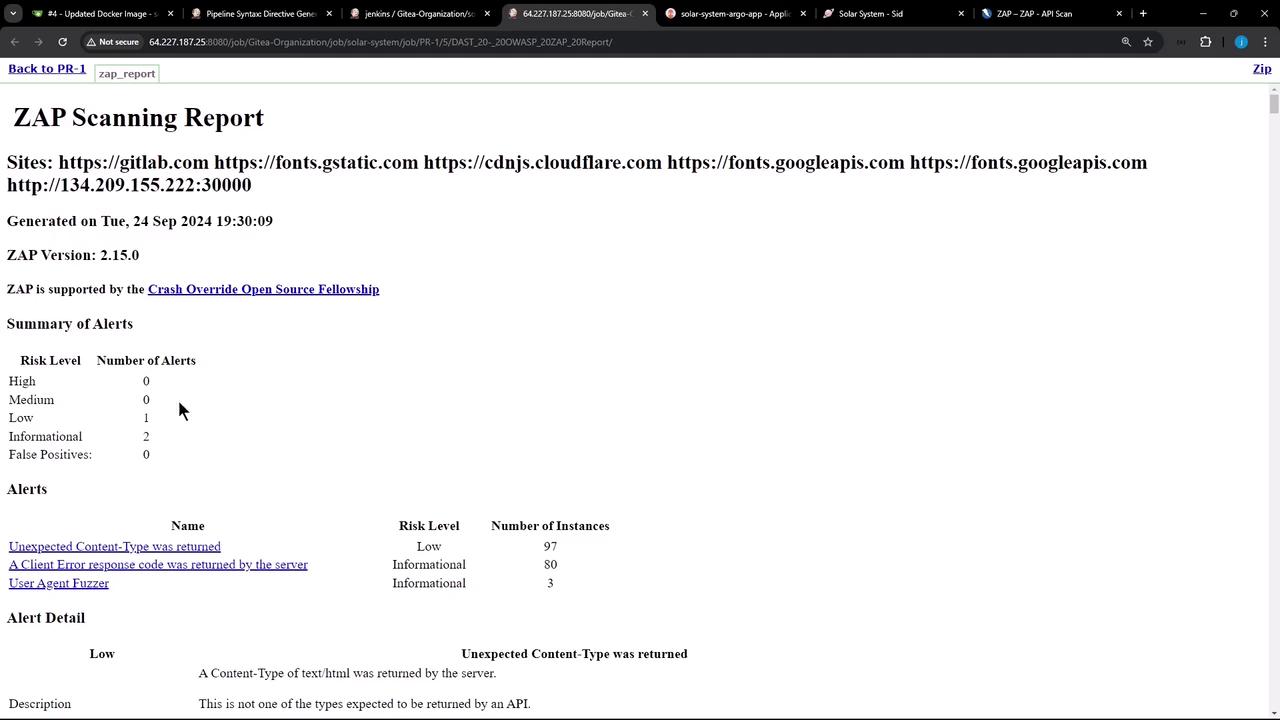
Upon successful pipeline completion, you can review the OWASP ZAP security scanning report:
This concludes the demonstration on how to configure OWASP ZAP to ignore specific warnings and integrate it into a CI/CD pipeline for Kubernetes deployments.