This article explores query parameters in FastAPI for filtering API results, including implementation of pagination and search functionality.
In this article, we explore how query parameters work in FastAPI and demonstrate how to use them for filtering API results. If you’ve ever worked with an API—even without realizing it—you’ve encountered query parameters. They appear in the URL after a ”?” and consist of key-value pairs that allow you to control the data you receive. For example, when searching for restaurants in Miami on Yelp, you’ll notice that the URL includes a domain, an endpoint such as /search, and a query string with parameters.Everything to the right of the question mark constitutes the query parameters. These optional parameters help refine results, such as retrieving posts created in the last two hours or posts with over 100 likes. In Yelp’s case, a parameter like find_location=Miami, Florida instructs the API to filter results by location.
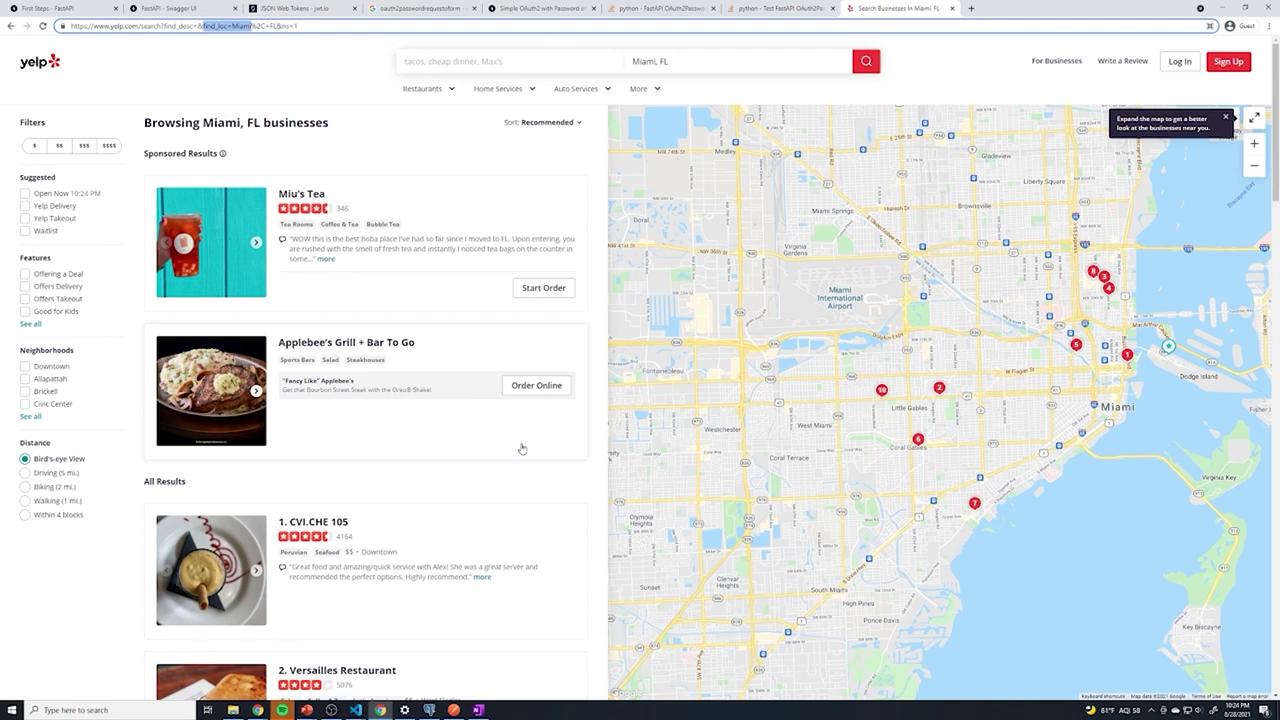
Let’s see how you can implement query parameter filtering, pagination, and search in FastAPI.
To support pagination, include a skip query parameter that allows clients to bypass a specified number of posts. The skip parameter is an integer with a default value of 0. SQLAlchemy’s offset function helps achieve this:
Copy
Ask AI
@router.get("/", response_model=List[schemas.Post])def get_posts( db: Session = Depends(get_db), current_user: int = Depends(oauth2.get_current_user), limit: int = 10, skip: int = 0): print(limit) posts = db.query(models.Post).limit(limit).offset(skip).all() return posts
For example, querying /posts?limit=2&skip=1 will return posts starting from the second result. Sample log outputs might look like:
In addition to pagination, you can let users search for posts by keywords in the title. Add an optional search query parameter, defaulting to an empty string, and use SQLAlchemy’s filtering to search within the title field:
Copy
Ask AI
from typing import Optional@router.get("/", response_model=List[schemas.Post])def get_posts( db: Session = Depends(get_db), current_user: int = Depends(oauth2.get_current_user), limit: int = 10, skip: int = 0, search: Optional[str] = ""): print(limit) posts = db.query(models.Post)\ .filter(models.Post.title.contains(search))\ .limit(limit)\ .offset(skip)\ .all() return posts
For instance, sending a GET request to /posts?limit=2&skip=1&search=beaches will filter posts to those whose titles contain “beaches”. Console outputs may look like:
When the search term contains spaces (for example, “beaches hello”), ensure you URL-encode the space as %20. For example:
Copy
Ask AI
/posts?limit=2&skip=1&search=beaches%20hello
This encoding allows the API to correctly filter posts with titles containing the entire phrase.A sample JSON response for a matching post might look like:
Below is the complete implementation of the endpoint that supports limiting, skipping, and searching:
Copy
Ask AI
from typing import List, Optionalfrom fastapi import APIRouter, Dependsfrom sqlalchemy.orm import Sessionfrom .. import models, schemas, oauth2from ..database import get_dbrouter = APIRouter( prefix="/posts", tags=["Posts"])@router.get("/", response_model=List[schemas.Post])def get_posts( db: Session = Depends(get_db), current_user: int = Depends(oauth2.get_current_user), limit: int = 10, skip: int = 0, search: Optional[str] = ""): print(limit) posts = db.query(models.Post)\ .filter(models.Post.title.contains(search))\ .limit(limit)\ .offset(skip)\ .all() return posts@router.post("/", status_code=201, response_model=schemas.Post)def create_posts( post: schemas.PostCreate, db: Session = Depends(get_db), current_user: int = Depends(oauth2.get_current_user)): # Implementation for creating a post pass
You can test the API endpoints using various query parameters:
• /posts?limit=3 retrieves three posts.
• /posts?limit=2&skip=1 retrieves posts after skipping the first one.
• /posts?limit=2&skip=1&search=beaches filters posts based on the keyword “beaches” in the title.
This implementation demonstrates how query parameters in FastAPI can work together to build robust and flexible APIs that support filtering, pagination, and search functionality.