This guide details building a social media app using FastAPI, covering user authentication, CRUD operations, and voting features.
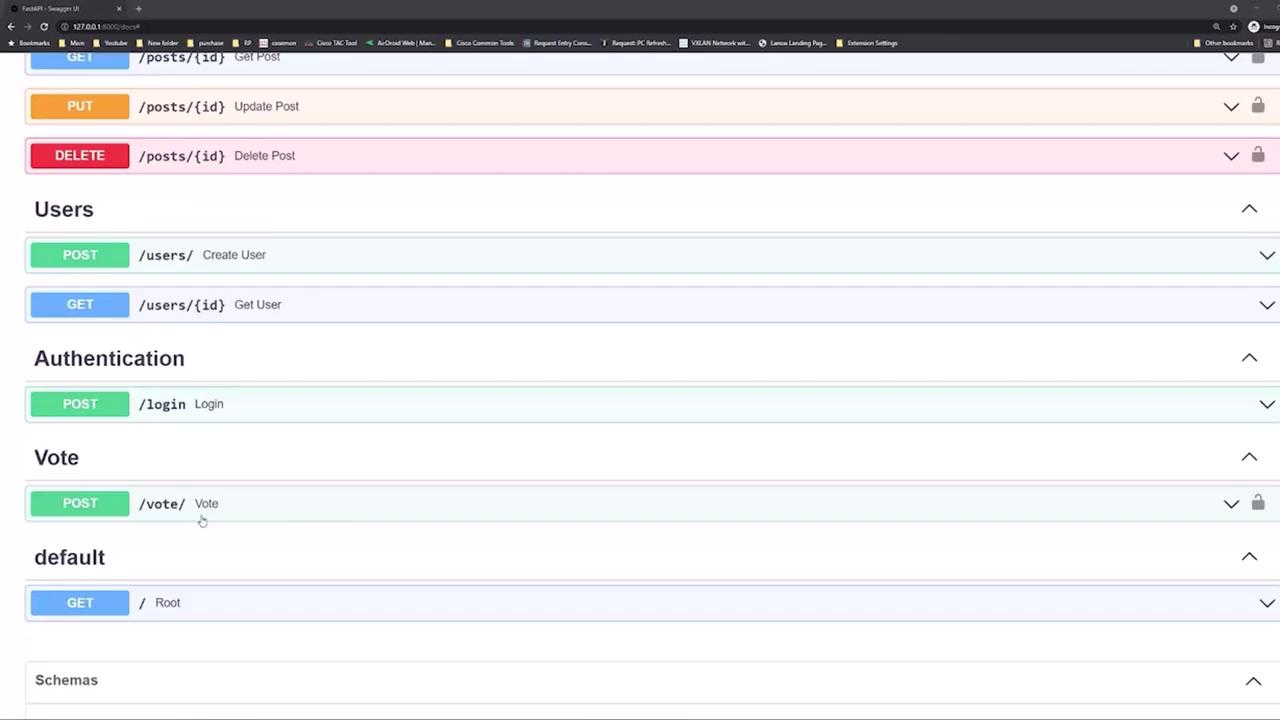
In this guide, we will develop a social media–inspired application using FastAPI. The app allows users to create posts, as well as perform all CRUD operations (create, read, update, and delete). Additionally, users can vote or “like” posts—one of the common features in modern social media applications.FastAPI automatically generates interactive documentation that displays all the endpoints we will create. These endpoints include:
Posts: Retrieve all posts, create a post, retrieve an individual post, update posts, and delete posts.
Start by using the interactive documentation to test your API. For example, try retrieving all posts by clicking the GET button in the Swagger UI. When you perform this action, a request is sent to the API. Below is an example of the corresponding curl command:
To begin, create a new user. In the interactive documentation, navigate to the users’ section and select the “create user” endpoint. You will see a JSON structure similar to the following:
Replace these values with your desired credentials. For demonstration purposes, we will create a user with the email john@gmail.com and a simple password. Once you execute the request, the API will respond with a 201 status code, indicating that the user has been successfully created, along with details such as the user ID, email, and creation date.Next, log in using either the login endpoint or by clicking the “Authorize” button on the top right of the documentation. Enter the credentials for john@gmail.com to receive an authorization token.
After successfully logging in, try retrieving posts again. With a valid authorization token, the API should return the posts in the database. For example, using the following curl command:
To add your own post, navigate to the “create post” endpoint in the interactive documentation. The required JSON schema for creating a post includes:
title (required)
content (required)
published (optional, defaults to true)
The schema is defined as follows:
PostCreate { title* string content* string published boolean default: true}
For instance, you can create a post with the title “favorite foods” and the content “pizza and burgers.” Since the published field defaults to true, it can be omitted. Execute the following command:
The JSON structure for casting a vote (like) on a post looks like this:
{ "post_id": 0, "dir": 1}
This structure allows you to indicate which post to vote on as well as the direction of the vote.With these endpoints, you have a solid foundation to build a fully functioning social media–style application. This guide covers the essentials of API design including SQL and database operations using FastAPI.Now that you have an overview of the application’s API endpoints and how to interact with them, let’s begin coding the application!