This article explains how to use router prefixes and tags in FastAPI to simplify route definitions and improve API documentation clarity.
In FastAPI, simplifying route definitions using router prefixes and tags not only reduces code redundancy but also improves the clarity of your automatically generated API documentation. In this guide, we explain how to implement router prefixes and tags to group endpoints logically, making your API more maintainable and easier to understand.
For operations that target a specific post (such as GET, DELETE, or PUT), the URL path generally includes the post’s ID. Consider this snippet for deleting a post:
Copy
Ask AI
post = db.query(models.Post).filter(models.Post.id == id)if post.first() is None: raise HTTPException(status_code=status.HTTP_404_NOT_FOUND, detail=f"post with id: {id} does not exist")post.delete(synchronize_session=False)db.commit()return Response(status_code=status.HTTP_204_NO_CONTENT)@router.put("/posts/{id}", response_model=schemas.Post)def update_post(id: int, updated_post: schemas.PostCreate, db: Session = Depends(get_db)): ...
And the corresponding log entries might look like this:
For simple APIs, repeating route strings might not seem problematic. However, as applications grow in complexity, consolidating routes with common prefixes minimizes errors and simplifies maintenance.
FastAPI enables you to define a common prefix once for all routes within a router. Instead of hardcoding “/posts” in each route, you can specify it when creating the APIRouter. This approach cleans up the code significantly.Here’s an updated version of the posts routes using a prefix:
When targeting a specific post (for example, /posts/{id}), only the relative path needs to be specified:
Copy
Ask AI
new_post = models.Post(**post.dict())db.add(new_post)db.commit()db.refresh(new_post)return new_post@router.get("/{id}", response_model=schemas.Post)def get_post(id: int, db: Session = Depends(get_db)): # cursor.execute("""SELECT * from posts WHERE id = %s """, (str(id),)) post = db.query(models.Post).filter(models.Post.id == id).first() if not post: raise HTTPException(status_code=status.HTTP_404_NOT_FOUND, detail=f"post with id: {id} was not found") return post
Organizing routes into logical groups is essential for scaling your API. For instance, you can group user-related endpoints under a /users prefix while applying a tag to clearly separate them in your documentation.Below is an example of a users router with a defined prefix and tag:
After refining your routes with prefixes and tags, test your endpoints to ensure everything works as expected. For example, a GET request to /posts should return a list of posts:
Copy
Ask AI
[ { "title": "new sqlalchemy post", "content": "some random content", "published": true, "id": 4, "created_at": "2021-08-22T19:29:55.725772-04:00" }, { "title": "welcome to funland", "content": "so much fun", "published": true }]
Similarly, creating a new user with a unique email should yield a proper response:
Leveraging Automatic Documentation with Swagger UI
One of FastAPI’s most powerful features is its automatic generation of interactive API documentation with Swagger UI. Navigate to /docs in your browser to explore and test your endpoints. Organizing routes with prefixes and tags further enhances the documentation by grouping related endpoints together.
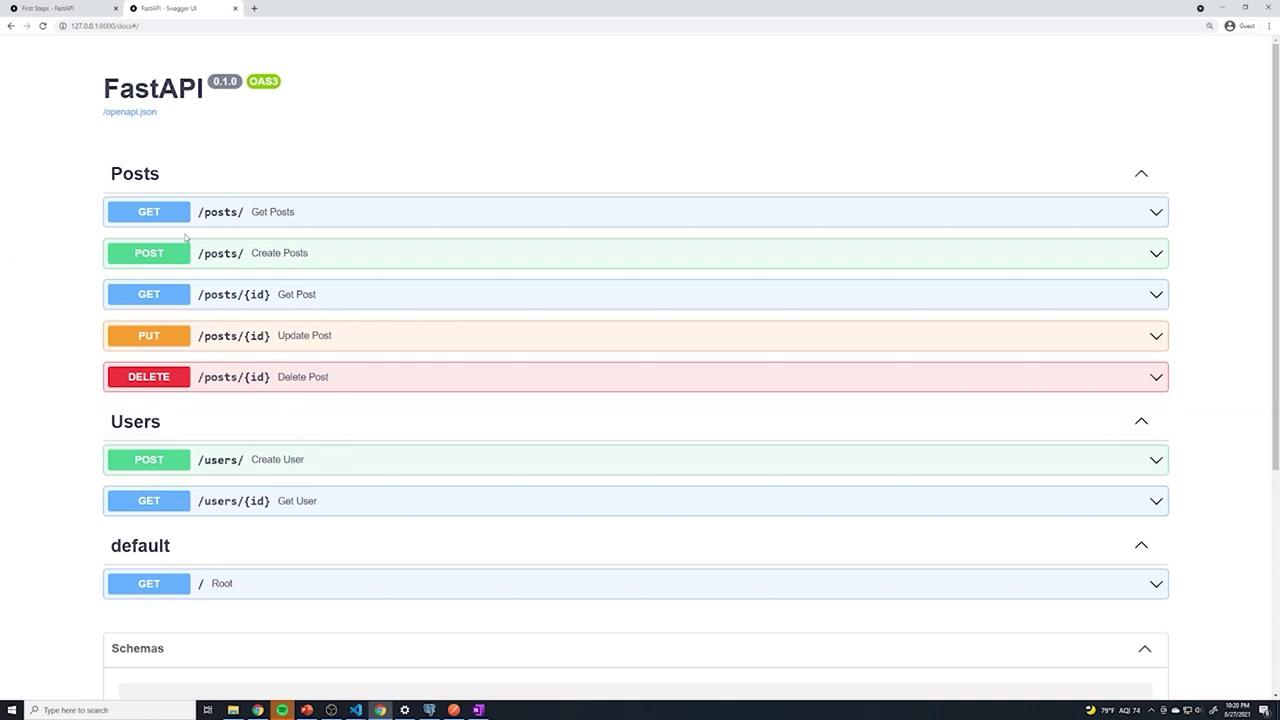
The Swagger UI documentation is generated dynamically by FastAPI. While a static image provides a visual reference, the interactive docs offer comprehensive details about every endpoint.
In summary, using router prefixes and tags in FastAPI streamlines your code, reduces redundancy, and enhances the automatic documentation. This results in an API that is easier to maintain and more intuitive for both users and developers.