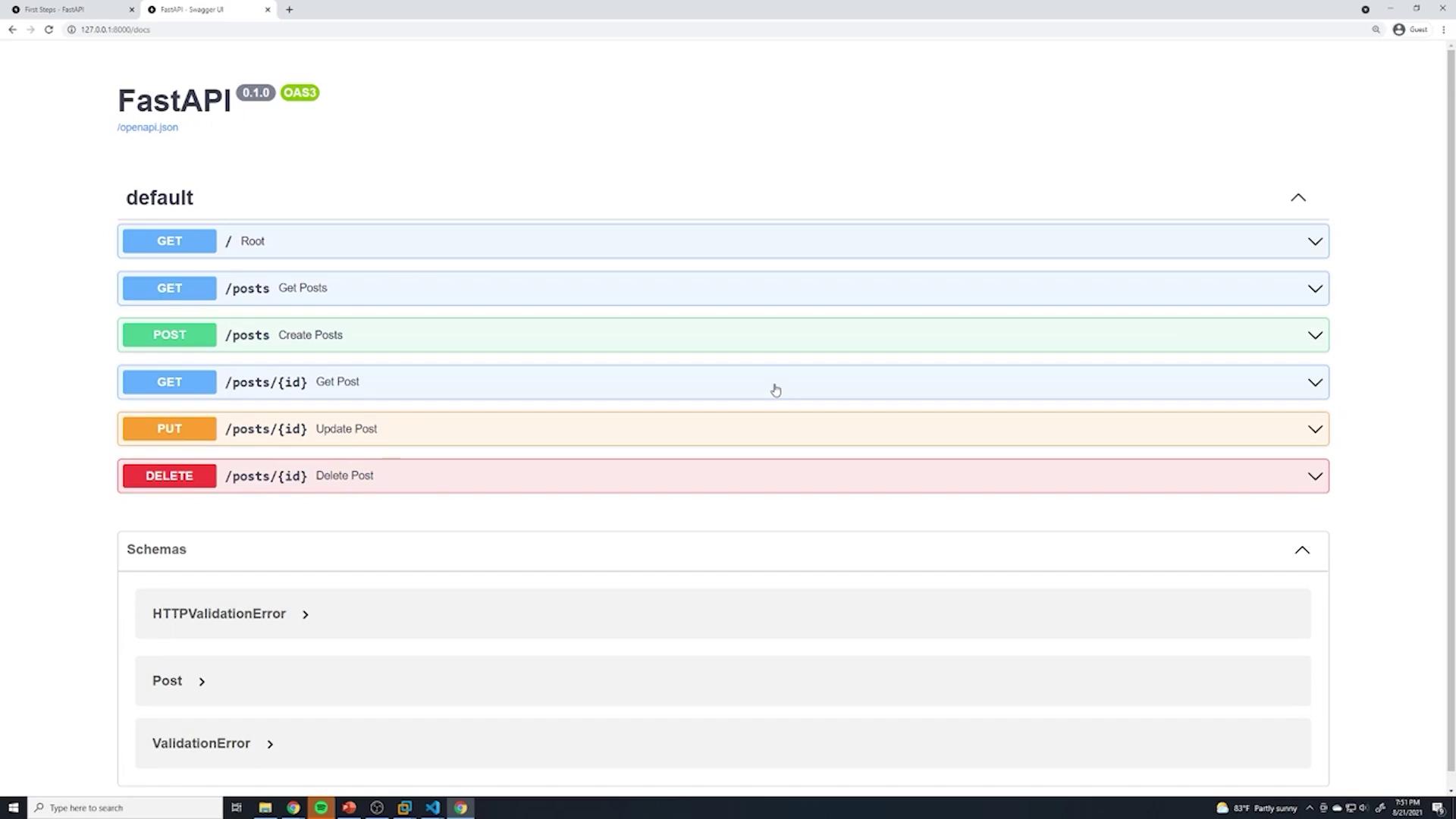
FastAPI provides automatic API documentation, enabling interactive testing and ensuring documentation stays in sync with API changes.
FastAPI is renowned for its built-in support for automatic API documentation. This feature enables developers to effortlessly generate interactive documentation, which is critical for understanding and testing API endpoints. Instead of manually updating documentation for every change in your API, FastAPI handles this automatically.When you build your API, simply navigate to /docs in your browser to access interactive documentation powered by Swagger UI. If you prefer a different interface, FastAPI also offers documentation via Redoc—allowing you to choose the interface that best suits your needs without any extra configuration.
FastAPI automatically generates and updates documentation based on your path operations, ensuring that your documentation is always in sync with your API implementation.
The diagram below illustrates the HTTP methods available for managing posts:
Common operations include:
Retrieving all posts
Creating a new post
Fetching an individual post
Updating a specific post
Deleting a post
Clicking on any of these endpoints provides detailed information, including example input data. You can use the “Try it out” button to execute queries directly against your API server. The result is displayed instantly within the interface, making it easy to verify functionality.
Below is a sample curl command to fetch all posts:
curl -X GET \
  http://127.0.0.1:8000/posts \
  -H 'accept: application/json'
The expected JSON response might look like this:
{ "data": [ { "title": "title of post 1", "content": "content of post 1", "id": 1 }, { "title": "favorite foods", "content": "I like pizza", "id": 2 } ]}
Additionally, the HTTP response headers may include:
You can adjust this schema based on your requirements. For a more engaging post, your JSON payload might look like this:
{ "title": "Treating new post with document", "content": "This is really cool.", "published": true, "rating": 0}
After entering your JSON payload in the documentation interface, click “Execute” to send the request to your API. FastAPI also displays the equivalent curl command for each request, which is useful for command-line interactions.Here’s how you can create a new post using curl:
curl -X 'POST' \ 'http://127.0.0.1:8000/posts' \ -H 'accept: application/json' \ -H 'Content-Type: application/json' \ -d '{ "title": "creating new post with documents", "content": "this is really cool.", "published": true, "rating": 4}'
The response confirms that the post was successfully created:
{ "data": { "title": "creating new post with documents", "content": "this is really cool.", "published": true, "rating": 4, "id": 231802 }}
And the response headers may appear as follows:
content-length: 125content-type: application/jsondate: Sat, 21 Aug 2021 23:32:46 GMTserver: uvicorn
FastAPI’s interactive documentation via Swagger UI or Redoc allows you to experiment with API endpoints without requiring external tools like Postman.
One of FastAPI’s major advantages is its dynamic documentation feature. Whenever you modify your API—such as adding a new field to your data models—the documentation is automatically updated to reflect these changes. This dynamic synchronization ensures that your API users always have access to the most current API specifications, significantly reducing the risk of outdated documentation.Explore FastAPI’s automatic documentation feature to streamline the process of API testing and validation. Happy coding!