

failureAction field in Kyverno policies and how it controls policy behavior for create and update requests.
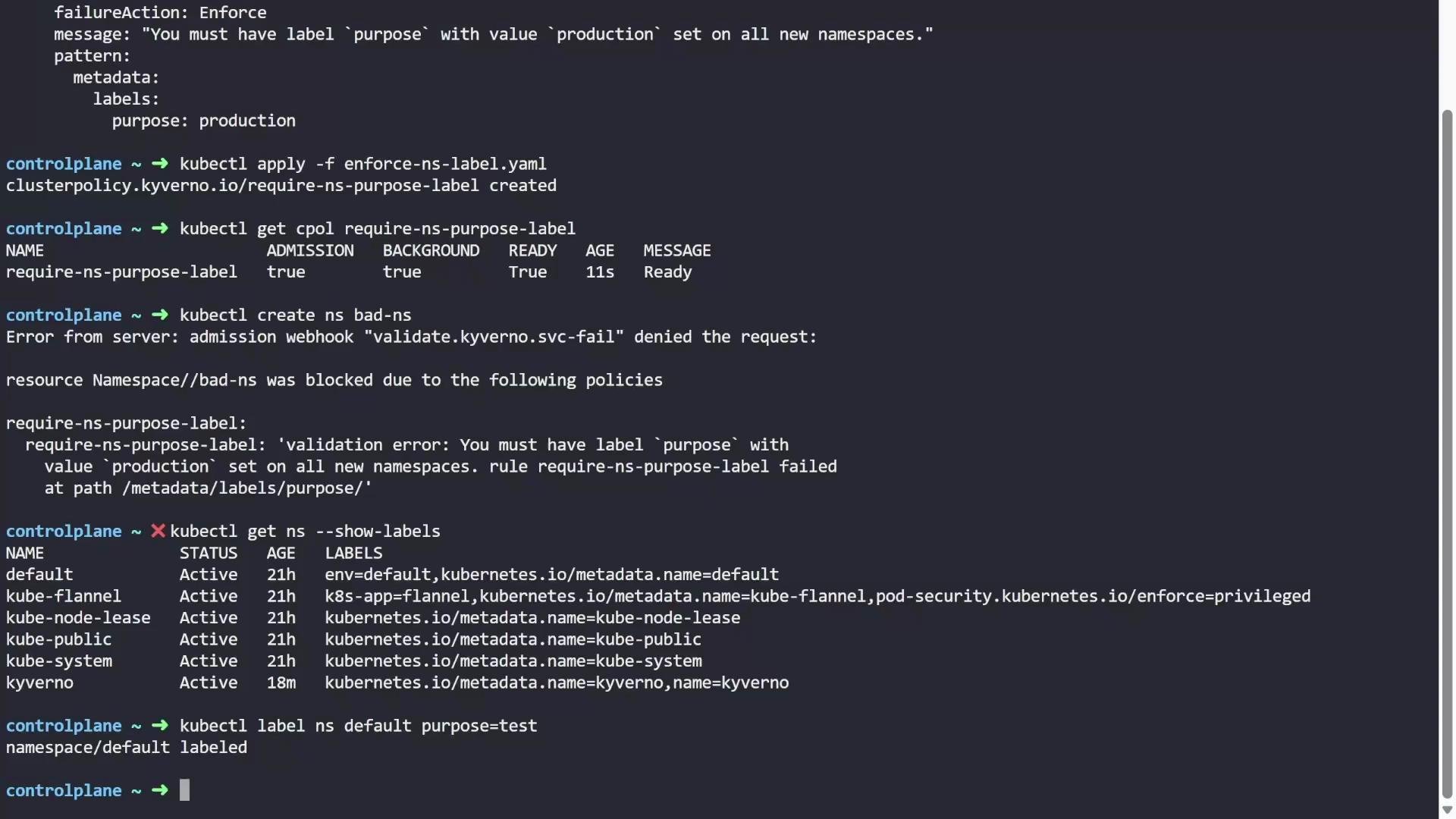
We begin with a simple ClusterPolicy that requires every Namespace to include a purpose: production label:
ClusterPolicy (applies cluster-wide). The rule is a validate rule that:
- matches resources of kind
Namespace - rejects non-conforming resources because
failureActionisEnforce - returns the provided
messagewhen validation fails - enforces the
patternthat requiresmetadata.labels.purposeto equalproduction
failureAction: Enforce, the admission webhook blocks the creation and returns a validation error:
Next, consider updates to pre-existing, non-compliant resources. By default, Kyverno will not block updates to resources that were already violating the policy when the policy was added. This is controlled by the
allowExistingViolations field (defaults to true).
For example, list existing namespaces and their labels:
default with purpose=test (an incorrect value according to our policy):
purpose value is test (not production), the label operation succeeds because Kyverno allows updates to existing violations by default.
By default
allowExistingViolations: true allows updates to resources that were non-compliant before the policy was added. This prevents sudden disruptions to an existing cluster.If you want Kyverno to re-evaluate and block updates to already-violating resources, set
allowExistingViolations: false in the policy spec and re-apply it. For example:
purpose value). Overwrite the existing label:
Audit mode: if you change
failureAction from Enforce to Audit, Kyverno will not block create or update operations. Instead it records violations in ClusterPolicyReport resources (useful for monitoring and auditing).
Policy example set to Audit:
ClusterPolicyReport (CPR). List CPRs:
emitWarning: immediate user feedback without blocking If you want users to receive a warning message in their terminal when an operation violates an audit-rule, add
emitWarning: true at the policy spec level. Example:
Summary
- failureAction: Enforce — blocks creation/updates of non-compliant resources.
- allowExistingViolations (default true) — if true, updates to already-violating resources are allowed; set to false to enforce on updates as well.
- failureAction: Audit — allows the resource but records violations in ClusterPolicyReport objects.
- emitWarning: true — with audit mode, returns a warning to the user in the terminal while still allowing the operation.