Documentation Index

Fetch the complete documentation index at: https://notes.kodekloud.com/llms.txt

Use this file to discover all available pages before exploring further.

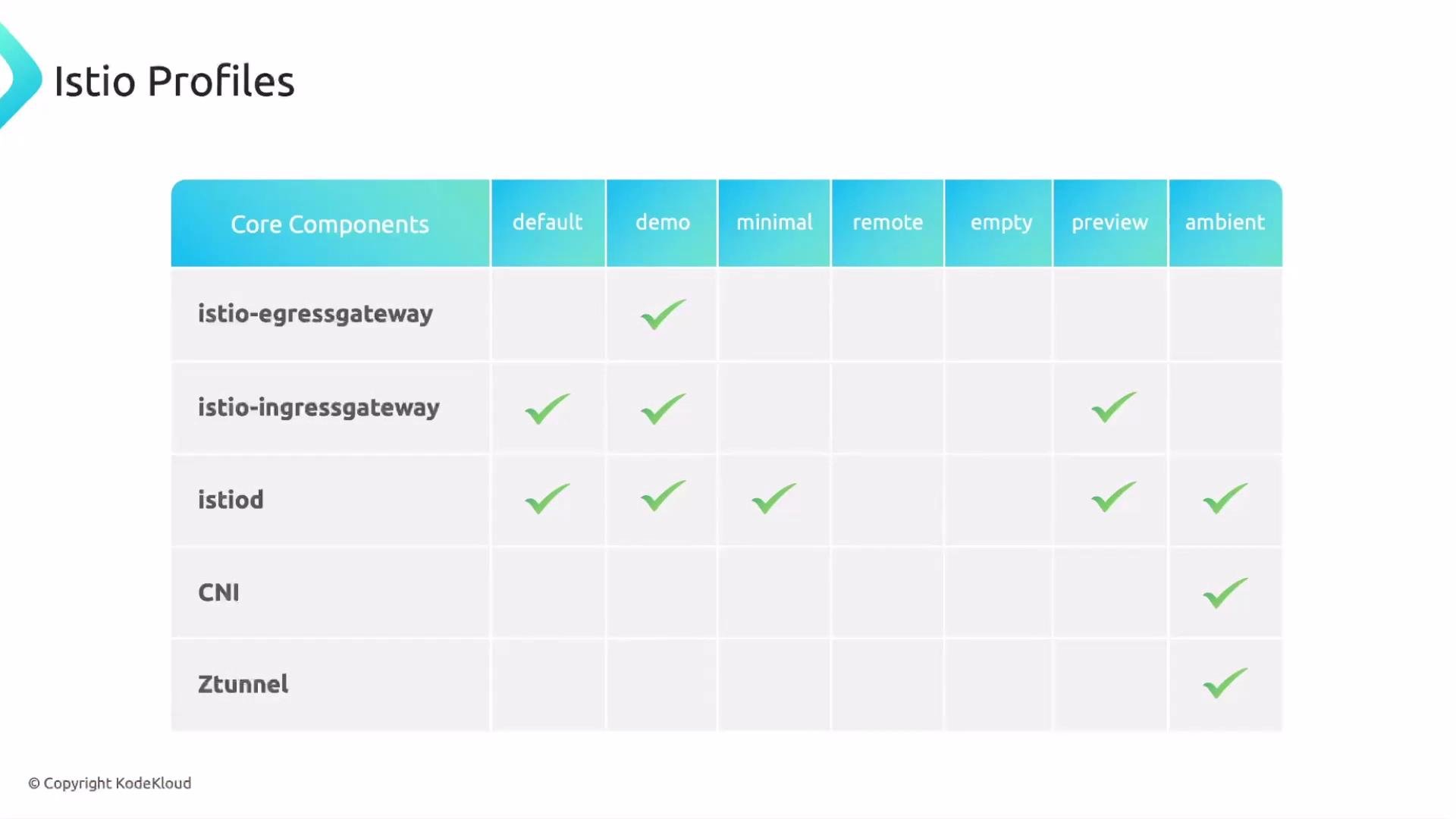
You can (and often should) customize Istio installs rather than relying on defaults. Istio provides several installation profiles (for example: demo, ambient, default, minimal, remote, empty, preview) that determine which control-plane components are included.
A slide showing a table titled "Istio Profiles" that maps core components to different installation profiles with green checkmarks indicating which components are included. Rows list components like istio-egressgateway, istio-ingressgateway, istiod, CNI and Ztunnel while columns show profiles such as default, demo, minimal, remote, empty, preview and ambient.
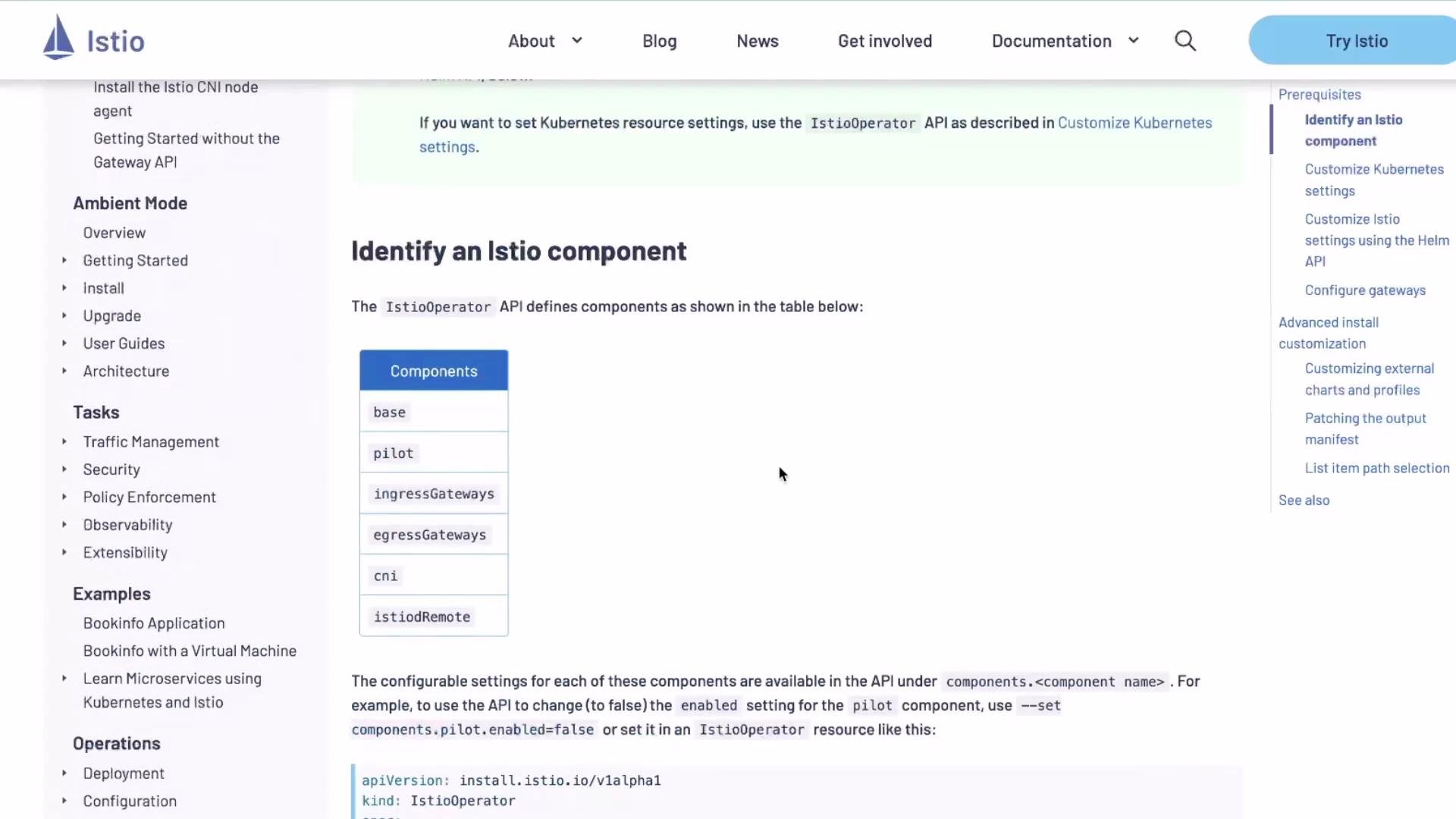
Previously istioctl included a subcommand that emitted a full IstioOperator manifest for a given profile. That helper was removed—today you author the IstioOperator resource yourself. The IstioOperator CR is the canonical way to customize control-plane installs; many examples are available in the official docs: https://istio.io/latest/docs/setup/install/operator/. Below are practical examples and notes you can reuse. They show the most common customizations you will need for installs, upgrades, exam tasks, and day-to-day operations.

Minimal IstioOperator skeleton

Start from a small, clear IstioOperator manifest and adjust as needed:
apiVersion: install.istio.io/v1alpha1
kind: IstioOperator
spec:
  profile: default
  hub: docker.io/istio
  tag: 1.18.2
  components:
    base:
      enabled: true
    cni:
      enabled: false
    ingressGateways:
    - enabled: true
      name: istio-ingressgateway
    egressGateways:
    - enabled: false
      name: istio-egressgateway
    istiodRemote:
      enabled: false
    pilot:
      enabled: true
  meshConfig:
    defaultConfig:
      proxyMetadata: {}
    enablePrometheusMerge: true
  values: {}
You can also apply single-value overrides directly on the istioctl command line:
# Set a single values key during installation
istioctl install --set values.pilot.traceSampling=0.1

Disabling Pilot (istiod)

If you need to disable Pilot (istiod) entirely, set pilot.enabled: false. This is rarely recommended unless you fully understand the consequences.
apiVersion: install.istio.io/v1alpha1
kind: IstioOperator
spec:
  components:
    pilot:
      enabled: false
Disabling Pilot (istiod) removes the control-plane component that distributes service discovery and configuration to Envoy sidecars. Only disable it if you have an alternative management/control-plane strategy.
Note: Pilot/istiod is the control-plane component that distributes service discovery and configuration to proxies (Envoy). The data plane proxy itself is proxyv2 (Envoy).

Adjusting Pilot (istiod) resources and autoscaling

You can override Kubernetes resources and HPA settings for components using the k8s block under each component. Example for Pilot:
apiVersion: install.istio.io/v1alpha1
kind: IstioOperator
spec:
  components:
    pilot:
      k8s:
        resources:
          requests:
            cpu: 1000m   # override from default 500m
            memory: 4096Mi
        hpaSpec:
          minReplicas: 2   # override default 1
          maxReplicas: 10  # override default 5
Then install or upgrade using that file:
# Install with a custom IstioOperator file
istioctl install -f samples/operator/pilot-k8s.yaml

# Or upgrade an existing install using a modified IstioOperator file
istioctl upgrade -f default.yaml

Example: custom profile, hub, tag, and revision

On the exam you may be asked to install a specific profile (for example minimal or empty), set hub/tag, and use revision for control-plane revisioning:
apiVersion: install.istio.io/v1alpha1
kind: IstioOperator
spec:
  profile: empty
  hub: docker.io/istio
  tag: 1.19.6
  revision: 1-19-6
  components:
    pilot:
      enabled: true
      namespace: istio-control
      k8s:
        overlays:
        - kind: Deployment
          name: istiod
          patches:
          - path: /spec/template/spec/containers/0/args/30
            value: "60m"

Key areas of an IstioOperator

The IstioOperator CR has three primary areas you should know. The table below summarizes their purpose and common examples.
AreaPurposeExample
global / top-levelSet profile, image registry/hub, tag, revision, and global namespaceprofile: empty, hub: docker.io/istio, tag: 1.19.6, revision: 1-19-6
meshConfigControl-plane and proxy configuration (access logs, tracing, proxy defaults)meshConfig.accessLogFile: /dev/stdout, enableTracing: true
componentsEnable/disable control-plane components and customize their Kubernetes resources via k8singressGateways, egressGateways, pilot, cni

meshConfig and enabling gateways

A typical customization enabling an egress gateway and setting meshConfig values:
apiVersion: install.istio.io/v1alpha1
kind: IstioOperator
spec:
  profile: default
  hub: gcr.io/istio-testing
  tag: latest
  revision: 1-8-0
  meshConfig:
    accessLogFile: /dev/stdout
    enableTracing: true
  components:
    egressGateways:
    - name: istio-egressgateway
      enabled: true
Many proxy-related defaults are configured under the values section. Example:
values:
  proxy:
    autoInject: enabled
    clusterDomain: cluster.local
    componentLogLevel: misc:error
    enableCoreDump: false
    excludeIPRanges: ""
    excludeInboundPorts: ""
    excludeOutboundPorts: ""
    image: proxyv2
    includeIPRanges: '*'
    logLevel: warning
    privileged: false
    readinessFailureThreshold: 30
    readinessInitialDelaySeconds: 1
    readinessPeriodSeconds: 2
    resources:
      limits:
        cpu: 2000m
        memory: 1024Mi
      requests:
        cpu: 100m
        memory: 128Mi

Helm alternative

If you prefer Helm, inspect default chart values, edit them, and install/upgrade with -f:
# Dump chart values to files
helm show values istio/base > istio_base.yaml
helm show values istio/istiod > istiod.yaml
helm show values istio/gateway > istio_gateway.yaml

# Install using customized values
helm install istio-base istio/base -n istio-system -f istio_base.yaml
helm install istiod istio/istiod -n istio-system -f istiod.yaml
To update an existing installation, either:
  • Modify your IstioOperator and run istioctl upgrade -f <file>, or
  • Use helm upgrade for Helm-based installs.

Typical install output

When installing with istioctl install -f default.yaml, you should see output like:
$ istioctl install -f default.yaml

 Istio core installed
 Istiod installed
 Egress gateways installed
 Ingress gateways installed
 Installation complete

Uninstall

To remove Istio and purge state:
# istioctl uninstall (purge state)
istioctl uninstall --purge

# Helm uninstall example for a specific release
helm uninstall istio-ingress -n istio-ingress

Quick validation commands

After installing or upgrading, validate the control plane and gateways:
# Check istio-system pods
kubectl get pods -n istio-system

# Inspect istiod deployment and pods
kubectl get deploy -n istio-system istiod
kubectl get pods -n istio-system -l app=istiod

# Check ingress/egress gateways
kubectl get svc -n istio-system

Study and practice tips

  • For the Istio Certified Associate (ICA) exam, practice creating a small IstioOperator manifest, change one option (for example enable an egress gateway or adjust Pilot CPU/memory), and apply it with istioctl install -f or istioctl upgrade -f.
  • Review the Istio docs operator guide and examples: https://istio.io/latest/docs/setup/install/operator/
  • Try both istioctl and Helm workflows so you’re comfortable with either during real-world tasks or exam scenarios.

Watch Video