Documentation Index

Fetch the complete documentation index at: https://notes.kodekloud.com/llms.txt

Use this file to discover all available pages before exploring further.

In this lesson you’ll install Istio into an existing Kubernetes cluster, deploy the Bookinfo sample application, and demonstrate both automatic namespace injection and manual (per-workload) injection of the Istio sidecar proxy. This guide follows a step-by-step flow:
  1. Deploy the Bookinfo sample (pre-Istio).
  2. Install istioctl.
  3. Install the Istio control plane (demo profile).
  4. Enable automatic sidecar injection for a namespace.
  5. Manually inject the sidecar into an individual workload in an unlabeled namespace.
Prerequisites
RequirementWhy it matters
A running Kubernetes cluster with kubectl configuredYou need cluster access to deploy resources and inspect pods
Cluster privileges to install cluster components and label namespacesInstalling Istio and modifying namespace labels requires sufficient RBAC permissions
Optional: Familiarity with Kubernetes kubectl basicsHelpful for troubleshooting and pod inspection

1) Deploy the Bookinfo sample (pre-Istio)

First apply the Bookinfo sample so we have workloads to inject later. This deploys several microservices into the default namespace.
kubectl apply -f https://raw.githubusercontent.com/istio/istio/release-1.11/samples/bookinfo/platform/kube/bookinfo.yaml
Verify pods are being created in default:
kubectl get pods
Sample output (initial state, containers are being created):
NAME                           READY   STATUS              RESTARTS   AGE
details-v1-65599dcf88-k44bb    0/1     ContainerCreating   0          6s
productpage-v1-9487c9c5b-9cqhs 0/1     ContainerCreating   0          5s
ratings-v1-59b99c644-fhsp8     0/1     ContainerCreating   0          6s
reviews-v1-5985998544-k4lph    0/1     ContainerCreating   0          6s
reviews-v2-86d6cc668-qntwq     0/1     ContainerCreating   0          6s
reviews-v3-dbb5fb5dd-ffg9v     0/1     ContainerCreating   0          6s
Inspect a pod to confirm it currently has only the application container (no Istio proxy yet):
kubectl describe pod details-v1-65599dcf88-k44bb
Relevant excerpt (shows a single container details):
Containers:
  details:
    Image:          docker.io/istio/examples-bookinfo-details-v1:1.16.2
    Port:           9080/TCP
    State:          Running
    Ready:          True
At this point Bookinfo is running, but Istio is not yet installed in the cluster.

2) Install istioctl (download the client)

Check whether istioctl is already present:
istioctl version
If not installed, download the Istio release used in this demo (1.26.3):
curl -L https://istio.io/downloadIstio | ISTIO_VERSION=1.26.3 sh -
Add the istioctl binary directory to your PATH (adjust the path as needed for your user/home location):
export PATH="$PATH:/root/istio-1.26.3/bin"
Confirm istioctl is available. At this point it will typically show a client version and note that Istio is not installed in-cluster:
istioctl version
Sample output:
client version: 1.26.3
Istio not installed

3) Install Istio control plane (demo profile)

Install the Istio control plane into your cluster using the demo profile, which is suitable for learning and demos:
istioctl install --set profile=demo -y
You should see output indicating core components and control plane services have been installed:
✔ Istio core installed ⛵
✔ Istiod installed 🧠
✔ Egress gateways installed ✈️
✔ Ingress gateways installed ✈️
✔ Installation complete
Verify the Istio system components are running in the istio-system namespace:
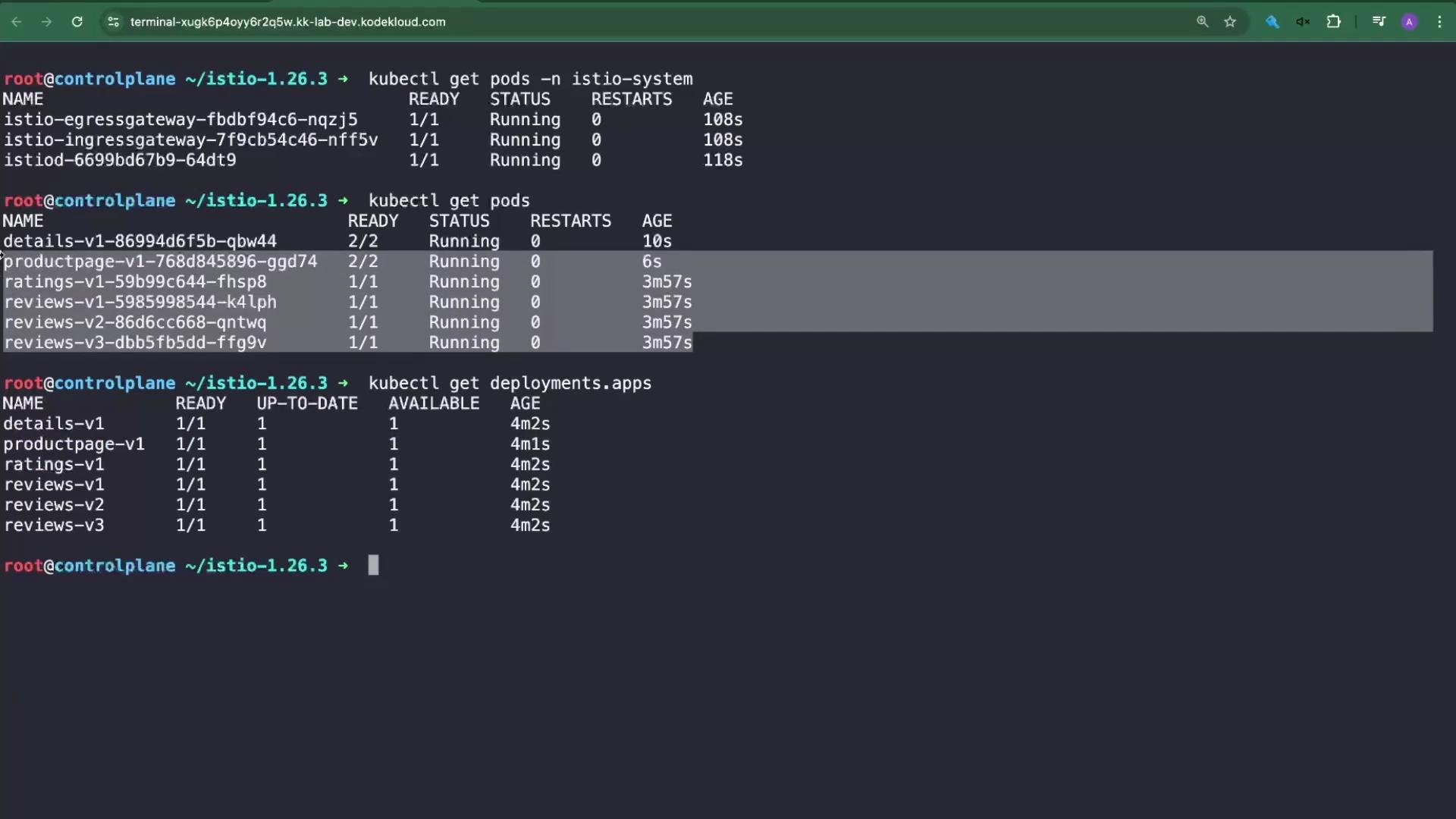
kubectl get pods -n istio-system
Expect pods such as istiod-..., istio-ingressgateway-..., and istio-egressgateway-....

4) Enable automatic sidecar injection for a namespace

Use istioctl analyze to surface common configuration hints. For example, analyze the default namespace:
istioctl analyze -n default
If the namespace is not enabled for automatic injection, you may see an info message such as:
Info [IST0102] (Namespace default) The namespace is not enabled for Istio injection. Run 'kubectl label namespace default istio-injection=enabled' to enable it, or 'kubectl label namespace default istio-injection=disabled' to explicitly mark it as not needing injection.
Enable automatic sidecar injection for the namespace (for this demo we use default):
kubectl label namespace default istio-injection=enabled --overwrite
Important: labeling a namespace does not restart existing pods. To apply injection to running workloads you must restart them (or delete/recreate them). Restart one or more deployments so the sidecar is injected:
kubectl rollout restart deployment details-v1 productpage-v1
Check pods; injected workloads should now show 2/2 (application container + istio-proxy):
kubectl get pods
Example showing injected pods:
details-v1-...    2/2   Running   0   14s
productpage-v1-...2/2   Running   0   13s
ratings-v1-...    1/1   Running   0   14s   # not yet restarted in this snapshot
Describe an injected pod to confirm the injected istio-proxy container:
kubectl describe pod details-v1-...
Excerpt showing the proxy container:
Containers:
  details:
    Image: docker.io/istio/examples-bookinfo-details-v1:1.16.2
    Port: 9080/TCP
  istio-proxy:
    Image: docker.io/istio/proxyv2:1.26.3
    Port: 15090/TCP
    Args:
      proxy sidecar --domain $(POD_NAMESPACE).svc.cluster.local ...
    Readiness: http-get http://:15021/healthz/ready ...
This confirms the Istio sidecar proxy (version 1.26.3) was injected and is running alongside the application container.

5) Manual (per-workload) injection into an unlabeled namespace

Automatic namespace injection is convenient, but there are cases where you want to inject only specific workloads within a namespace. Manual injection—by annotating the pod or deployment manifest—lets you do that without labeling the namespace. Create a new namespace named db (do not label it for injection):
kubectl create ns db
kubectl get ns --show-labels
Run a simple Redis pod without injection:
kubectl run redis-no-proxy --image=redis -n db
kubectl get pods -n db
You will see redis-no-proxy running with only one container (no istio-proxy). Analyze the namespace to confirm it’s not enabled for injection:
istioctl analyze -n db
You should receive the same IST0102 hint indicating the namespace is not enabled for injection. To inject the sidecar for a single workload without labeling the namespace, add the injector annotation sidecar.istio.io/inject: "true" to that pod or deployment. A simple way is to create the pod manifest locally and apply it. Create a pod manifest using a dry-run:
kubectl run redis-istio-proxy --image=redis -n db --dry-run=client -o yaml > pod.yaml
Edit pod.yaml and add the injector annotation under metadata, for example:
metadata:
  name: redis-istio-proxy
  namespace: db
  annotations:
    sidecar.istio.io/inject: "true"
Apply the manifest:
kubectl apply -f pod.yaml
After applying, check pods in db:
kubectl get pods -n db
You should see two pods:
  • redis-no-proxy with 1/1 (application container only)
  • redis-istio-proxy with 2/2 (application container + istio-proxy)
Describe the injected pod to inspect the proxy container and Istio environment variables:
kubectl describe pod redis-istio-proxy -n db
Excerpt showing both containers and Istio metadata:
Containers:
  redis-istio-proxy:
    Image: redis
    State: Running
  istio-proxy:
    Image: docker.io/istio/proxyv2:1.26.3
    Args: proxy sidecar --domain $(POD_NAMESPACE).svc.cluster.local ...
Environment:
  PILOT_CERT_PROVIDER: istiod
  CA_ADDR: istiod.istio-system.svc:15012
  POD_NAME: redis-istio-proxy
  POD_NAMESPACE: db
ISTIO_META_INTERCEPTION_MODE: REDIRECT
ISTIO_META_WORKLOAD_NAME: redis-istio-proxy
This demonstrates per-workload injection via annotation, without labeling the entire namespace.
Automatic namespace injection (labeling the namespace) is the simpler and recommended approach for most environments. Use the annotation sidecar.istio.io/inject: "true" when you need to inject only specific workloads in an otherwise unlabeled namespace. Note: some legacy helpers such as istioctl kube-inject have been deprecated or removed in recent Istio releases, so prefer annotation-based injection or istioctl-based installation workflows.

Quick reference: common commands

TaskCommand
Apply Bookinfo samplekubectl apply -f https://raw.githubusercontent.com/istio/istio/release-1.11/samples/bookinfo/platform/kube/bookinfo.yaml
Check podskubectl get pods
Describe podkubectl describe pod <pod-name>
Download Istio`curl -L https://istio.io/downloadIstioISTIO_VERSION=1.26.3 sh -`
Add istioctl to PATHexport PATH="$PATH:/root/istio-1.26.3/bin"
Install Istio (demo)istioctl install --set profile=demo -y
Analyze namespaceistioctl analyze -n <namespace>
Label namespace for injectionkubectl label namespace default istio-injection=enabled --overwrite
Restart deployments to injectkubectl rollout restart deployment <deployment-name>
Create namespacekubectl create ns db
Create pod manifest with dry-runkubectl run redis-istio-proxy --image=redis -n db --dry-run=client -o yaml > pod.yaml
Apply manifestkubectl apply -f pod.yaml

Summary

  • Installed istioctl (client v1.26.3) and the Istio control plane using the demo profile.
  • Deployed the Bookinfo sample before installing Istio to illustrate pre- and post-injection behavior.
  • Enabled automatic sidecar injection by labeling a namespace, then restarted specific workloads to have the istio-proxy injected.
  • Demonstrated manual, per-workload injection by annotating a pod manifest so the admission webhook would add the sidecar in an otherwise unlabeled namespace.
Keep both automatic and manual injection workflows in mind — they are commonly tested and useful in real-world cluster operations and troubleshooting. Links and references

Watch Video

Practice Lab