Documentation Index

Fetch the complete documentation index at: https://notes.kodekloud.com/llms.txt

Use this file to discover all available pages before exploring further.

This guide shows how to configure circuit breaking in Istio using a simple echo service and Fortio for load testing. You’ll deploy an echo application, create a VirtualService and a DestinationRule (with connection pool limits and outlier detection), generate load to observe Envoy rejecting requests (HTTP 503) when limits are exceeded, and inspect sidecar stats to validate behavior.
Always verify the namespace has Istio sidecar injection enabled before you deploy. If you deploy into a namespace without the istio-injection=enabled label, your pods won’t get sidecars and Istio traffic rules (including circuit breaking) won’t apply.

1) Verify the namespace is labeled

Confirm that the target namespace has istio-injection=enabled so that Istio sidecars are injected:
root@controlplane ~ kubectl get ns --show-labels
NAME               STATUS   AGE   LABELS
default            Active   24m   istio-injection=enabled,kubernetes.io/metadata.name=default
istio-system       Active   71s   kubernetes.io/metadata.name=istio-system
kube-node-lease    Active   24m   kubernetes.io/metadata.name=kube-node-lease
kube-public        Active   24m   kubernetes.io/metadata.name=kube-public
kube-system        Active   24m   kubernetes.io/metadata.name=kube-system
If your target namespace is not labeled, either add the label:
kubectl label namespace <your-namespace> istio-injection=enabled
or create a new labeled namespace:
kubectl create namespace <your-namespace>
kubectl label namespace <your-namespace> istio-injection=enabled

2) Deploy the echo application and Service

Create a Deployment for the echo service (file: echo_deployment.yaml) and a ClusterIP Service echo_svc.yaml. The Service manifest looks like:
apiVersion: v1
kind: Service
metadata:
  name: echo-server
  labels:
    app: echo-server
spec:
  ports:
  - port: 80
    name: http
  selector:
    app: echo-server
Apply the Deployment and Service:
root@controlplane ~ kubectl apply -f echo_deployment.yaml
deployment.apps/echo-server created

root@controlplane ~ kubectl apply -f echo_svc.yaml
service/echo-server created

root@controlplane ~ kubectl get pods
NAME                                READY   STATUS    RESTARTS   AGE
echo-server-64fb4c5655-vzdh6        2/2     Running   0          67s

root@controlplane ~ kubectl get svc
NAME          TYPE        CLUSTER-IP       EXTERNAL-IP   PORT(S)    AGE
echo-server   ClusterIP   10.104.144.230   <none>        80/TCP     4m7s
kubernetes    ClusterIP   10.96.0.1        <none>        443/TCP    30m
With the sidecar injected, Istio routing and policies (DestinationRule/VirtualService) will apply to traffic for this Service.

3) Deploy Fortio (load-testing client)

Fortio is a simple load-testing client used to generate HTTP traffic against the echo service. Deploy Fortio from the Istio samples:
root@controlplane ~ kubectl apply -f https://raw.githubusercontent.com/istio/istio/release-1.25/samples/httpbin/sample-client/fortio-deploy.yaml
service/fortio created
deployment.apps/fortio-deploy created

root@controlplane ~ kubectl get pods
NAME                                    READY   STATUS    RESTARTS   AGE
fortio-deploy-689bd5969b-l8z2v          2/2     Running   0          9s
echo-server-64fb4c5655-vzdh6            2/2     Running   0          67s
Test the echo service from the Fortio pod and extract the HOSTNAME field in the response:
root@controlplane ~ kubectl exec fortio-deploy-689bd5969b-l8z2v -c fortio -- /usr/bin/fortio curl -quiet http://echo-server | grep -o '"HOSTNAME":"[^"]*"'
HTTP/1.1 200 OK
content-type: application/json; charset=utf-8
content-length: 1103
date: Tue, 15 Apr 2025 15:35:04 GMT
x-envoy-upstream-service-time: 10
server: envoy

"HOSTNAME":"echo-server-64fb4c5655-vzdh6"
At this point, no circuit breaker is configured, so requests succeed normally.

4) Create a VirtualService (basic routing)

Create vs.yaml to route traffic for echo-server through Istio:
apiVersion: networking.istio.io/v1
kind: VirtualService
metadata:
  name: echo-vs
spec:
  hosts:
  - echo-server
  http:
  - route:
    - destination:
        host: echo-server
        port:
          number: 80
Apply the VirtualService:
root@controlplane ~ kubectl apply -f vs.yaml
virtualservice.networking.istio.io/echo-vs created
Note: The VirtualService handles routing but does not enforce circuit breaking itself. Circuit breaking behavior comes from DestinationRule trafficPolicy settings.

5) Create a DestinationRule to enable circuit breaking

Create dr.yaml containing connection pool limits and outlier detection to exercise circuit breaking:
apiVersion: networking.istio.io/v1
kind: DestinationRule
metadata:
  name: echo-dr
spec:
  host: echo-server
  trafficPolicy:
    connectionPool:
      tcp:
        maxConnections: 1
      http:
        http1MaxPendingRequests: 1
        maxRequestsPerConnection: 1
    outlierDetection:
      consecutive5xxErrors: 1
      interval: 5s
      baseEjectionTime: 30s
      maxEjectionPercent: 100
Apply it:
root@controlplane ~ kubectl apply -f dr.yaml
destinationrule.networking.istio.io/echo-dr created

root@controlplane ~ kubectl get vs
NAME    GATEWAYS    HOSTS                AGE
echo-vs        ["echo-server"]       3m36s

root@controlplane ~ kubectl get destinationrules.networking.istio.io
NAME      HOST          AGE
echo-dr   echo-server   7s

Quick reference — DestinationRule trafficPolicy fields

FieldPurposeExample value
connectionPool.tcp.maxConnectionsMaximum concurrent TCP connections per upstream host1
connectionPool.http.http1MaxPendingRequestsMax queued HTTP requests per upstream connection1
connectionPool.http.maxRequestsPerConnectionMax number of requests on a single connection1
outlierDetection.consecutive5xxErrorsNumber of consecutive 5xx responses to eject a host1
outlierDetection.intervalFrequency Envoy checks hosts5s
outlierDetection.baseEjectionTimeDuration to eject a host30s
outlierDetection.maxEjectionPercentMax percent of hosts Envoy can eject100
These fields control how Envoy accepts or rejects requests and when it ejects unhealthy upstream hosts.

6) Load test to trigger the circuit breaker

Use Fortio to generate concurrent requests. A single request won’t trigger circuit breaking — generate concurrent load. First, a small sanity test:
root@controlplane ~ kubectl exec fortio-deploy-689bd5969b-l8z2v -c fortio -- /usr/bin/fortio load -c 2 -qps 0 -n 20 -loglevel Warning http://echo-server
Example summary:
Code 200 : 19 (95.0 %)
Code 503 : 1 (5.0 %)
All done 20 calls 7.465 ms avg, 260.3 qps
Now run a heavier test designed to exceed maxConnections: 1:
root@controlplane ~ kubectl exec fortio-deploy-689bd5969b-l8z2v -c fortio -- /usr/bin/fortio load -c 20 -qps 0 -n 80 -loglevel Warning http://echo-server
Example output showing the circuit breaker tripping:
Code 200 : 7 (8.8 %)
Code 503 : 73 (91.2 %)
All done 80 calls 10.916 ms avg, 1202.9 qps
When connection/pending request limits are reached, Envoy rejects excess requests with HTTP 503.

7) Adjust the DestinationRule to allow more load

If you need to accept more concurrent requests, update the DestinationRule. Example: increase maxConnections to 10 and maxRequestsPerConnection to 10:
apiVersion: networking.istio.io/v1
kind: DestinationRule
metadata:
  name: echo-dr
spec:
  host: echo-server
  trafficPolicy:
    connectionPool:
      tcp:
        maxConnections: 10
      http:
        http1MaxPendingRequests: 1
        maxRequestsPerConnection: 10
    outlierDetection:
      consecutive5xxErrors: 1
      interval: 5s
      baseEjectionTime: 30s
      maxEjectionPercent: 100
Apply the updated rule:
root@controlplane ~ kubectl apply -f dr.yaml
destinationrule.networking.istio.io/echo-dr configured
Re-run the same Fortio load test:
root@controlplane ~ kubectl exec fortio-deploy-689bd5969b-l8z2v -c fortio -- /usr/bin/fortio load -c 20 -qps 0 -n 80 -loglevel Warning http://echo-server
Updated sample summary:
Code 200 : 15 (18.8 %)
Code 503 : 65 (81.2 %)
All done 80 calls 13.418 ms avg, 1131.1 qps
Tuning these parameters changes how many requests Envoy accepts before it begins rejecting new requests.

8) Inspect Envoy / pilot-agent stats for circuit breaker metrics

Query the sidecar proxy (pilot-agent) stats to inspect pending/open/rejected metrics for the cluster. From a pod with the Istio sidecar (e.g., Fortio), run:
root@controlplane ~ kubectl exec fortio-deploy-689bd5969b-l8z2v -c istio-proxy -- pilot-agent request GET stats | grep echo-server | grep pending
cluster.outbound|80||echo-server.default.svc.cluster.local;.circuit_breakers.default.remaining_pending: 1
cluster.outbound|80||echo-server.default.svc.cluster.local;.circuit_breakers.default.rq_pending_open: 0
cluster.outbound|80||echo-server.default.svc.cluster.local;.upstream_rq_pending_active: 0
cluster.outbound|80||echo-server.default.svc.cluster.local;.upstream_rq_pending_failure_eject: 0
cluster.outbound|80||echo-server.default.svc.cluster.local;.upstream_rq_pending_overflow: 139
cluster.outbound|80||echo-server.default.svc.cluster.local;.upstream_rq_pending_total: 36
Key metrics to watch:
  • .upstream_rq_pending_overflow: number of requests overflowed (rejected due to queue limits).
  • .circuit_breakers.default.remaining_pending: remaining pending capacity.
  • .upstream_rq_pending_failure_eject: pending requests that caused ejection.
These metrics help validate whether pending queues, overflows, and ejection events occurred.
Circuit breaking and aggressive connection-pool limits can easily cause availability issues. Only apply production limits after you understand the application’s requirements and test thoroughly. For exam purposes, remember: circuit breaking is configured via DestinationRule; focus on connectionPool and outlierDetection fields.

9) Reference and example DestinationRule patterns

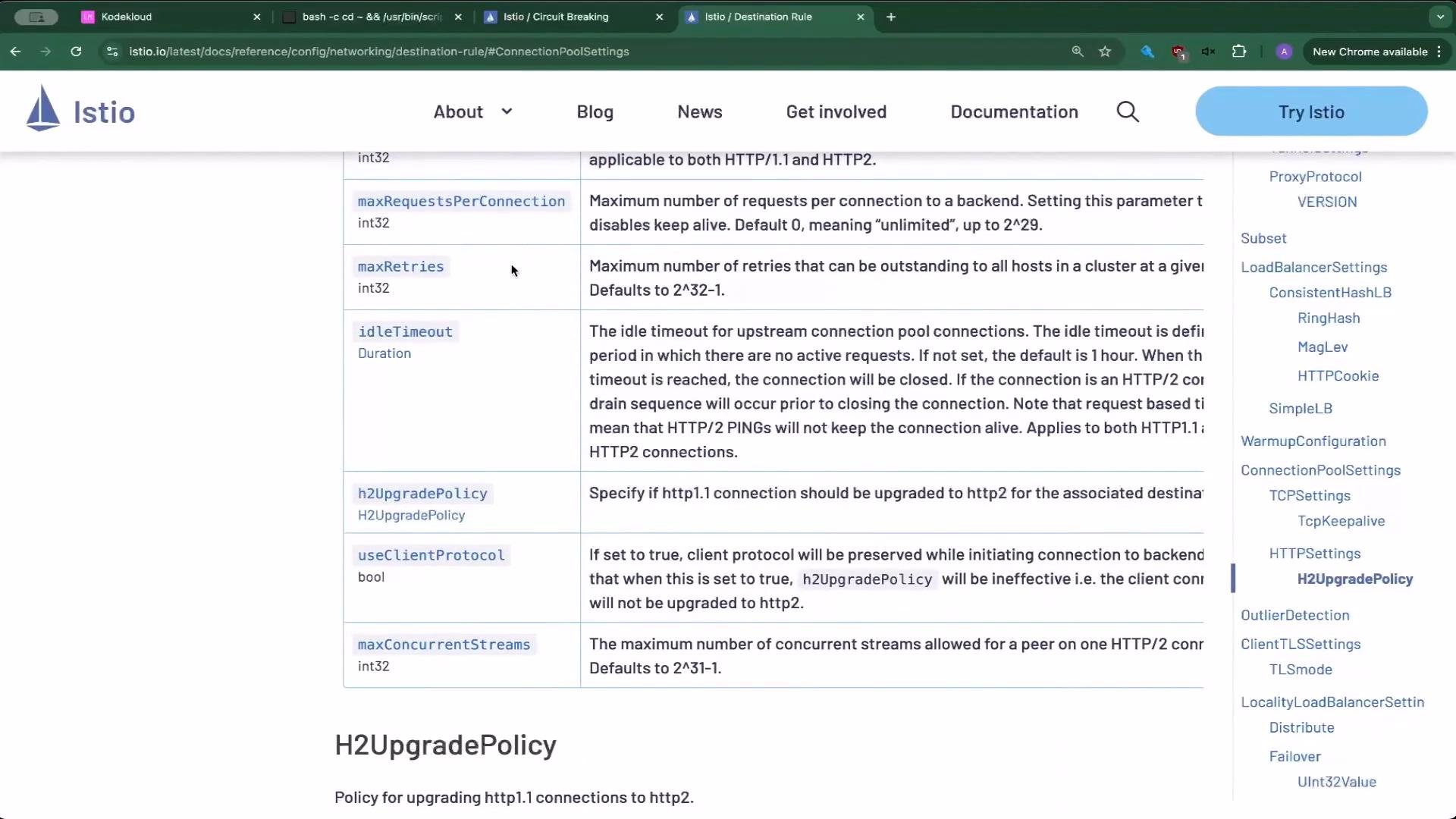
Istio docs contain many DestinationRule examples. Useful patterns include subset-level trafficPolicy, TCP/keepalive tuning, larger outlier detection thresholds, and TLS settings.
  • Per-service + subset trafficPolicy example:
apiVersion: networking.istio.io/v1
kind: DestinationRule
metadata:
  name: bookinfo-ratings
spec:
  host: ratings.prod.svc.cluster.local
  trafficPolicy:
    loadBalancer:
      simple: LEAST_REQUEST
  subsets:
  - name: testversion
    labels:
      version: v3
    trafficPolicy:
      loadBalancer:
        simple: ROUND_ROBIN
  • TCP connection pool + keepalive + timeout:
apiVersion: networking.istio.io/v1
kind: DestinationRule
metadata:
  name: bookinfo-redis
spec:
  host: myredissrv.prod.svc.cluster.local
  trafficPolicy:
    connectionPool:
      tcp:
        maxConnections: 100
        connectTimeout: 30ms
        tcpKeepalive:
          time: 7200s
          interval: 75s
  • Larger outlier detection thresholds:
apiVersion: networking.istio.io/v1
kind: DestinationRule
metadata:
  name: reviews-cb-policy
spec:
  host: reviews.prod.svc.cluster.local
  trafficPolicy:
    connectionPool:
      tcp:
        maxConnections: 100
      http:
        http2MaxRequests: 1000
        maxRequestsPerConnection: 10
    outlierDetection:
      consecutive5xxErrors: 7
      interval: 5m
      baseEjectionTime: 15m
  • Configuring mutual TLS for a service:
apiVersion: networking.istio.io/v1
kind: DestinationRule
metadata:
  name: db-mtls
spec:
  host: mydbserver.prod.svc.cluster.local
  trafficPolicy:
    tls:
      mode: MUTUAL
      clientCertificate: /etc/certs/myclientcert.pem
      privateKey: /etc/certs/client_private_key.pem
      caCertificates: /etc/certs/rootcacerts.pem
For the full DestinationRule reference and more examples, see the Istio documentation: https://istio.io/latest/docs/reference/config/networking/destination-rule/
A screenshot of the Istio website documentation page titled "Circuit Breaking," showing the page header, navigation/menu on the left, and explanatory text about configuring circuit breakers.

Final notes

  • For the exam: when you see “circuit breaking,” think “DestinationRule” and look for connectionPool and outlierDetection.
  • Validate changes with controlled load (Fortio or similar) and inspect sidecar stats using pilot-agent request GET stats.
  • Tune connectionPool and outlierDetection values to match real application capacity to avoid unintentional outages.
  • Next topics to explore: fault injection, retries, and advanced load-balancing policies.
Links and References

Watch Video

Practice Lab