Documentation Index

Fetch the complete documentation index at: https://notes.kodekloud.com/llms.txt

Use this file to discover all available pages before exploring further.

A sidecar proxy (for example, Envoy) is injected into application pods to manage and secure traffic for workloads in the Istio service mesh. Envoy provides secure connections, observability, and advanced traffic-management capabilities such as load balancing, retries, circuit breaking, and mirroring. When Istio automatic sidecar injection is disabled for a namespace, workloads there do not receive an Envoy proxy and therefore do not benefit from sidecar features. Traffic can still flow unless you apply policies (for example, PeerAuthentication) that restrict it, but without an injected proxy you cannot enforce Istio mTLS or rely on many Istio features that assume a proxy is present.
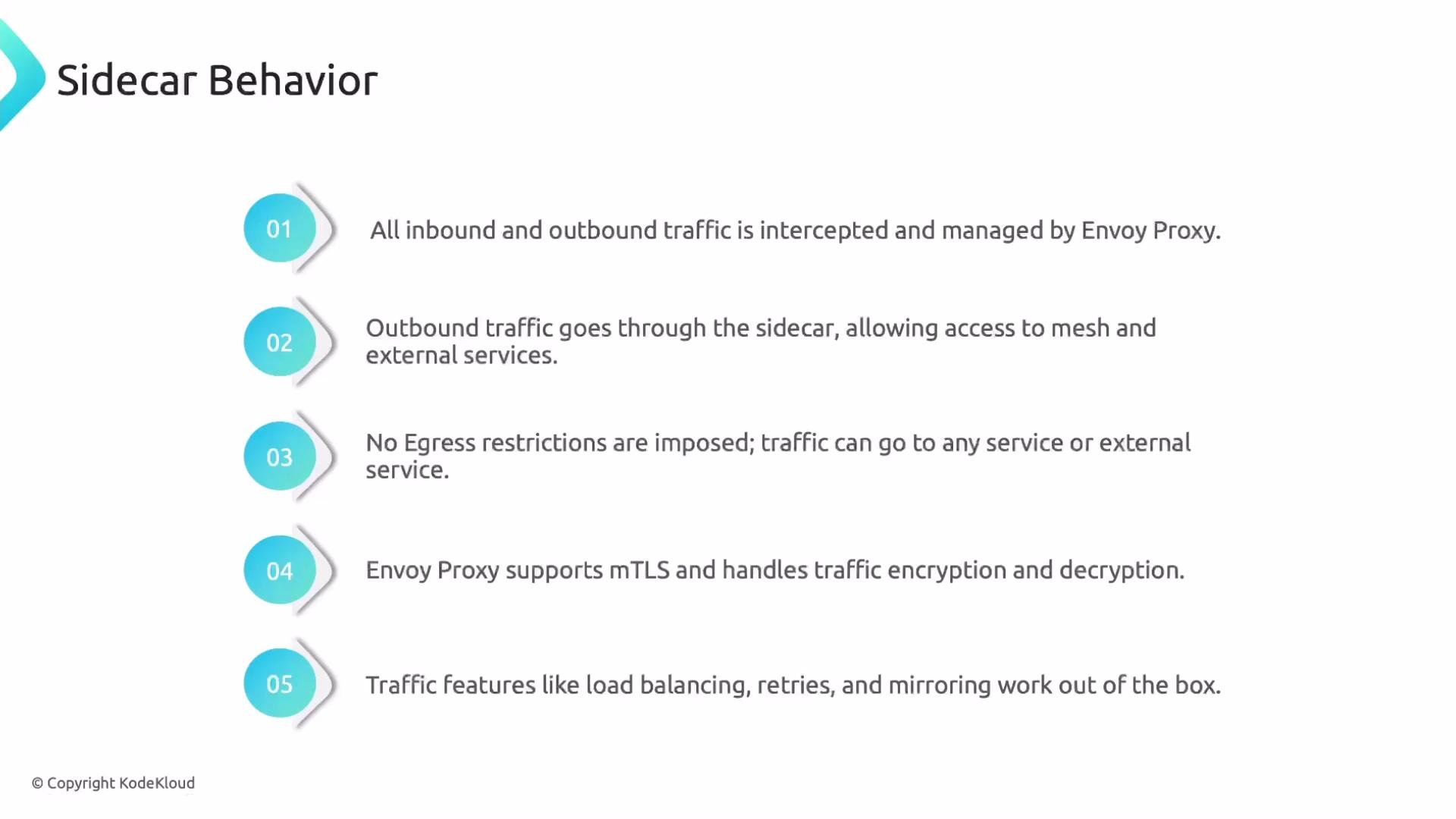
A presentation slide titled "Sidecar Behavior" listing five numbered points
about Envoy sidecar behavior. It explains that Envoy intercepts and manages
inbound/outbound traffic, routes outbound traffic to mesh/external services
with no egress restrictions, supports mTLS, and provides built‑in features
like load balancing, retries, and
mirroring.

Default sidecar behavior

By default, an injected Envoy sidecar intercepts both inbound and outbound traffic for a workload. Istio’s PeerAuthentication is often left in PERMISSIVE mode unless explicitly configured; permissive mode accepts both mTLS and plaintext traffic. Together, default interception and permissive authentication allow communication between workloads regardless of whether the peer has an Envoy proxy (plaintext clients can talk to permissive mTLS-enabled servers). For many deployments the defaults are sufficient. Use the Sidecar resource to gain finer-grained control over namespace- or workload-level egress and ingress behavior when needed.

Restricting egress using a Sidecar resource

You might want to restrict egress from a namespace so workloads can only talk to a small set of permitted namespaces. For example, to limit the payments namespace so it can only send outbound traffic to itself, the app namespace, and istio-system, create a Sidecar resource in payments:
apiVersion: networking.istio.io/v1
kind: Sidecar
metadata:
  name: default
  namespace: payments
spec:
  egress:
    - hosts:
        - "./*"
        - "app/*"
        - "istio-system/*"
Explanation:
  • ./* — all workloads in the same namespace (payments/*).
  • app/* — every workload in the app namespace.
  • istio-system/* — every workload in the istio-system namespace.
With this Sidecar, outbound traffic from workloads in payments will be allowed only to:
  • workloads in the same payments namespace,
  • workloads in app, and
  • workloads in istio-system.
Any other egress destinations are blocked by the sidecar configuration.
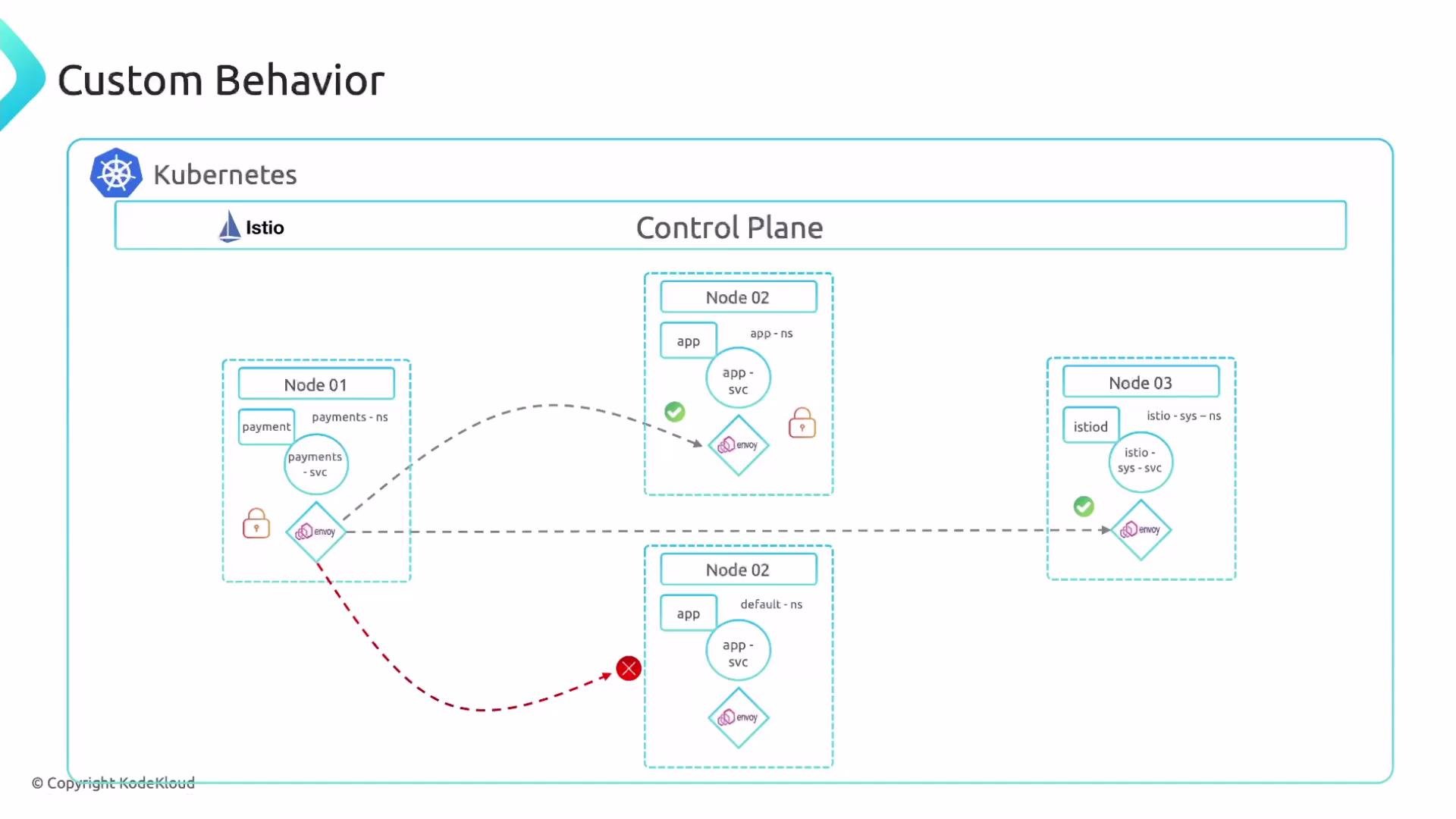
A schematic titled "Custom Behavior" showing a Kubernetes control plane with
Istio and multiple nodes. Each node contains app services and Envoy sidecars,
with dashed arrows illustrating inter-node traffic and security/health
indicators.

PeerAuthentication and mTLS enforcement

Istio does not enforce mTLS unless you create PeerAuthentication resources. Common modes include:
  • PERMISSIVE — accepts both plaintext and mTLS.
  • STRICT — requires mTLS for all traffic in the scope (namespace or mesh).
To require mTLS for the app namespace, and at the same time enforce the payments Sidecar shown earlier, combine PeerAuthentication and Sidecar resources (apply this YAML as peer-sidecar.yaml):
apiVersion: security.istio.io/v1beta1
kind: PeerAuthentication
metadata:
  name: default
  namespace: app
spec:
  mtls:
    mode: STRICT
---
apiVersion: networking.istio.io/v1
kind: Sidecar
metadata:
  name: default
  namespace: payments
spec:
  egress:
    - hosts:
        - "./*"
        - "app/*"
        - "istio-system/*"
Important considerations:
  • When STRICT mTLS is set in a namespace, clients connecting to workloads in that namespace must use mTLS. Typically this requires that client workloads have Envoy sidecars injected so the proxy can handle certificate exchange.
  • If a client application implements application-level mTLS with proper certificates and keys, it may communicate without an Envoy proxy, but this is an advanced configuration and not common for standard Istio deployments.
Common Sidecar/PeerAuthentication outcomes
ConfigurationEffect
Default (Sidecar injected, PeerAuthentication PERMISSIVE)Envoy intercepts traffic; both plaintext and mTLS are accepted.
Sidecar injection disabled, PeerAuthentication PERMISSIVENo Envoy proxy present; plaintext works, mTLS enforcement not applied via Istio.
Sidecar injection enabled, PeerAuthentication STRICTIstio requires mTLS using Envoy-managed certificates for clients with sidecars.
Sidecar resource restricting egressLimits outbound destinations from workloads to the declared hosts only.

Example: Bookinfo ratings Sidecar

This example shows a more detailed Sidecar with a workload selector, an ingress port that forwards to a Unix domain socket, and egress rules permitting traffic within bookinfo and to istio-system:
apiVersion: networking.istio.io/v1
kind: Sidecar
metadata:
  name: ratings
  namespace: bookinfo
spec:
  workloadSelector:
    labels:
      app: ratings
  ingress:
    - port:
        number: 9080
        protocol: HTTP
        name: ratings
      defaultEndpoint: unix:///var/run/someuds.sock
  egress:
    - port:
        number: 9080
        protocol: HTTP
        name: egresshttp
      hosts:
        - "bookinfo/*"
    - hosts:
        - "istio-system/*"
This declares:
  • A Sidecar named ratings in the bookinfo namespace that applies to pods labeled app=ratings.
  • An ingress listener accepting HTTP on port 9080 and forwarding to a Unix domain socket (defaultEndpoint).
  • Egress rules allowing HTTP to workloads in bookinfo/* and to istio-system/*.
Ensure the namespaces involved in mTLS or Sidecar restrictions have Istio sidecar injection enabled. Without an injected Envoy, policies that rely on the proxy cannot be enforced.

Where to learn more

That wraps up this lesson. A demo demonstrates Sidecar and PeerAuthentication behavior in action.

Watch Video