

- a CSV dataset,
- a processed CSV,
- a pickled model file,
- and logged metrics.
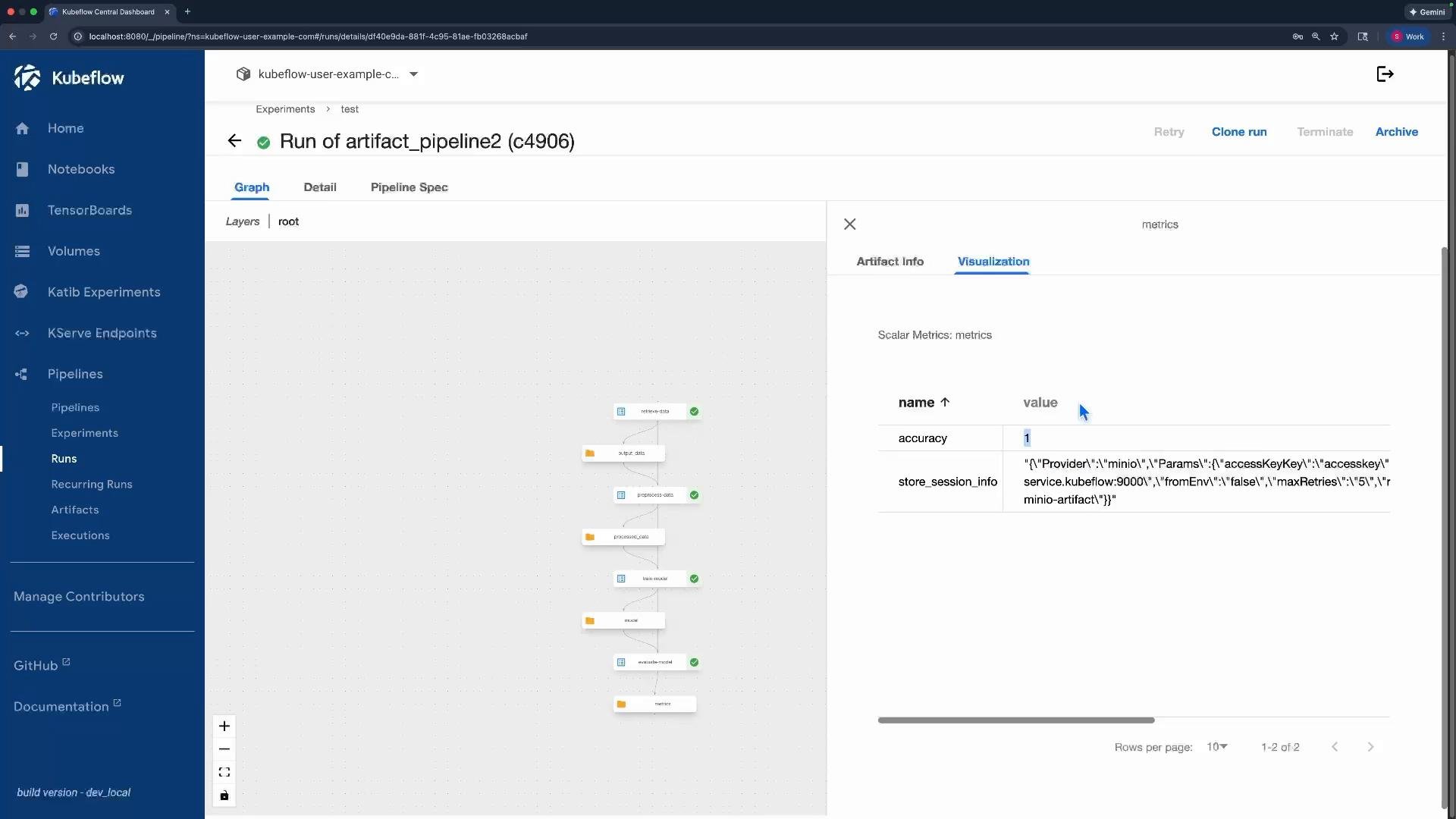
retrieve_data— generate and write a CSV dataset (artifact).preprocess_data— read the CSV, add a feature, write a processed CSV.train_model— read the processed CSV, train a trivial model, write a pickled model artifact.evaluate_model— read the pickled model, compute and log a metric.
Use artifacts whenever you need to exchange files or structured data between components. Inside a component the artifact location is available via the
.path attribute on Input[...] and Output[...] typed arguments.- Use artifacts for files, datasets, models, and any structured or large content.
- Use parameters for scalars (strings, numbers, booleans) and small configuration values.
Complete example pipeline
Below is a complete, cleaned example implementing the pipeline described above. Save it as
pipeline_artifact.py and compile to YAML to upload to the Kubeflow Pipelines UI.
- Declare artifact inputs and outputs as typed function arguments:
- Example outputs:
output_data: Output[Dataset],model: Output[Model],metrics: Output[Metrics] - Example inputs:
raw_data: Input[Dataset],training_data: Input[Dataset],model: Input[Model]
- Example outputs:
- Use the
.pathattribute inside the component to read/write the artifact contents:- Write CSV:
df.to_csv(processed_data.path, index=False) - Read CSV:
df = pd.read_csv(raw_data.path) - Save model:
with open(model.path, "wb") as f: pickle.dump(..., f) - Load model:
with open(model.path, "rb") as f: model_data = pickle.load(f)
- Write CSV:
- Wire components in the pipeline by referencing a producer task’s outputs by name:
preprocess_data(raw_data=data_task.outputs["output_data"])train_model(training_data=preprocess_task.outputs["processed_data"])evaluate_model(model=train_task.outputs["model"])
Avoid passing large files as parameters. Parameters are for small scalar values — use
Input[...] / Output[...] artifacts for files and structured data to prevent serialization and size issues.- Compile the pipeline: python
pipeline_artifact.pywill generateartifact_pipeline.yaml. - Upload
artifact_pipeline.yamlto the Kubeflow Pipelines UI and run the pipeline. - In the UI you can inspect:
- Input/output artifacts for each task,
- Object storage locations (e.g., MinIO),
- Previews of supported artifact types,
- Logged metrics such as
accuracy.
x_squared), the pickled model file, and the metrics output.
- Kubeflow Pipelines documentation
- MinIO (object storage example)
- KFP SDK: component, pipeline, Input/Output typing patterns (see the Kubeflow Pipelines SDK docs)