In this lesson we cover how Border Gateway Protocol (BGP) integrates with Cilium so your Kubernetes cluster can advertise pod and service routes to your physical/core network. Using BGP enables native routing (no encapsulation), so external routers can reach pods and services directly without tunnel headers. This guide explains the two routing modes relevant for BGP, how to enable Cilium’s BGP control plane, which custom resources to configure, and how to troubleshoot sessions and advertised routes.

Routing modes: Tunnel (encapsulation) vs Native routing

Tunnel mode (encapsulation)
  • Pod A sends a packet to Pod B using Pod IPs (src = Pod A IP, dst = Pod B IP).
  • Cilium encapsulates the packet; the outer packet uses node IPs (node1 -> node2).
  • The physical network only needs to route node IPs; node2 decapsulates and forwards to Pod B.
  • Because of encapsulation (e.g., VXLAN), the physical network does not need knowledge of pod CIDRs.
Example outer packet addressing:
SIP: 172.16.1.1
DIP: 172.16.2.1
Native routing
  • Pod A sends a packet to Pod B using Pod IPs and no encapsulation is applied.
  • The physical network must route pod CIDRs (for example, 192.168.1.0/24 and 192.168.2.0/24).
  • One approach is to add static routes on physical routers pointing each pod CIDR to the respective node IP.
  • Static routes do not scale (100 nodes → 100 static routes per router), so dynamic routing with BGP is preferred.
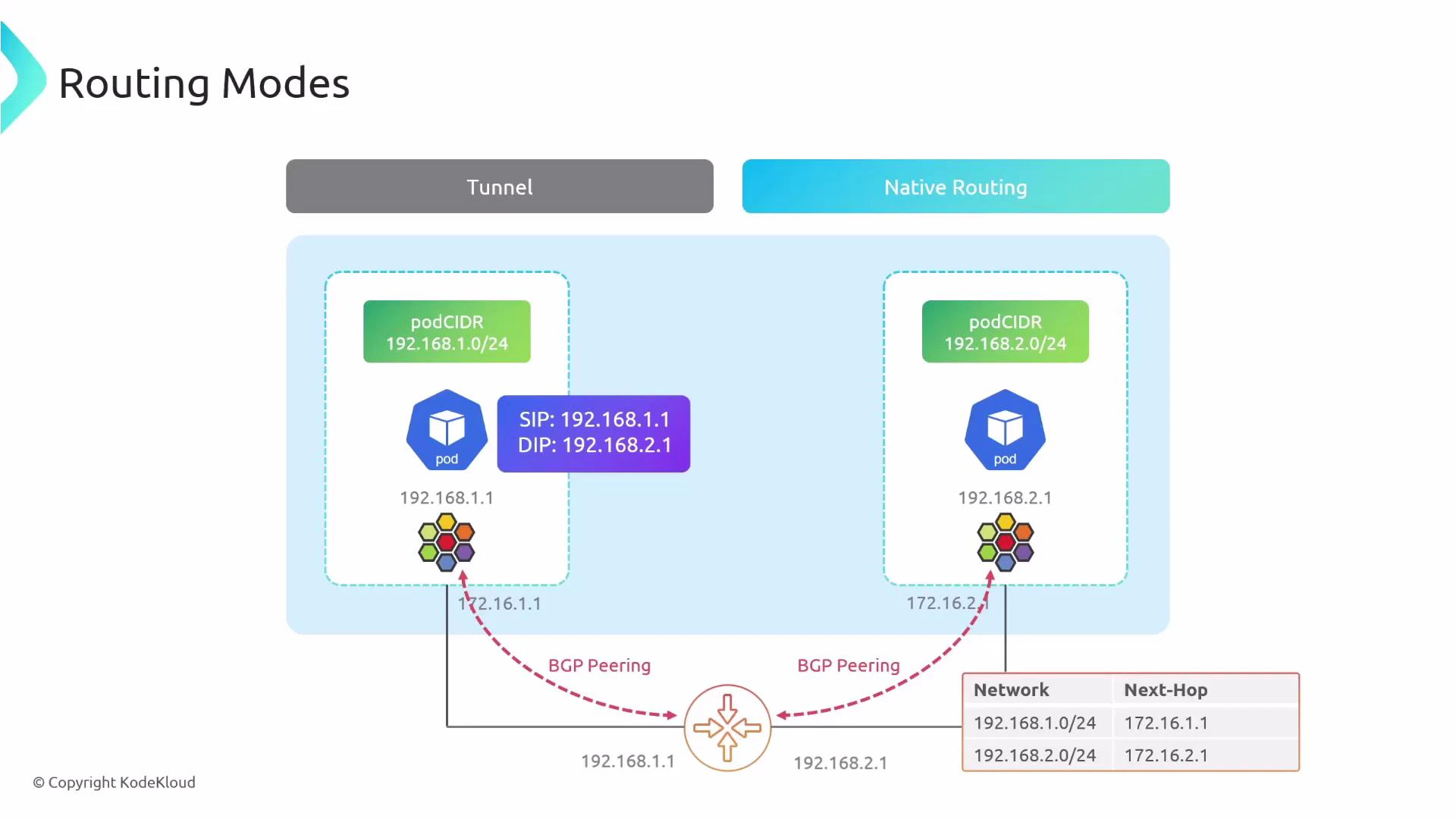
A diagram titled "Routing Modes" comparing Tunnel and Native Routing, showing two Kubernetes pods in separate podCIDRs (192.168.1.0/24 and 192.168.2.0/24). It illustrates BGP peering to a router with next-hop addresses 172.16.1.1 and 172.16.2.1 for the respective networks.
Quick comparison
ModeEncapsulationPhysical network must know pod CIDRs?Scalability
Tunnel (encapsulation)YesNoHigh (no router config)
Native routingNoYes (or dynamic routing)High with BGP; poor with static routes

Why use BGP with Cilium?

BGP lets Cilium form peering sessions with physical routers and automatically advertise:
  • Pod CIDRs (so routers can forward packets to nodes hosting pods).
  • Service IPs (ClusterIP, ExternalIP, LoadBalancerIP) when configured.
This removes manual static routes and enables native cross-network pod connectivity. Useful references:

Enable the BGP control plane in Cilium

To enable the BGP control plane in the Cilium configuration:
bgpControlPlane:
  # Enables the BGP control plane.
  enabled: true
After enabling, restart the Cilium operator and agents so they pick up the control plane configuration.

Cilium BGP CRDs — what to create

Three Kubernetes custom resources are typically involved:
ResourcePurposeExample
CiliumBGPClusterConfigWhich nodes run BGP, cluster/local ASN, and peersSelect nodes by label and define bgpInstances
CiliumBGPPeerConfigPeer-specific settings (timers, multihop, families, advertisement selectors)Referred by peerConfigRef
CiliumBGPAdvertisementWhich prefixes to advertise (PodCIDR, Service IPs, routes attributes)Controls advertisementType and attributes
In a typical deployment, label a subset of nodes (e.g., bgp: “true”) to run the BGP control plane so you can control how many peers are formed and which interfaces are used. Example topology: two nodes labeled bgp: “true” with node IPs 172.16.1.1 and 172.16.2.1, pod CIDRs 192.168.1.0/24 and 192.168.2.0/24, and an external router with loopback 5.5.5.5 in AS 65000. Cilium will use local ASN 64000 and peer to the router.
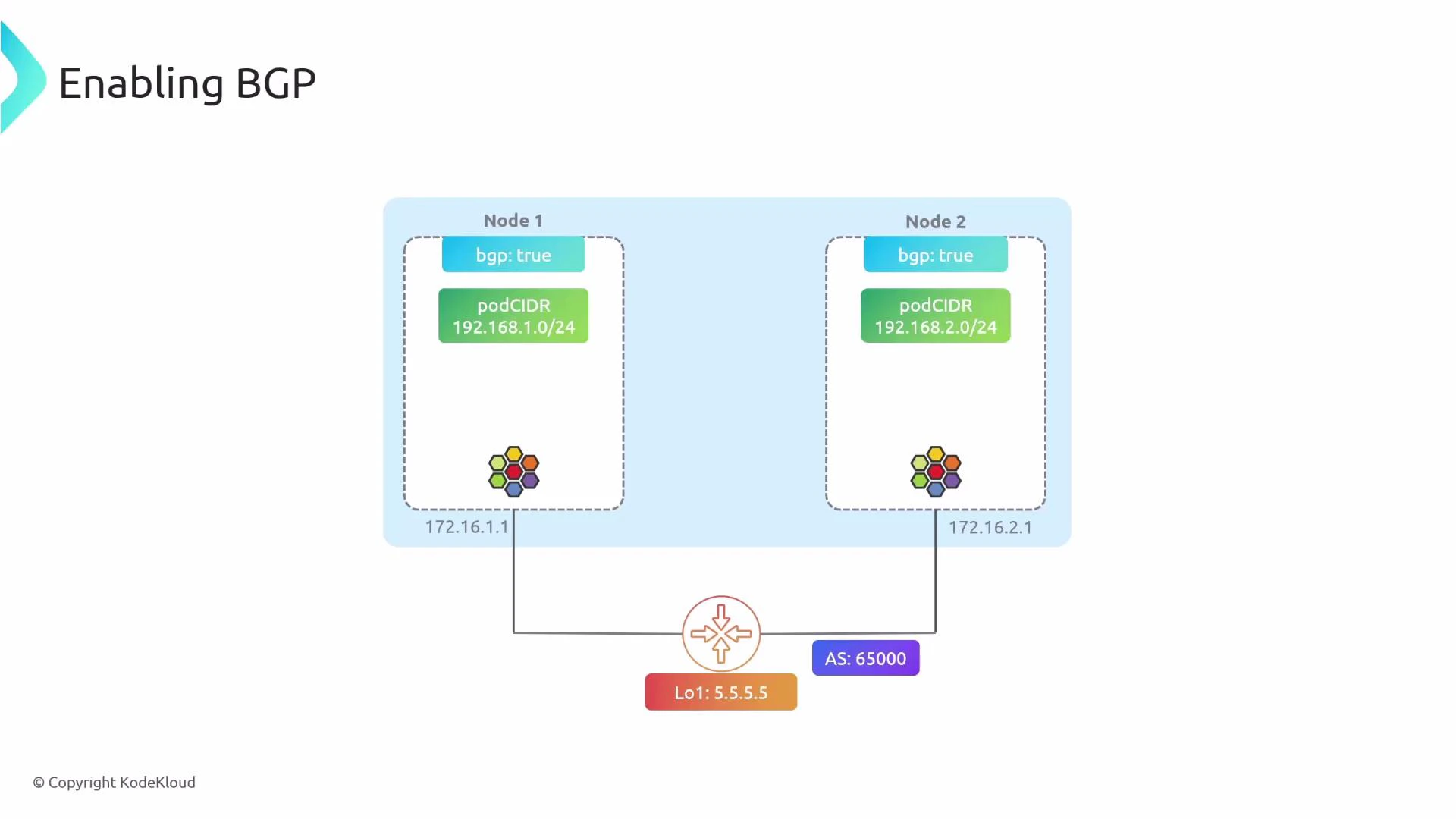
A network diagram titled "Enabling BGP" showing two nodes (Node 1 and Node 2) each configured with bgp:true and podCIDRs 192.168.1.0/24 and 192.168.2.0/24. Both nodes (IPs 172.16.1.1 and 172.16.2.1) peer with an external router whose loopback is 5.5.5.5 and AS is 65000.

Example resources

CiliumBGPClusterConfig
apiVersion: cilium.io/v2alpha1
kind: CiliumBGPClusterConfig
metadata:
  name: cilium-bgp
spec:
  nodeSelector:
    matchLabels:
      bgp: "true"
  bgpInstances:
    - name: instance-64000
      localASN: 64000
      peers:
        - name: peer-65000-r1
          peerASN: 65000
          peerAddress: 5.5.5.5
          peerConfigRef:
            name: cilium-peer
CiliumBGPPeerConfig (peer settings referenced above)
apiVersion: cilium.io/v2alpha1
kind: CiliumBGPPeerConfig
metadata:
  name: cilium-peer
spec:
  timers:
    keepAliveTimeSeconds: 3
    holdTimeSeconds: 9
  ebgpMultihop: 5
  families:
    - afi: ipv4
      safi: unicast
      advertisements:
        matchLabels:
          advertise: "bgp"
CiliumBGPAdvertisement — advertise PodCIDR and selected Service addresses
apiVersion: cilium.io/v2alpha1
kind: CiliumBGPAdvertisement
metadata:
  name: bgp-advertisements
  labels:
    advertise: bgp
spec:
  advertisements:
    - advertisementType: PodCIDR
      attributes:
        communities:
          standard: ["65000:99"]
        localPreference: 99
    - advertisementType: Service
      service:
        addresses:
          - ClusterIP
          - ExternalIP
          - LoadBalancerIP
      selector:
        matchExpressions:
          - key: somekey
            operator: NotIn
            values: ["never-used-value"]
Key fields explained
  • timers.keepAliveTimeSeconds & holdTimeSeconds: govern BGP keepalive and hold intervals.
  • ebgpMultihop: TTL for eBGP multi-hop peerings (required when peer is not directly connected).
  • families: choose address families (IPv4/IPv6) and safi (e.g., unicast).
  • advertisements selector: controls which Advertisement resources a BGPPeer should consult.
If you rely on native routing (no encapsulation), enable PodCIDR advertisements so your physical routers learn how to reach pod networks. Use node labels (nodeSelector) to control which nodes run the BGP control plane and avoid advertising routes from every node if not required.
Be cautious with ebgpMultihop and route attributes. Incorrect multihop or advertisement configuration can cause session flaps or unexpected route leaks. Always validate on a staging router before applying in production.

Troubleshooting with the Cilium CLI

Useful cilium CLI commands and sample outputs. List BGP peers and session state:
$ cilium bgp peers
Node       Local AS  Peer AS  Peer Address  Session State  Uptime    Family         Received  Advertised
worker1    64000     65000    5.5.5.5       established    2h2m54s   ipv4/unicast   10        8
worker2    64000     65000    5.5.5.5       established    2h2m57s   ipv4/unicast   3         8
Show available/learned routes (defaults to ipv4/unicast):
$ cilium bgp routes available
(Defaulting to `ipv4 unicast` AFI & SAFI, please see help for more options)

Node        VRouter    Prefix                 NextHop    Age       Attrs
worker1     64000      10.0.1.0/24            0.0.0.0    2h4m14s   [{Origin: i} {Nexthop: 0.0.0.0}]
            64000      10.100.67.164/32      0.0.0.0    2h4m14s   [{Origin: i} {Nexthop: 0.0.0.0}]
            64000      10.103.112.96/32      0.0.0.0    2h4m14s   [{Origin: i} {Nexthop: 0.0.0.0}]
worker2     64000      10.0.2.0/24            0.0.0.0    2h4m14s   [{Origin: i} {Nexthop: 0.0.0.0}]
Show routes that Cilium has advertised to a peer:
user1@control-plane:~$ cilium bgp routes advertised

Node       VRouter  Peer     Prefix               NextHop           Age     Attrs
worker1    64000    5.5.5.5  10.0.1.0/24          192.168.211.128   2h4m57s [{Origin: i} {AsPath: 64000} {Nexthop: 192.168.211.128} {Communities: 65000:99}]
           64000    5.5.5.5  10.100.67.164/32     192.168.211.128   2h4m57s [{Origin: i} {AsPath: 64000} {Nexthop: 192.168.211.128}]
worker2    64000    5.5.5.5  10.0.2.0/24          192.168.44.128    2h4m57s [{Origin: i} {AsPath: 64000} {Nexthop: 192.168.44.128} {Communities: 65000:99}]
What to check if sessions fail
  • Verify node selector labels match your CiliumBGPClusterConfig.
  • Check network reachability between peers (TCP/179 and any configured multi-hop TTL).
  • Confirm ASNs and peerAddress values are correct.
  • Inspect Cilium agent/operator logs for BGP negotiation messages.
  • Validate that advertisement selectors (labels) match the CiliumBGPAdvertisement resources.

Summary & next steps

  • BGP with Cilium enables scalable native routing for PodCIDRs and service IPs.
  • Enable bgpControlPlane in Cilium, label nodes to run BGP, and create CiliumBGPClusterConfig, CiliumBGPPeerConfig, and CiliumBGPAdvertisement resources.
  • Use the cilium CLI to inspect peers, learned routes, and advertised prefixes.
  • Test in staging before applying to production routers; validate route attributes and policies on both Cilium and your physical routers.
Further reading

Watch Video