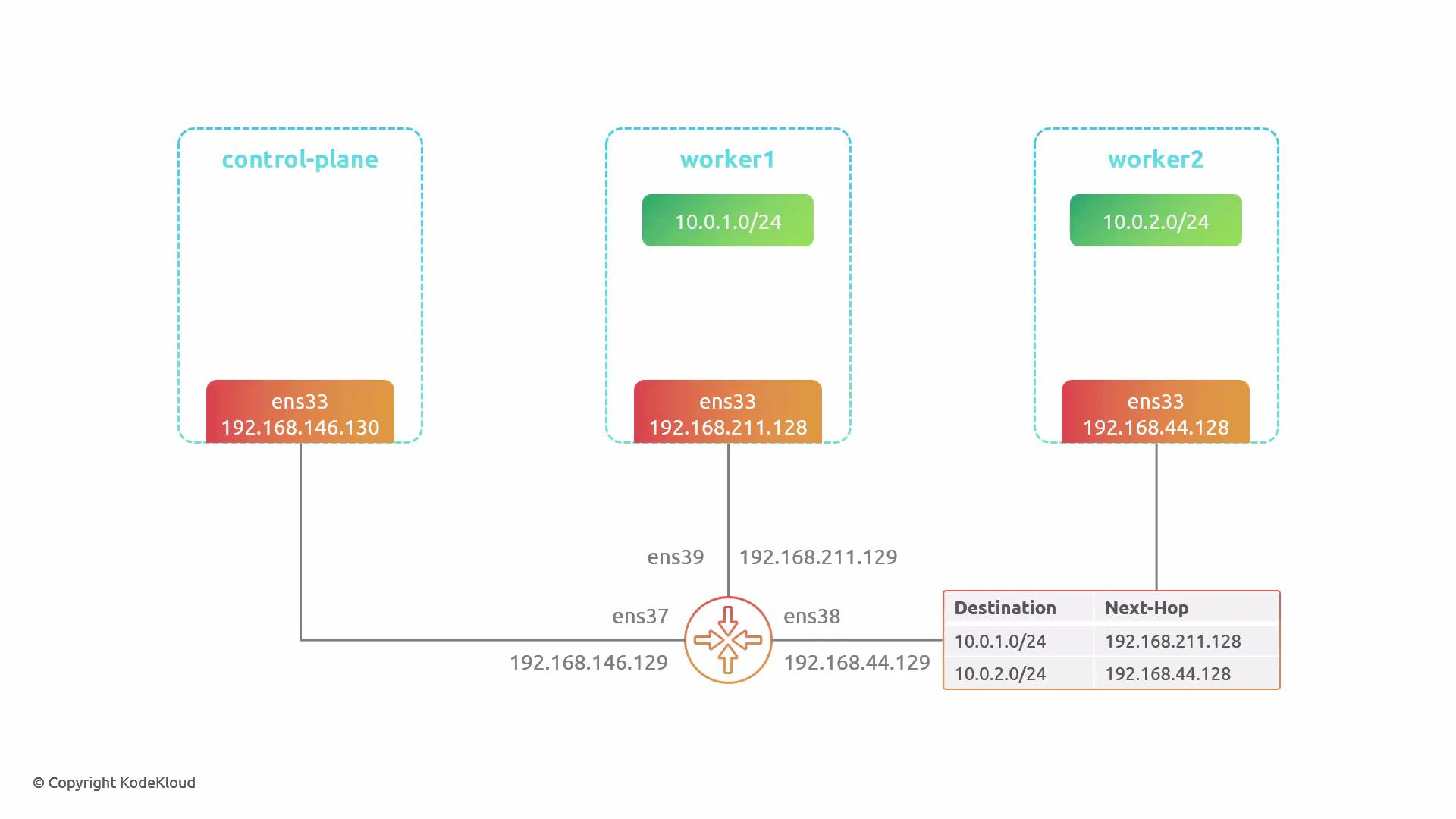
By default Cilium uses tunnel mode (VXLAN) to encapsulate pod traffic between nodes, so no changes are required on the physical network for basic pod-to-pod connectivity.
Environment details
- Cluster: 3 nodes — 1 control-plane, 2 workers
- Node physical network interfaces and IPs:
- control-plane: 192.168.146.130 (router .129)
- worker1: 192.168.211.128 (router .129)
- worker2: 192.168.44.128 (router .129)
- Pod CIDR ranges: 10.0.0.0/8 split per node (e.g., 10.0.1.0/24, 10.0.2.0/24)
- Tools used: kubectl, helm, tcpdump, Wireshark
1) Install Cilium (default: tunnel/encapsulation mode)
Install Cilium using the upstream Helm chart and a default values.yaml (no routing changes). The default uses VXLAN encapsulation. Install:2) Inspect tunnel-mode traffic on the router
Capture the traffic that flows between nodes on the router (interface that sees inter-node traffic, e.g.,ens38):
- Outer IP header uses node IPs (e.g., 192.168.x.x).
- Encapsulation uses UDP destination port 8472 (VXLAN).
- Original pod-to-pod Ethernet/IP/ICMP is encapsulated inside VXLAN.
- Physical network only needs to route between node IPs — pod IPs are hidden inside VXLAN.
3) Switch to native routing (disable encapsulation)
To enable native routing, update your Cilium values.yaml to set routingMode to “native”, disable the tunnel (tunnelPort: 0), and configure ipv4NativeRoutingCIDR so Cilium knows which pod CIDRs should be advertised/routed natively. Example values to change:- ipv4NativeRoutingCIDR tells Cilium which pod ranges to put onto the physical network (no encapsulation).
- You can pick a subset of CIDRs to mix tunnel and native behavior if desired.
4) Native routing: expected connectivity failure until physical routes exist
Once native routing is enabled, pod traffic is sent on the physical network using pod source/destination IPs. If the router does not have routes for the pod CIDRs, packets will be dropped. Example: Pods after native mode is enabled:When using native routing, your physical network must route the pod CIDR(s). Provide routes via static entries, a dynamic routing protocol (for example, BGP), or another mechanism so other network segments can reach pod subnets.
5) Capture native-mode traffic on the router (no encapsulation)
Capture packets on the router interface that sees pod traffic (e.g.,ens39):
- The single IP header uses pod source/destination IPs (10.0.x.x).
- No VXLAN/outer IP header is present.
- Router/physical network must be able to forward pod CIDRs.
6) Determine per-node pod CIDRs (what to route)
Each node receives a dedicated IPAM range from Cilium. Use the agent debug info to find per-node IPAM allocations. Find the cilium agent pods and node IPs:- worker1: 10.0.1.0/24
- worker2: 10.0.2.0/24
7) Add static routes on the router (quick demo)
Add static routes on the router that map the pod CIDRs to each node’s physical IP: Check current routes:8) Verify connectivity after adding routes
From the pod on worker1, ping the pod on worker2 again:Side-by-side comparison (summary)
Final notes and recommendations
- Tunnel mode is convenient for quick deployments or when you cannot change the underlay network. It hides pod IPs from the physical network but adds encapsulation overhead.
- Native routing removes encapsulation overhead and can reduce latency but requires that your physical network be aware of the pod CIDRs. This can be done via static routes for small deployments or dynamic routing (BGP) for production-scale environments.
- For production clusters with many nodes and dynamic topology, prefer a routing protocol (BGP) over manual static routes.