

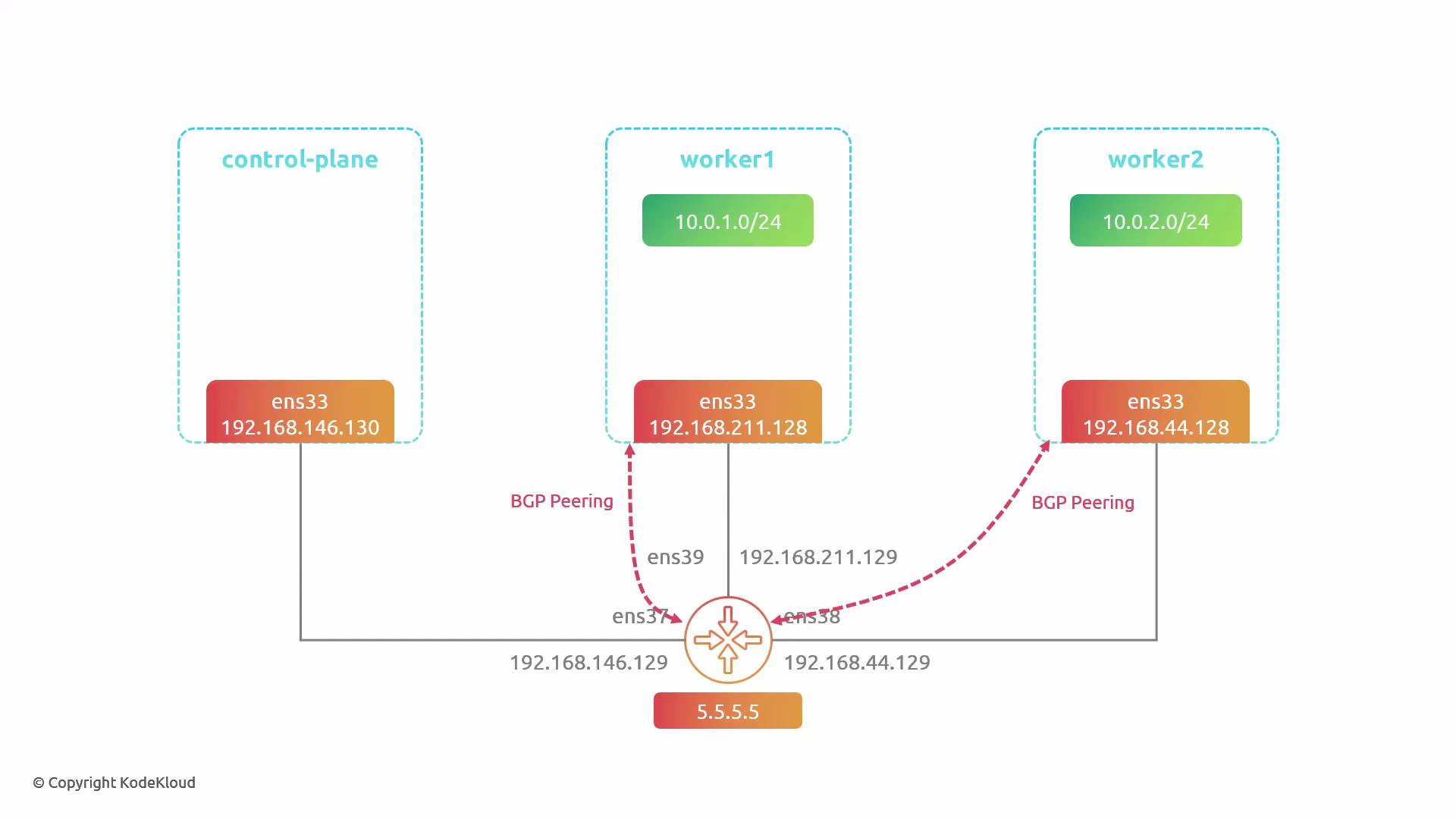
- 3-node cluster: control-plane, worker1, worker2.
- Each node sits on a different L2 network; all are reachable via a central router (the “outside world”).
- Router loopback: 5.5.5.5 — worker1 and worker2 will peer to that IP and advertise their Pod CIDRs and service IPs.
- Enable Cilium’s BGP control plane via Helm values.
- Restart Cilium operator and agents to pick up the change.
- Label nodes to select where BGP instances should run.
- Create three Cilium CRDs in order:
- CiliumBGPAdvertisement — defines what to advertise (PodCIDR, Service types, attributes).
- CiliumBGPPeerConfig — peer-level settings (timers, multihop, address families).
- CiliumBGPClusterConfig — cluster-level config (which nodes, BGP instances & peers).
- Apply resources and validate peers, sessions and routes.
- Inspect Cilium logs on the agent if troubleshooting is required.
- A running Kubernetes cluster with Cilium installed.
- Helm access to upgrade Cilium (if needed).
- Network reachability between nodes and the external router (ensure any firewall/NAT allows BGP TCP/179 or multihop TTL as configured).
- bgp-advertisement.yaml — which prefixes and attributes to advertise
- The first entry advertises each node’s PodCIDR and attaches route attributes (communities, local preference).
- The second entry advertises service addresses for services matched by the selector. The example selector intentionally matches nothing; to advertise all services omit the selector or use an empty selector. In production prefer a controlled selector to avoid leaking internal service IPs.
- bgp-peer-config.yaml — peer-level timers, multihop and address families
- keepAlive (3s) and holdTime (9s) must match the external router configuration.
- ebgpMultihop permits a TTL > 1 for eBGP sessions when peers are not directly connected.
- This demo uses only IPv4 unicast.
- bgp-config.yaml — cluster-level config enabling BGP instances on selected nodes
- nodeSelector chooses nodes labeled with bgp=true.
- localASN is the ASN used by the node’s BGP instance (here 64000). For eBGP your peer ASN should differ (here 65000).
- peerConfigRef binds this peer to the peer settings defined earlier.
- Session State “established” means the BGP neighborship is up.
- Received & Advertised columns show route counts from/to the peer.
- When the router learns the same service IP from multiple nodes, it can use ECMP (equal-cost multipath) for load distribution.
- Choose ASNs, BGP timers and ebgp-multihop values consistent with your physical network and external router configuration.
- Use selectors in CiliumBGPAdvertisement to control which services are announced; avoid advertising all service IPs in production unless intentionally required.
- Monitor route advertisements and BGP session health with the Cilium CLI and your router tooling (e.g., Bird, FRR).
- You enabled Cilium’s BGP control plane, configured node-level BGP instances, established a peer to an external router, and advertised Pod CIDRs and service IPs.
- With these announcements your physical network can natively route traffic to nodes and support ECMP for service IPs advertised by multiple nodes.
- Cilium Documentation — BGP
- Cilium CLI reference
- BIRD Internet Routing Daemon
- Kubernetes Documentation
- BGP — Wikipedia