In this lesson we cover the Kubernetes Gateway API and how Cilium implements it. We’ll first examine why the Gateway API was created (the limitations of the traditional Ingress) and then walk through Gateway API concepts, manifests, Cilium-specific configuration, and runtime expectations.

Why Gateway API? Limitations of Kubernetes Ingress

Kubernetes Ingress is widely used but has constraints that motivated a more expressive, extensible API:
  • Route matching is limited to host and path only — no request-header or query-parameter matching, no method-based routing, and no weighted traffic-splitting.
  • Focused primarily on HTTP; lacks standardized first-class support for other protocols such as TCP and gRPC, or richer behaviors (e.g., standardized WebSocket handling).
  • Minimal standardized request/response manipulation: no built-in, consistent mechanism for header rewrites, redirects, or rate limiting across implementations.
  • Controller-specific configuration is commonly buried in annotations, mixing platform/operator concerns with application routing configuration.
  • TLS and routing rules often live in the same Ingress resource, reducing separation of concerns and clear responsibility boundaries.
Example Ingress demonstrating the limited matching fields:
apiVersion: networking.k8s.io/v1
kind: Ingress
metadata:
  name: my-ingress
spec:
  rules:
  - host: "shopping.com"
    http:
      paths:
      - pathType: Prefix
        path: "/products"
        backend:
          service:
            name: service1
            port:
              number: 80
  - host: "myblog.com"
    http:
      paths:
      - pathType: Prefix
        path: "/"
        backend:
          service:
            name: service2
            port:
              number: 80
Separation-of-concerns is often lost when application teams, platform teams, and operator settings are combined into a single Ingress:
apiVersion: networking.k8s.io/v1
kind: Ingress
metadata:
  name: my-ingress
  annotations:
    nginx.ingress.kubernetes.io/rewrite-target: /
spec:
  tls:
  - hosts:
    - myapp.example.com
    secretName: my-cert
  rules:
  - host: myapp.example.com
    http:
      paths:
      - path: /foo
        pathType: Prefix
        backend:
          service:
            name: my-service
            port:
              number: 80

Gateway API: Separation by design

The Gateway API was designed to address these issues by splitting responsibilities into multiple resources so different teams can manage different concerns. Key Gateway API resource types and responsibilities:
Resource TypePurposeTypical Owner
GatewayClassDeclares available gateway controllers in the cluster.Infra / platform teams
GatewayInstantiates and configures a gateway instance (listeners, ports).Cluster operators
Route types (HTTPRoute, TCPRoute, GRPCRoute, etc.)Define routing policy: hostnames, matches, backends.Application developers
This design enforces clearer ownership: infra registers controllers, operators instantiate gateways, and developers provide route definitions that bind to those gateways.
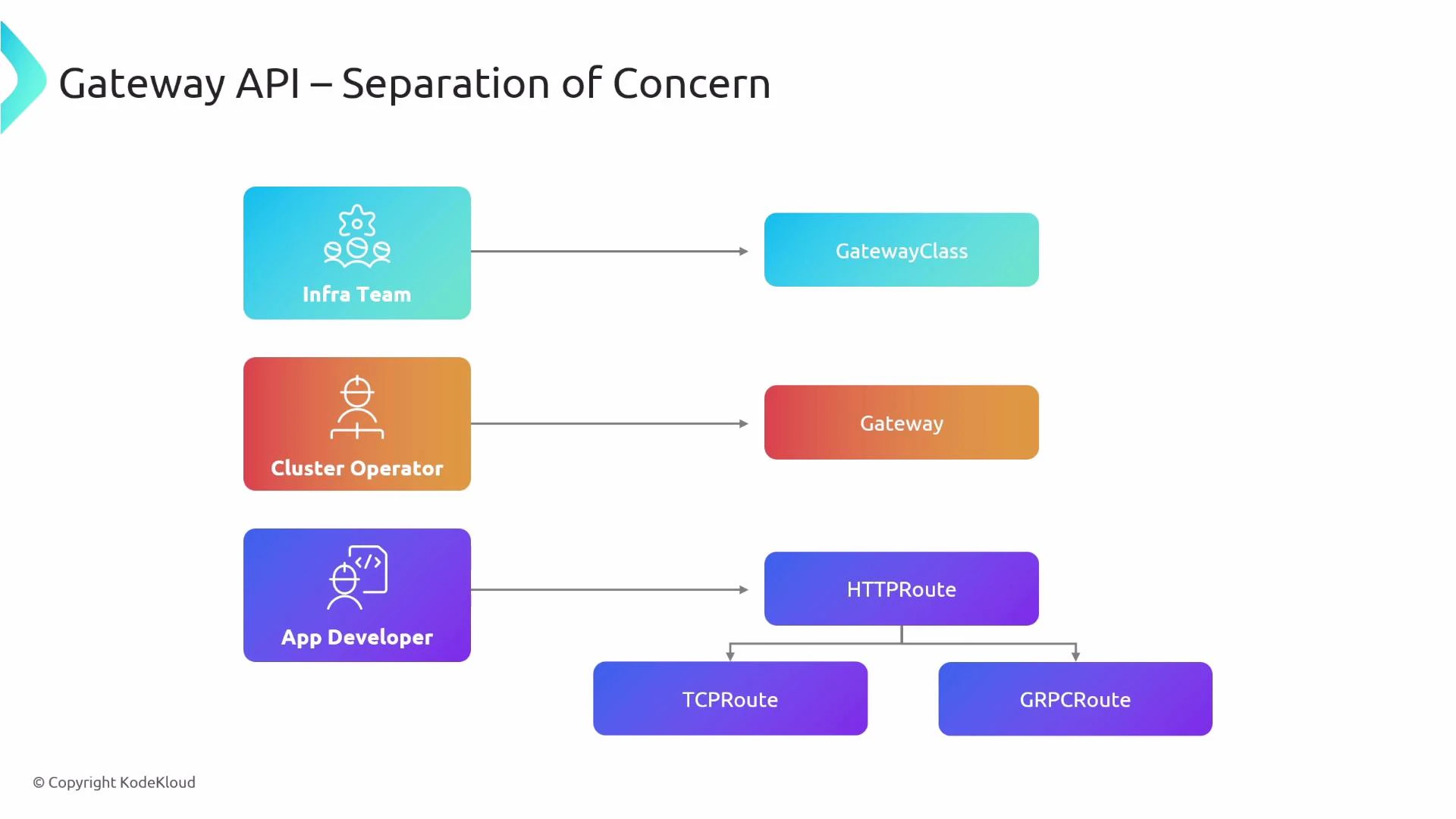
A diagram titled "Gateway API — Separation of Concern" showing three roles (Infra Team, Cluster Operator, App Developer) mapped by arrows to corresponding API objects: GatewayClass, Gateway, and HTTPRoute (which branches to TCPRoute and GRPCRoute). It illustrates how responsibility is separated across teams for gateway configuration and routing.

Cross-namespace routing and restrictions

Gateway API supports richer cross-namespace semantics and explicit restrictions:
  • A Gateway can be created in an infrastructure namespace and permit Routes from other namespaces to attach to it.
  • Gateways can restrict which namespaces’ Routes are allowed to bind to them via allowedRoutes.namespaces.from (e.g., Same, All, or FromList).
  • This prevents arbitrary namespaces from attaching routes to a shared gateway and centralizes operator control.
Gateways can tightly control which namespaces may bind Routes. If you expect cross-namespace routing, verify the Gateway’s allowedRoutes policy and, if needed, explicitly include the namespaces allowed to attach Routes.
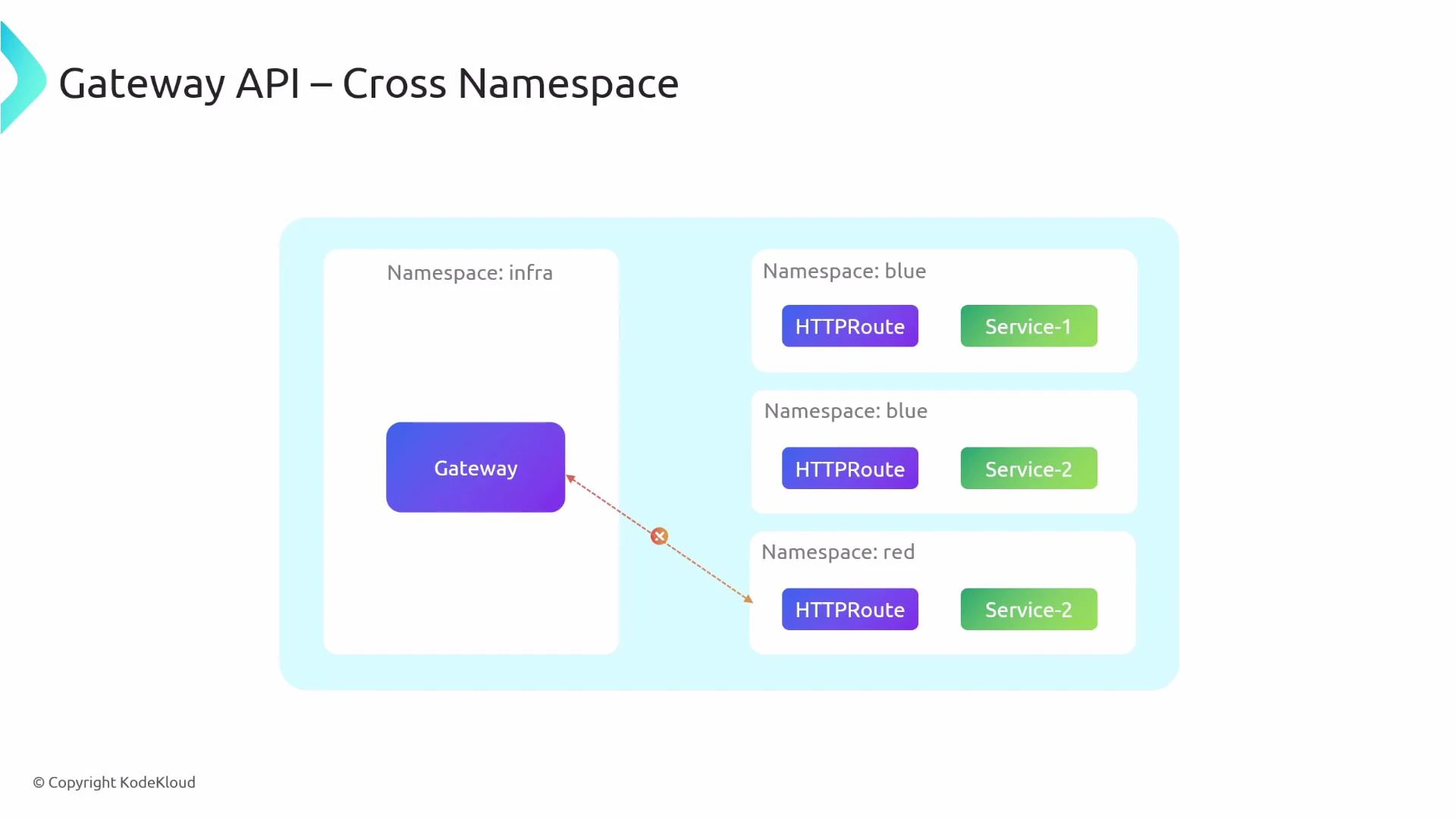
A slide titled "Gateway API – Cross Namespace" showing a Gateway in the "infra" namespace attempting to route (dashed arrow with an error X) to HTTPRoute and Service objects in "blue" and "red" namespaces, illustrating a cross-namespace routing restriction.

How-to: Basic Gateway API manifests

Below is a typical flow for deploying Gateway API resources. These examples show the separation of roles and their respective manifests.
  1. Define a GatewayClass (created by infra/platform):
apiVersion: gateway.networking.k8s.io/v1
kind: GatewayClass
metadata:
  name: cluster-gateway
spec:
  controllerName: "example.net/gateway-controller"
  1. Create a Gateway instance (created by the cluster operator). Example: listens on HTTP port 80 and only allows Routes from the same namespace.
apiVersion: gateway.networking.k8s.io/v1
kind: Gateway
metadata:
  name: prod
spec:
  gatewayClassName: cluster-gateway
  listeners:
    - name: prod-web-gw
      protocol: HTTP
      port: 80
      allowedRoutes:
        namespaces:
          from: Same
When you create this Gateway, the referenced controller provisions the required runtime objects (for example a load balancer service, listeners, and controller pods) according to the implementation.
  1. Application developers create an HTTPRoute that binds to the Gateway and instructs it how to route specific hostnames and paths to services:
apiVersion: gateway.networking.k8s.io/v1
kind: HTTPRoute
metadata:
  name: example-route
spec:
  parentRefs:
    - name: prod
      # namespace: (optional) if the gateway is in a different namespace
  hostnames:
    - "example.com"
  rules:
    - matches:
        - path:
            type: PathPrefix
            value: /login
      backendRefs:
        - name: example-svc
          port: 80

Cilium’s Gateway API implementation

Cilium supports the Gateway API and provides a controller implementation you can enable via its Helm values or other configuration mechanism. Example Helm values snippet to enable NodePort and Gateway API support:
nodePort:
  # Enable the Cilium NodePort service implementation.
  enabled: true

gatewayAPI:
  # Enable support for Gateway API in Cilium.
  # This may automatically enable additional required features (for example_envoy config).
  enabled: true
After updating configuration you should restart the Cilium operator and agents so the new behavior is applied.
After enabling gatewayAPI in Cilium, Cilium will automatically create a GatewayClass named cilium (or a similar name) for its controller. Use that GatewayClass name when creating Gateway resources intended to be handled by Cilium.

Typical runtime behavior with Cilium

  • Cilium installs/creates a GatewayClass (for example cilium) for its controller.
  • When you create a Gateway that references that GatewayClass, Cilium provisions the gateway runtime (which can include a LoadBalancer Service).
  • Create HTTPRoute (or other route types) that reference the Gateway; the gateway then forwards traffic to the backend services.
Illustrative kubectl output:
$ kubectl get gatewayclass
NAME     CONTROLLER                      ACCEPTED   AGE
cilium   io.cilium/gateway-controller    True       30h

$ kubectl get svc
NAME                         TYPE           CLUSTER-IP      EXTERNAL-IP     PORT(S)           AGE
app1-service                 ClusterIP      10.96.46.196    <none>          80/TCP            30h
app2-service                 ClusterIP      10.96.229.156   <none>          80/TCP            30h
cilium-gateway-my-gateway    LoadBalancer   10.96.128.244   172.19.255.3    80:32152/TCP      30h
When the LoadBalancer Service receives an external IP (for example 172.19.255.3), point your DNS entries at that IP so external traffic reaches the gateway.

Example Gateway + HTTPRoute for Cilium

Using the cilium GatewayClass: Gateway manifest:
apiVersion: gateway.networking.k8s.io/v1
kind: Gateway
metadata:
  name: my-gateway
spec:
  gatewayClassName: cilium
  listeners:
    - name: web-gw
      protocol: HTTP
      port: 80
HTTPRoute manifest:
apiVersion: gateway.networking.k8s.io/v1
kind: HTTPRoute
metadata:
  name: http-app-1
spec:
  parentRefs:
    - name: my-gateway
      namespace: default
  hostnames:
    - "example.com"
  rules:
    - matches:
        - path:
            type: PathPrefix
            value: /
      backendRefs:
        - name: app1-service
          port: 80

Quick comparison: Ingress vs Gateway API

CapabilityIngressGateway API
Protocol supportPrimarily HTTPHTTP, TCP, gRPC, extensible
MatchingHost + PathHost, Path, Headers, Query params, Methods, weighted splits (depending on implementation)
Ownership modelSingle resource mixes concernsClear separation: GatewayClass, Gateway, Route
Namespace scopingLimitedExplicit allowedRoutes and cross-namespace options
Controller configAnnotations (controller-specific)Controller model with GatewayClass and typed fields

Summary

  • Gateway API resolves many Ingress limitations by separating responsibilities, enabling richer routing semantics, and supporting multiple protocols.
  • Use GatewayClass (infra), Gateway (operators), and Route resources (developers) to establish clear ownership.
  • Cilium provides a Gateway API implementation. Enable gatewayAPI and, if needed, nodePort in Cilium configuration, then create Gateway and Route resources that reference the Cilium GatewayClass.

Watch Video