In this lesson we’ll cover Cilium Network Policies from basic L3/L4 (network and transport) rules—similar to Kubernetes NetworkPolicy—to advanced L7 (application) features that make Cilium policies more powerful and flexible. You’ll learn selector semantics, port and CIDR handling, service and FQDN matching, entities (host, world, kube-apiserver), deny rules, and cluster-wide policies. Quick reference table
ConceptUse caseExample
Namespace-scoped endpoint selectorRestrict traffic to pods within the same namespaceendpointSelector.matchLabels
Allow/deny listsPermit or block specific ingress/egressingress: [] (deny all) or ingress: - {} (allow all sources)
L4 (ports)Restrict by port or port rangetoPorts.ports.port and endPort
L7 (HTTP/DNS/FQDN)Application-level controls (methods, paths, DNS names)rules.http, rules.dns, toFQDNs
Cluster-wide policiesApply policy across namespacesCiliumClusterwideNetworkPolicy

L3/L4 rules in Cilium

A CiliumNetworkPolicy specifies apiVersion, kind, metadata (including namespace) and a spec that selects the endpoints (pods) to which the policy applies. Cilium uses endpointSelector to select endpoints. By default, policies are namespace-scoped: a policy created in namespace dev matches endpoints in dev unless you explicitly reference other namespaces. Example — allow ingress to backend pods from frontend pods in the same namespace (dev):
apiVersion: "cilium.io/v2"
kind: CiliumNetworkPolicy
metadata:
  name: "l3-rule-allow-frontend"
  namespace: dev
spec:
  endpointSelector:
    matchLabels:
      role: backend
  ingress:
  - fromEndpoints:
    - matchLabels:
        role: frontend
Cilium’s endpointSelector is namespace-aware by default. If you need cross-namespace matching, include explicit namespace labels in matchLabels or use a cluster-wide policy.
Allow all endpoints in the same namespace (empty selector in fromEndpoints permits any source in the policy’s namespace):
apiVersion: "cilium.io/v2"
kind: CiliumNetworkPolicy
metadata:
  name: "l3-rule-allow-all-endpoints-in-namespace"
  namespace: dev
spec:
  endpointSelector:
    matchLabels:
      role: backend
  ingress:
  - fromEndpoints:
    - {}
Egress examples
  • Allow frontend pods to talk only to backend pods:
apiVersion: "cilium.io/v2"
kind: CiliumNetworkPolicy
metadata:
  name: "l3-rule-frontend-egress"
  namespace: dev
spec:
  endpointSelector:
    matchLabels:
      role: frontend
  egress:
  - toEndpoints:
    - matchLabels:
        role: backend
  • Allow all egress within the same namespace:
apiVersion: "cilium.io/v2"
kind: CiliumNetworkPolicy
metadata:
  name: "l3-rule-frontend-egress-allow-all"
  namespace: dev
spec:
  endpointSelector:
    matchLabels:
      role: frontend
  egress:
  - toEndpoints:
    - {}
Deny all ingress and egress for an endpoint
  • Use empty lists (ingress: [] and egress: []) to explicitly deny all traffic to the selected endpoints:
apiVersion: "cilium.io/v2"
kind: CiliumNetworkPolicy
metadata:
  name: "l3-rule-deny-all"
  namespace: dev
spec:
  endpointSelector:
    matchLabels:
      role: frontend
  # Empty lists deny all traffic
  ingress: []
  egress: []
To explicitly deny all ingress/egress for selected endpoints use empty lists (ingress: [] and egress: []). In contrast, a rule like ingress: - {} allows ingress from any source because it represents a rule entry with no source constraints.
Match services instead of direct pods
  • You can match traffic via service references: k8sService (serviceName + namespace) or k8sServiceSelector (label selector + namespace). This implicitly matches the pods behind the service and can reference services across namespaces.
apiVersion: "cilium.io/v2"
kind: CiliumNetworkPolicy
metadata:
  name: "l3-rule-to-services"
  namespace: dev
spec:
  endpointSelector:
    matchLabels:
      role: frontend
  egress:
  - toServices:
    # Services can be referenced by name + namespace
    - k8sService:
        serviceName: backend-service
        namespace: dev
    # Or by selector + namespace
    - k8sServiceSelector:
        selector:
          matchLabels:
            app: app1
        namespace: dev
CIDR and CIDR sets (with exceptions)
  • Use toCIDR and toCIDRSet to allow traffic to IPv4/IPv6 ranges and to exclude subranges with the except field.
apiVersion: "cilium.io/v2"
kind: CiliumNetworkPolicy
metadata:
  name: "cidr-rule"
  namespace: dev
spec:
  endpointSelector:
    matchLabels:
      role: frontend
  egress:
  - toCIDR:
    - 20.1.1.1/32
  - toCIDRSet:
    - cidr: 10.0.0.0/8
      except:
      - 10.96.0.0/12
In the example above, traffic to 10.0.0.0/8 is allowed except addresses inside 10.96.0.0/12.

L4 rules (ports)

You can target ports without specifying L3 selectors. If a rule matches only on ports, it applies to traffic targeting any endpoint (subject to the policy’s namespace scoping).
  • Allow egress on TCP port 80 to any pod (in the policy’s namespace):
apiVersion: "cilium.io/v2"
kind: CiliumNetworkPolicy
metadata:
  name: "l4-to-port-80"
  namespace: dev
spec:
  endpointSelector:
    matchLabels:
      role: frontend
  egress:
  - toPorts:
    - ports:
      - port: "80"
        protocol: TCP
  • Port range example (80 through 444):
apiVersion: "cilium.io/v2"
kind: CiliumNetworkPolicy
metadata:
  name: "l4-port-range"
  namespace: dev
spec:
  endpointSelector:
    matchLabels:
      role: frontend
  egress:
  - toPorts:
    - ports:
      - port: "80"
        endPort: 444
        protocol: TCP
Combine L3 and L4
  • Allow frontend -> backend only on TCP/80:
apiVersion: "cilium.io/v2"
kind: CiliumNetworkPolicy
metadata:
  name: "l4-l3-combined"
  namespace: dev
spec:
  endpointSelector:
    matchLabels:
      role: backend
  ingress:
  - fromEndpoints:
    - matchLabels:
        role: frontend
    toPorts:
    - ports:
      - port: "80"
        protocol: TCP
  • Allow egress to a CIDR on a specific port:
apiVersion: "cilium.io/v2"
kind: CiliumNetworkPolicy
metadata:
  name: "egress-cidr-with-port"
  namespace: dev
spec:
  endpointSelector:
    matchLabels:
      role: frontend
  egress:
  - toCIDR:
    - 192.0.2.0/24
    toPorts:
    - ports:
      - port: "80"
        protocol: TCP

L7 (application layer) capabilities

Cilium supports application-layer controls including HTTP, DNS, and FQDN-based egress. These L7 filters require L4 match criteria (port/protocol) to scope inspection. HTTP filtering example — only allow GET /products from frontend to backend on port 80:
apiVersion: "cilium.io/v2"
kind: CiliumNetworkPolicy
metadata:
  name: "http-method-path"
  namespace: dev
spec:
  endpointSelector:
    matchLabels:
      role: backend
  ingress:
  - fromEndpoints:
    - matchLabels:
        role: frontend
    toPorts:
    - ports:
      - port: "80"
        protocol: TCP
      rules:
        http:
        - method: "GET"
          path: "/products"
DNS filtering and FQDNs
  • When restricting egress, ensure your pods can still reach DNS (kube-dns) or name resolution will break. Cilium can inspect DNS L7 payloads and also support toFQDNs so Cilium tracks DNS responses and allows the resolved IP addresses at runtime.
Example — allow DNS queries only to kube-dns and permit queries for google.com and subdomains; also allow HTTP to those FQDNs on TCP/80:
apiVersion: "cilium.io/v2"
kind: CiliumNetworkPolicy
metadata:
  name: "dns-and-fqdn"
  namespace: dev
spec:
  endpointSelector:
    matchLabels:
      role: backend
  egress:
  # Allow queries to kube-dns (namespace and label keys quoted to avoid YAML key ambiguity)
  - toEndpoints:
    - matchLabels:
        "k8s:io.kubernetes.pod.namespace": kube-system
        "k8s:k8s-app": kube-dns
    toPorts:
    - ports:
      - port: "53"
        protocol: ANY
      rules:
        dns:
        - matchName: "google.com"
        - matchPattern: "*.google.com"
  # Allow data egress to FQDNs resolved from those DNS responses
  - toFQDNs:
    - matchName: "google.com"
    - matchPattern: "*.google.com"
    toPorts:
    - ports:
      - port: "80"
        protocol: TCP
Cilium inspects DNS responses and adds the resolved IPs for allowed FQDNs to a runtime allow list so traffic to those IPs is permitted.

Entities (special keywords)

Cilium defines entities for common endpoint types such as the Kubernetes API server, host, and world (the public internet). Use toEntities or fromEntities to reference them.
  • Allow a pod to reach the kube-apiserver:
apiVersion: "cilium.io/v2"
kind: CiliumNetworkPolicy
metadata:
  name: "allow-kube-apiserver"
  namespace: dev
spec:
  endpointSelector:
    matchLabels:
      role: backend
  egress:
  - toEntities:
    - kube-apiserver
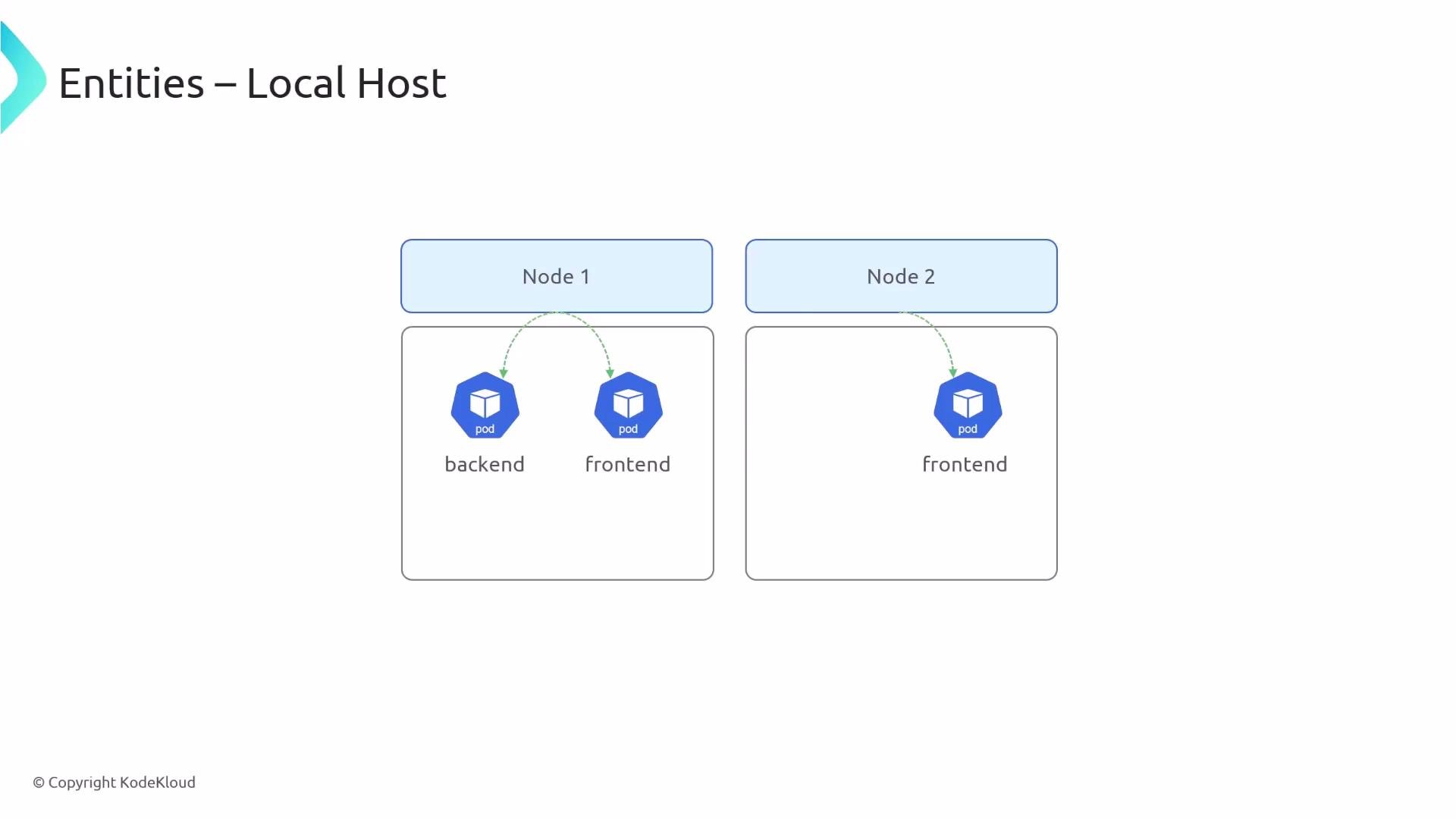
Default Kubernetes behavior allows node-local processes to talk to pods on the same node. You can change this behavior with Cilium’s option —allowed-localhost=policy, which lets policies control host <-> pod connections.
A diagram titled "Entities – Local Host" showing two nodes: Node 1 contains backend and frontend Kubernetes pods, and Node 2 contains a frontend pod. Green dashed arrows indicate connections from the node headers down to the pods.
After enabling policy-controlled localhost behavior, allow host processes to talk to a pod explicitly:
apiVersion: "cilium.io/v2"
kind: CiliumNetworkPolicy
metadata:
  name: "allow-host-to-backend"
  namespace: dev
spec:
  endpointSelector:
    matchLabels:
      role: backend
  ingress:
  - fromEntities:
    - host

NodePort and world entity

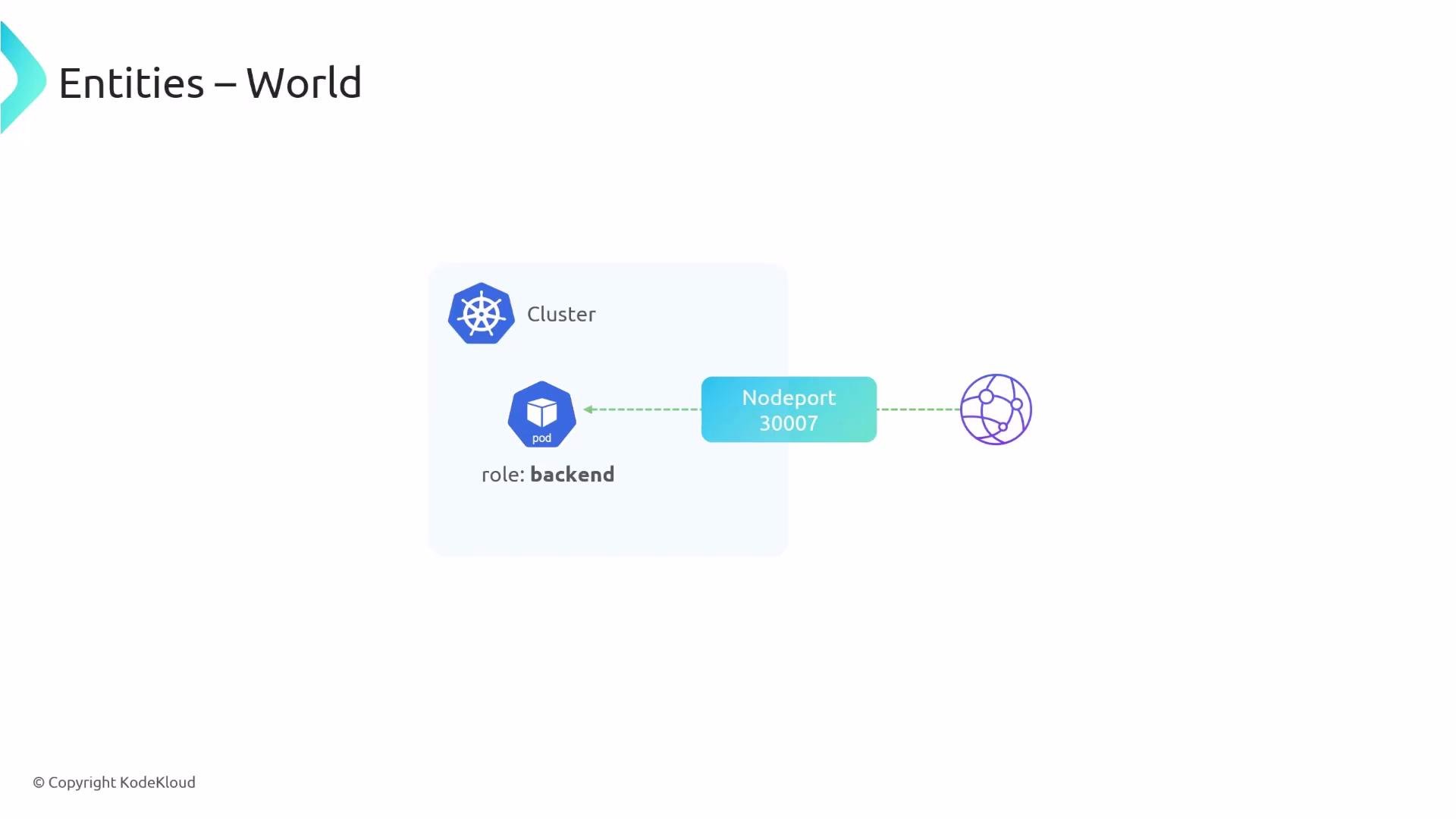
When you expose a pod via a NodePort, the internet can reach it by default. If you attach a CiliumNetworkPolicy that denies ingress to that pod, the NodePort traffic will also be blocked unless you explicitly allow it. To permit ingress from the internet, allow the world entity.
A simple diagram showing a Kubernetes cluster containing a backend pod that is exposed to the outside via a NodePort (30007). Dotted arrows connect the pod and cluster icons to a NodePort box and an external network/globe icon.
apiVersion: "cilium.io/v2"
kind: CiliumNetworkPolicy
metadata:
  name: "allow-nodeport-world"
  namespace: dev
spec:
  endpointSelector:
    matchLabels:
      role: backend
  ingress:
  - fromEntities:
    - world

Deny policies

Cilium supports explicit deny lists. Deny rules take precedence over allow rules, ensuring that disallowed sources remain blocked even if they match an allow rule. Example — allow frontend but explicitly deny pods labeled test: test (deny wins):
apiVersion: "cilium.io/v2"
kind: CiliumNetworkPolicy
metadata:
  name: "allow-frontend-with-deny"
  namespace: dev
spec:
  endpointSelector:
    matchLabels:
      role: backend
  ingress:
  - fromEndpoints:
    - matchLabels:
        role: frontend
  ingressDeny:
  - fromEndpoints:
    - matchLabels:
        test: test

Cluster-wide policies

Standard Kubernetes NetworkPolicies are namespace-scoped. Cilium provides CiliumClusterwideNetworkPolicy for policies that apply across namespaces. Cluster-wide policies omit the namespace field in metadata and their endpointSelector matches endpoints cluster-wide.
  • Allow all backend pods cluster-wide to accept ingress from frontend pods cluster-wide:
apiVersion: "cilium.io/v2"
kind: CiliumClusterwideNetworkPolicy
metadata:
  name: "clusterwide-backend-allow-frontends"
spec:
  endpointSelector:
    matchLabels:
      role: backend
  ingress:
  - fromEndpoints:
    - matchLabels:
        role: frontend
  • Restrict source to frontends only in a specific namespace (dev) while applying the policy cluster-wide:
apiVersion: "cilium.io/v2"
kind: CiliumClusterwideNetworkPolicy
metadata:
  name: "clusterwide-backend-allow-dev-frontends"
spec:
  endpointSelector:
    matchLabels:
      role: backend
  ingress:
  - fromEndpoints:
    - matchLabels:
        role: frontend
        "k8s:io.kubernetes.pod.namespace": dev
Real-world example — cluster-wide DNS access
  • To ensure all pods can resolve DNS, create a cluster-wide policy that matches all endpoints and allows egress to kube-dns (and any DNS names / external FQDNs your workloads require):
apiVersion: "cilium.io/v2"
kind: CiliumClusterwideNetworkPolicy
metadata:
  name: "clusterwide-allow-kube-dns"
spec:
  # Empty selector matches all endpoints across the cluster
  endpointSelector: {}
  egress:
  - toEndpoints:
    - matchLabels:
        "k8s:io.kubernetes.pod.namespace": kube-system
        "k8s:k8s-app": kube-dns
    toPorts:
    - ports:
      - port: "53"
        protocol: ANY
      rules:
        dns:
        - matchPattern: "*.kubernetes.default.svc.cluster.local"
  # Optionally allow external FQDNs needed by workloads
  - toFQDNs:
    - matchPattern: "*.example-external-service.com"
    toPorts:
    - ports:
      - port: "443"
        protocol: TCP
This pattern helps keep DNS resolution working cluster-wide while restricting other egress as needed.

Summary

  • L3/L4 rules in Cilium operate similarly to Kubernetes NetworkPolicy, with namespace-aware endpoint selectors by default.
  • L7 rules (HTTP, DNS, FQDN) offer fine-grained application-layer controls when paired with L4 scoping.
  • Entities (host, world, kube-apiserver) simplify references to common external or node-local endpoints.
  • Deny rules take priority over allow rules—explicit denies override allows.
  • Use CiliumClusterwideNetworkPolicy to apply policies across namespaces when cross-namespace control is required.
Links and references

Watch Video