Data Collection and Visualization
Azure Log Analytics collects log data by ingesting outputs from various resources into a centralized workspace. Once the data is stored, you can leverage the Kusto Query Language (KQL) to generate detailed reports and visualizations. For instance, the sample query below retrieves the count of successful SQL database authentications over time, then renders the results as a time chart:For more information on crafting efficient queries with KQL, refer to the Kusto Query Language documentation.
Creating a Log Analytics Workspace
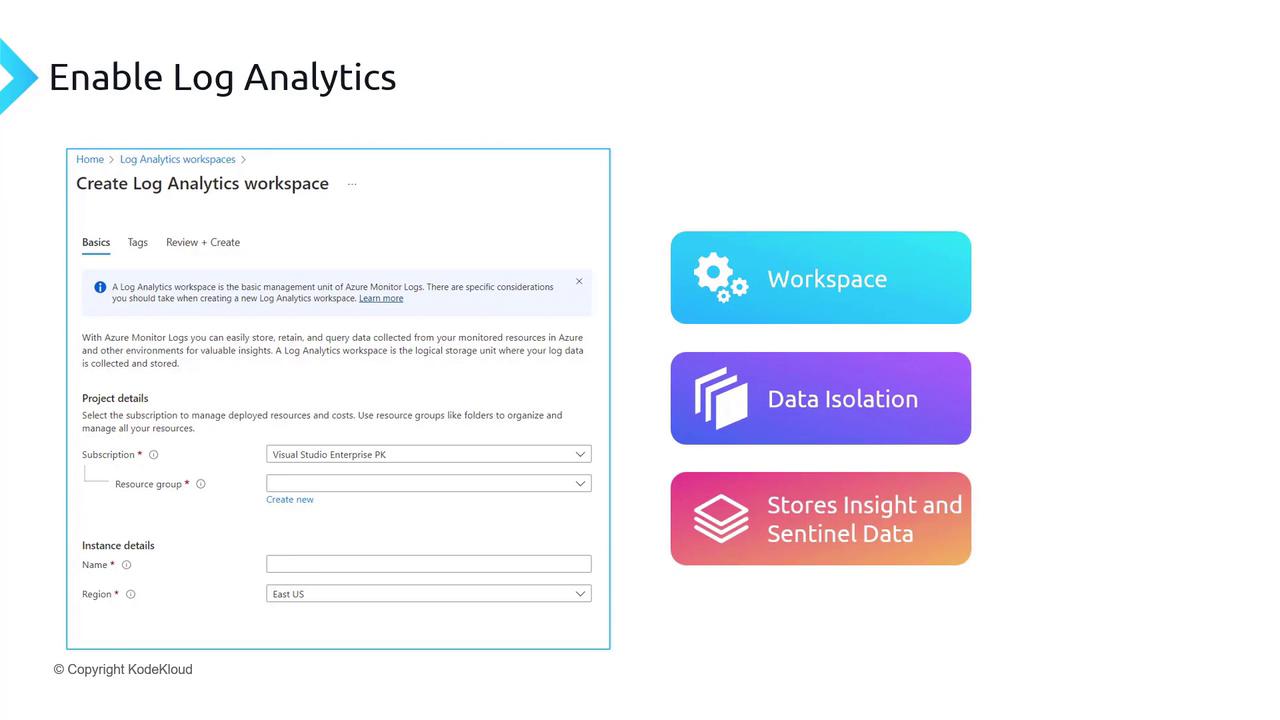
Before you can ingest data, you need to create a Log Analytics workspace in Azure. This workspace serves as the centralized repository where you collect, analyze, and visualize data from your resources. You can deploy multiple workspaces across different regions based on business needs or compliance requirements.If your environment spans production and disaster recovery (DR) regions, consider setting up separate workspaces. This approach helps maintain data isolation and ensure that production data remains compliant with designated regional policies.
Pricing and Data Retention
Log Analytics pricing is determined mainly by:- Data Ingestion Costs – billed per gigabyte of data ingested.
- Data Retention Costs – based on the duration logs are retained.
Onboarding and Integrating Resources
A Log Analytics workspace can aggregate data from numerous sources including:- Azure, AWS, GCP, and on-premises environments.
- Agents and services such as Azure Arc.
- Data collected from Application Insights and Microsoft Sentinel.
Setting Up a Workspace in the Azure Portal
To set up a new Log Analytics workspace, follow these steps:- Locate and click on “Log Analytics workspaces” in the Azure Portal.
- Create a new workspace by specifying a resource group (e.g., “RG Monitoring”) and a workspace name (e.g., “LAW Monitoring”).
- Choose the region where the workspace will reside (e.g., East US).
- Confirm the pricing tier, which defaults to pay-as-you-go. Upgrade to a commitment tier if you expect high data ingestion volumes (greater than 100 GB per day).